
GPU Virtualization: Concepts, Workflows, and Solutions
Common Terms
GPU ————— Graphics Processing Unit, graphics card
CUDA ———— Compute Unified Device Architecture, a compute API introduced by NVIDIA in 2006
VT/VT-x/VT-d — Intel Virtualization Technology. -x stands for x86 CPU, -d stands for Device.
SVM ————— AMD Secure Virtual Machine, AMD’s counterpart to Intel VT-x.
EPT ————— Extended Page Table, Intel’s hardware support for page table virtualization in CPU virtualization.
NPT ————— Nested Page Table, AMD’s counterpart to Intel EPT.
SR-IOV ——— Single Root I/O Virtualization, a PCIe virtualization technology introduced by PCI-SIG in 2007.
PF ————— Physical Function, i.e., the physical card
VF ————— Virtual Function, i.e., an SR-IOV virtual PCIe device
MMIO ——— Memory Mapped I/O. Registers or memory on a device that the CPU accesses via memory load/store instructions.
CSR ———— Control & Status Register, device registers used for control or reflecting status. CSRs are usually accessed via MMIO.
UMD ———— User Mode Driver. The user-space driver of a GPU, for example, CUDA’s UMD is libcuda.so.
KMD ———— Kernel Mode Driver. The PCIe driver of a GPU, for example, the KMD for NVIDIA GPUs is nvidia.ko.
GVA ———— Guest Virtual Address, the CPU virtual address inside a VM.
GPA ———— Guest Physical Address, the physical address inside a VM.
HPA ———— Host Physical Address, the physical address as seen by the host.
IOVA ———— I/O Virtual Address, the DMA address issued by a device.
PCIe TLP —— PCIe Transaction Layer Packet.
BDF ———— Bus/Device/Function, the ID of a PCIe/PCI function.
MPT ———— Mediated Pass-Through, a controlled pass-through scheme and a way to implement device virtualization.
MDEV ——— Mediated Device, the Linux implementation of MPT.
PRM ———— Programming Reference Manual, the programming manual for a piece of hardware.
MIG ———— Multi-Instance GPU, a hardware partitioning scheme supported by high-end Ampere GPUs such as the A100.
GPU Workflow
-
The application calls some GPU-supported API such as OpenGL or CUDA.
-
The OpenGL or CUDA library submits the workload to the KMD (Kernel Mode Driver) via the UMD (User Mode Driver).
-
The KMD writes to CSR MMIO and submits the workload to the GPU hardware.
-
The GPU hardware starts working… When completed, it performs DMA to memory and then raises an interrupt to the CPU.
-
The CPU locates the interrupt handler — which the KMD previously registered with the OS kernel — and invokes it.
-
The interrupt handler identifies which workload has completed… and eventually the driver wakes up the corresponding application.
PCIe Pass-Through
Only supports 1<1>, not 1
Principle: Inside the VM, the native GPU driver is used. It allocates memory from the VM kernel and writes the GPA into GPU CSR registers. The GPU uses this as the IOVA to perform DMA. VT-d ensures that the GPA is translated into the correct HPA so that DMA reaches the correct physical memory.
Under K8S Containers
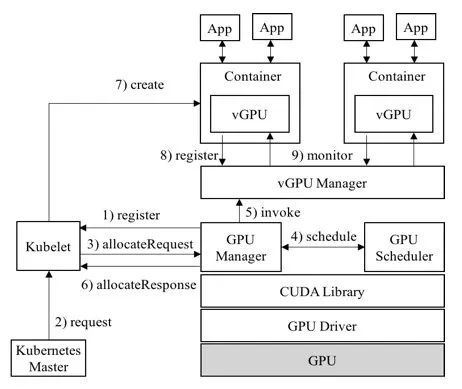
1. vCUDA Architecture (currently used by Tencent)
Advantages: Supports isolation of GPU memory and compute, allows ultra fine-grained partitioning, and is an open source solution.
Disadvantages: Since it works at the CUDA layer, it needs to replace the CUDA library, which is highly visible to users. CUDA versions must be aligned and there are certain compatibility issues.
Open source repo: https://github.com/tkestack/vcuda-controller
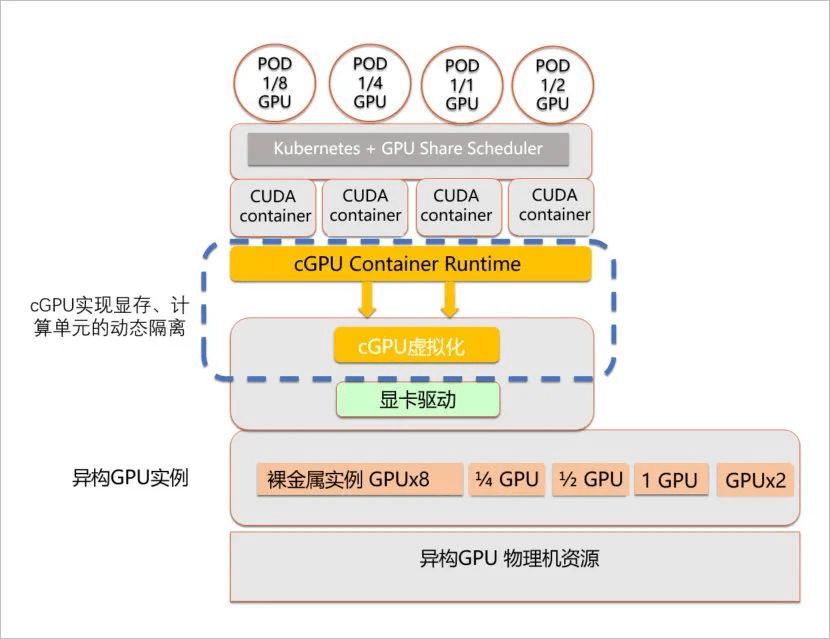
2. cGPU Architecture (Alibaba Cloud)
Advantages: Supports container-level GPU virtualization, multiple containers sharing one GPU, and isolates GPU memory and compute. It is non-intrusive to the CUDA library and transparent to users, with capabilities implemented at the nvidia-container-runtime layer.
Disadvantages: Only available on Alibaba Cloud.
Product white paper: https://developer.aliyun.com/article/771984?utm_content=g_1000184528
3. k8s-device-plugin
The vGPU device plugin is based on the official NVIDIA plugin (NVIDIA/k8s-device-plugin). On top of preserving the original features, it implements partitioning of physical GPUs and imposes limits on memory and compute units, thereby emulating multiple small vGPU cards. In a Kubernetes cluster, scheduling is done against these partitioned vGPUs so that different containers can safely share the same physical GPU and improve GPU utilization. In addition, the plugin can virtualize GPU memory (used memory can exceed physical memory) to run workloads with extremely large memory requirements or increase the number of shared workloads.
Open source repo: https://github.com/4paradigm/k8s-device-plugin
4. qGPU (Latest Tencent Solution)
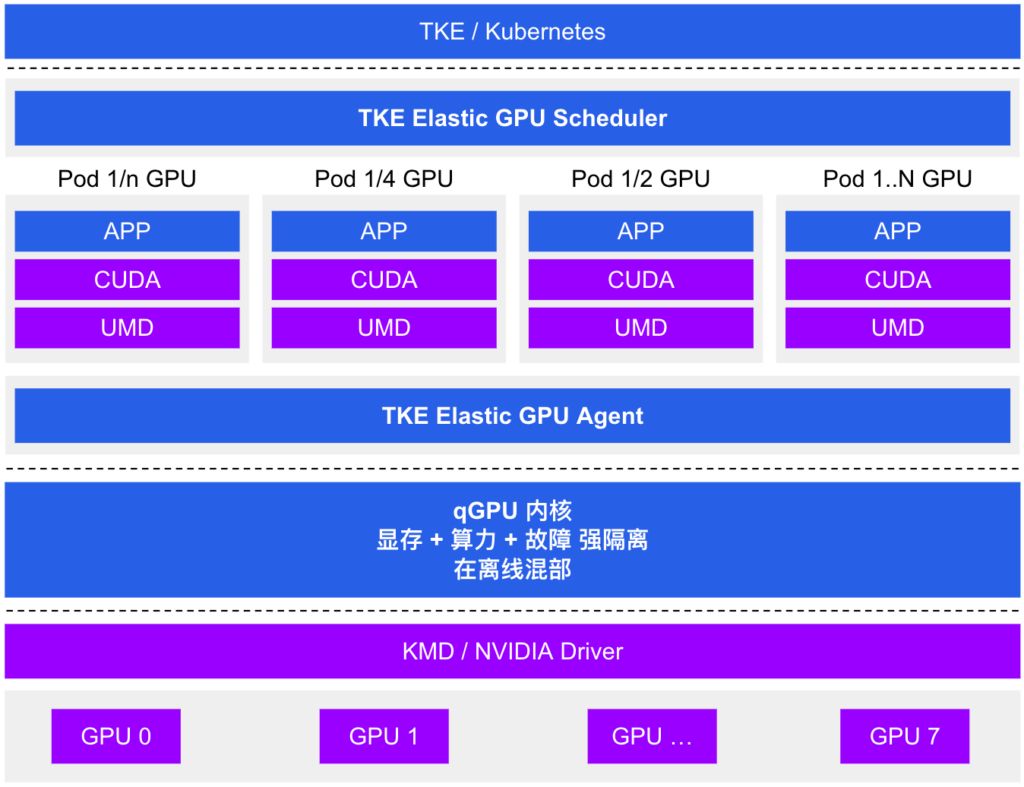
Tencent Cloud Tencent Kubernetes Engine qGPU service (hereinafter referred to as TKE qGPU) is a GPU container virtualization product launched by Tencent Cloud. It supports multiple containers sharing a single GPU card with fine-grained isolation of compute and memory across containers. At the same time, it provides the industry’s only online/offline mixed deployment capability: on top of fine-grained GPU resource partitioning, it maximizes GPU utilization and helps customers significantly reduce GPU costs while doing its best to ensure business stability.
qGPU is built on TKE’s open source Elastic GPU framework, which enables fine-grained scheduling of GPU compute and memory, supports multi-container sharing of a GPU, and allows multi-container cross-GPU resource allocation. Combined with the underlying qGPU isolation technology, it can provide strong isolation of GPU memory and compute so that while GPUs are shared, application performance and resources are minimally affected by interference.
Product docs: https://cloud.tencent.com/document/product/457/61448
5. OrionX (Virtaitech)
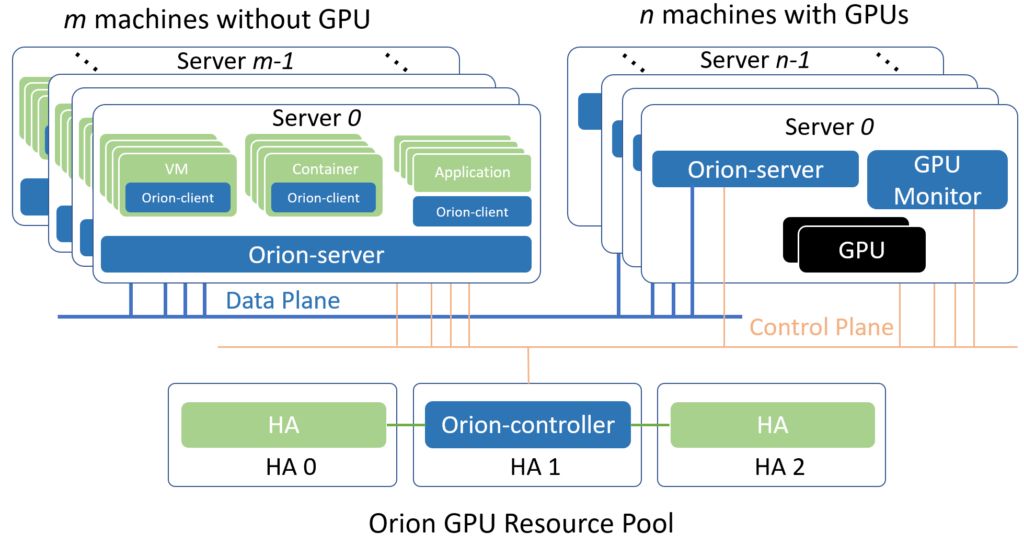
Orion vGPU software is a system software that provides GPU pooling and GPU virtualization for AI and CUDA applications in clouds or data centers. Through an efficient communication mechanism, AI and CUDA applications can run on any physical machine in the cloud or data center, inside a container or VM, without attaching a physical GPU. At the same time, these applications are provided with hardware compute power from the GPU resource pool. With this Orion GPU pooling capability, several benefits can be achieved:
- Compatible with existing AI and CUDA applications while still giving them GPU-accelerated performance.
- Provides great flexibility for deploying AI and CUDA applications in clouds and data centers, without being constrained by GPU server location or resource quantity.
- Orion GPU resources are allocated when AI and CUDA applications start and are automatically released when the applications exit, reducing GPU idle time and improving turnaround for shared GPUs.
- By managing and optimizing the GPU resource pool, it improves overall GPU utilization and throughput across the cloud or data center.
- Through unified GPU management, it reduces management complexity and cost.
Product white paper: https://virtaitech.com/development/index?doc=4381wjhd22vqhys8f1ts893jn4
Commercial Solutions
1. vGPU
Officially provided by NVIDIA. Licensing is expensive and it can only be used on virtualization platforms, not with Docker containers.
Principle: In a virtualization environment powered by NVIDIA virtual GPU technology, NVIDIA virtual GPU (vGPU) software is installed on the virtualization layer together with the hypervisor. This software creates virtual GPUs so that each VM can share the physical GPUs installed on the server. For the most demanding workflows, a single VM can fully leverage multiple physical GPUs. Our software includes graphics or compute drivers for different VMs. As workloads traditionally handled by the CPU are offloaded to the GPU, users enjoy a better experience. Virtualization and cloud environments can then support demanding engineering and creative applications, as well as compute-intensive workloads such as AI and data science.
Homepage: https://www.nvidia.cn/data-center/virtualization/it-management/
Product white papers: https://www.nvidia.cn/data-center/virtualization/resources/
2. MPS
One of the earliest GPU workload sharing solutions provided by NVIDIA. It offers shared compute capabilities via an MPS server and MPS client. Its fatal drawback is that if the server or a client exits abnormally, it has a significant impact on other clients, which is essentially unacceptable in production environments. (Not recommended.)
3. Citrix XenServer
XenServer is a server virtualization platform that delivers virtualized performance for servers and guest operating systems that is nearly on par with bare-metal servers.
XenServer uses the Xen hypervisor to virtualize each server on which XenServer is installed, enabling each server to host multiple virtual machines concurrently with excellent performance. In addition, XenServer can consolidate multiple Xen-enabled servers into a powerful resource pool using industry-standard shared storage architecture and resource clustering. In doing so, XenServer supports seamless virtualization of multiple servers as a resource pool. These resources are dynamically controlled to deliver optimal performance, improved resilience and availability, and maximum utilization of data center resources.
Official white paper: https://www.citrix.com/products/citrix-hypervisor/