
169 字
1 分钟
Add Rules for sentry.io to Protect ChatGPT
Possible Reasons for ChatGPT Bans
-
Massive abuse from accounts on the same network, leading to collateral bans
-
Accessing from a network located outside OpenAI’s supported regions
-
Renewing your subscription using high‑risk virtual payment accounts
In testing, when using ChatGPT’s web interface, the page’s JavaScript sends cross‑origin requests to sentry.io, including a key. sentry.io is a third‑party logging/analytics platform. If you use domain‑based traffic splitting, or if your “airport” backend only unlocks and filters openai.com, this behavior can cause your proxy IP to be exposed.
Therefore, it’s recommended to add sentry.io to the relevant rule lists.
Modifying Rules in Clash for Windows
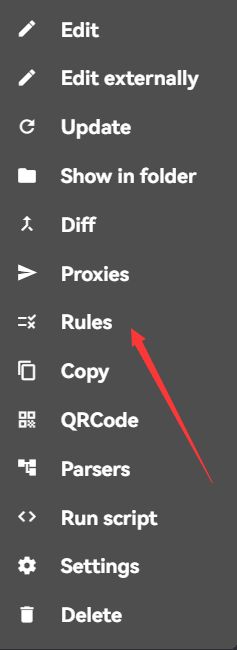
Right‑click the subscription and select Rule
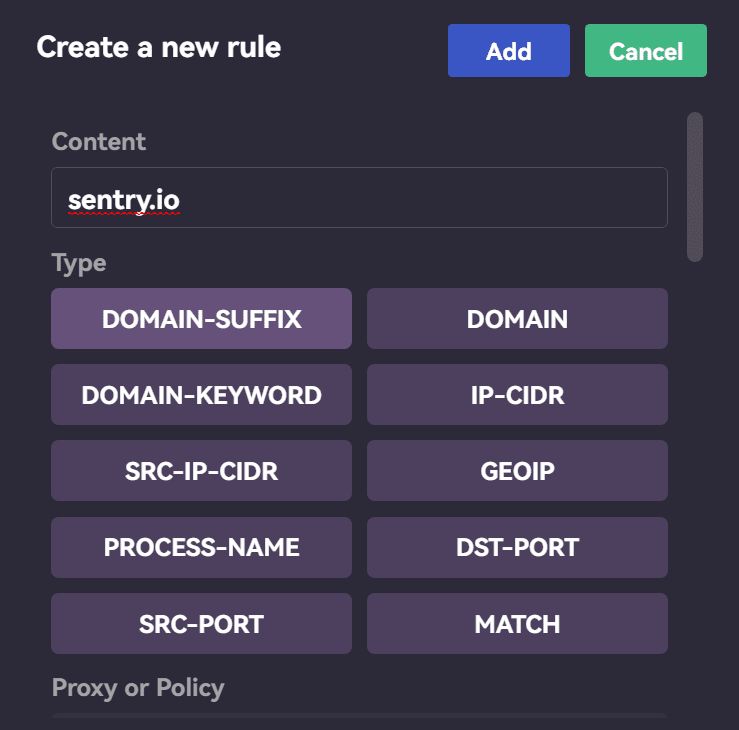
Enter sentry.io in the input box, set type to DOMAIN-SUFFIX, set Proxy to REJECT, then click Save
Open sentry.io in your browser, then check Connections in CFW to see whether this domain is now using the proxy rule you just added. If it is, the change has taken effect.
Add Rules for sentry.io to Protect ChatGPT
https://catcat.blog/en/chatgpt-add-sentry-io-rule.html