Multi‑Node Private Deployment of DeepSeek-r1:671B Full Version on K8s + SGLang
Application Prospects
As the trillion-parameter DeepSeek-r1 model delivers breakthrough results in complex tasks like code generation and mathematical reasoning, enterprise-grade private deployment demands are growing exponentially. In today’s market, Ollama—with its lightweight architecture and cross-platform compatibility (supporting the full NVIDIA/AMD GPU stack and mainstream model formats)—offers developers an out‑of‑the‑box local debugging solution. However, its single-node architecture and naive scheduling strategy result in more than a 30% performance gap in throughput compared with specialized inference frameworks such as vLLM and SGLang under production-grade, high-concurrency inference workloads.
Solution Overview
This article uses the full DeepSeek-r1-671B model as the baseline and dives into a cloud-native inference acceleration architecture built on Kubernetes + SGLang. By combining the LeaderWorkerSet controller for distributed workload orchestration and the Volcano batch scheduling system for preemptive GPU resource allocation, we build an enterprise-grade deployment solution with the following characteristics:
-
Performance Leap: RadixAttention in SGLang boosts KV cache reuse by 60%+
-
Elastic Topology: Supports dynamic scaling for multi-node, multi-GPU setups (compatible with heterogeneous H100/A100 clusters)
-
Production Ready: Integrated Prometheus + Grafana real-time inference monitoring, with TP99 latency controlled within 200 ms
Why Choose the SGLang Inference Engine
SGLang vs Ollama: Key Capability Comparison Matrix
| Capability | SGLang (Production-Grade Engine) | Ollama (Developer Tool) |
|---|---|---|
| Architecture Design | ✅ Distributed inference architecture (multi-node, multi-GPU collaboration) | ❌ Single-node only (local GPU only) |
| Performance | 🔥 300%+ throughput boost (RadixAttention optimizations) | ⏳ Suited for low-concurrency scenarios (naive scheduling strategy) |
| Production Readiness | 📊 Built-in Prometheus metrics + circuit breaking & degradation | ❌ No monitoring or high availability guarantees |
| Scalability | ⚡ Dynamic scaling + heterogeneous cluster management (K8s/Volcano integration) | ❌ Fixed resource configuration (no cluster support) |
| Enterprise Features | 🔒 Commercial SLA support + custom OP development | ❌ Community-only maintenance |
| Typical Scenarios | Trillion-parameter model deployment in production (e-commerce/finance high-concurrency workloads) | Local debugging for individual developers (fast small-model validation) |
Why SGLang?
-
Crushing Performance Advantage
-
Ollama single-GPU QPS ≤ 20, SGLang distributed cluster QPS ≥ 200 (10x improvement)
-
In 32k context scenarios, SGLang inference latency stays stable within 300 ms, while Ollama frequently runs into OOM
-
-
Cost Efficiency
-
With KV cache reuse, cluster resource utilization reaches 85%+ (Ollama only 40%–50%)
-
Supports FP8 quantization, reducing hardware costs by up to 60% for the same throughput
-
-
Risk Control
-
Ollama lacks circuit breaking/degradation mechanisms; burst traffic can easily cause cascading failures
-
SGLang has built-in multi-level traffic control, ensuring uninterrupted SLA for core business workloads
-
Decision Recommendations:
-
Choose SGLang when you need to handle online production traffic, run models with tens of billions of parameters and above, and maximize resource utilization.
-
Choose Ollama only for personal learning/research, quick validation of small models, and local testing with no SLA requirements.
Through architecture-level optimizations and production-hardened design, SGLang achieves a generation-level lead over Ollama in performance, stability, and scalability.
Environment Preparation
In this setup we deploy the full DeepSeek-r1<671b> model.
Hardware Configuration
| Server | Count | CPU (cores) | Memory (TB) | OS Version |
|---|---|---|---|---|
| NVIDIA A800 80GB | 2 | 128 | 2 | Ubuntu 22.04.5 LTS |
Software Stack
Software Version Notes Kubernetes v1.30.6 Container orchestration engine GPU Operator v24.9.1 Automated GPU driver management and configuration Volcano v1.9.0 Scheduling engine NVIDIA Driver 550.127.05 GPU driver NVIDIA-Fabric Manager 550.127.05 NVSwitch interconnect CUDA 12.4 CUDA MLNX_OFED 24.10-0.7.0.0 IB driver NCCL 2.21.5 Multi-GPU communication SGLang v0.4.3.post2-cu124 LLM inference engine LeaderWorkerSet v0.5.1 PodGroup Deploy API open-webui v0.5.14 AI chat UI tool Model Preparation
Option 1: Download via
HuggingFace
Repo: https://huggingface.co/deepseek-ai/DeepSeek-R1
Option 2: Download via
ModelScope(recommended for users in mainland China)
Repo: https://modelscope.cn/models/deepseek-ai/DeepSeek-R1/files
1、安装ModelScopepip3 install modelscope
2、下载完整模型repomkdir /mnt/catcat_data/model/DeepSeek-R1 -pnohup modelscope download --model deepseek-ai/DeepSeek-R1 --local_dir /mnt/catcat_data/model/DeepSeek-R1 &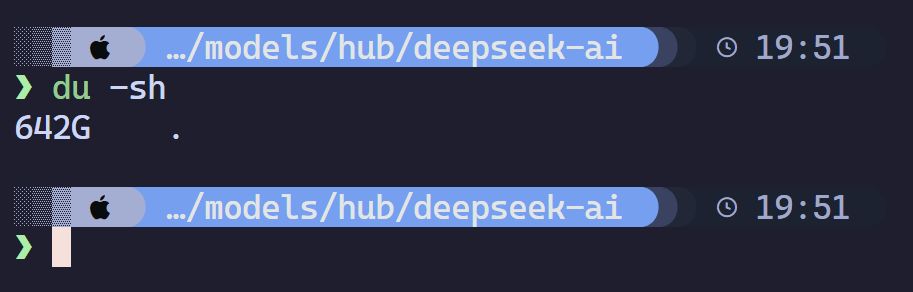
In practice, the full model takes about 642 GB on Linux.
Deployment
Deploying the LWS API
GitHub repo: https://github.com/kubernetes-sigs/lws
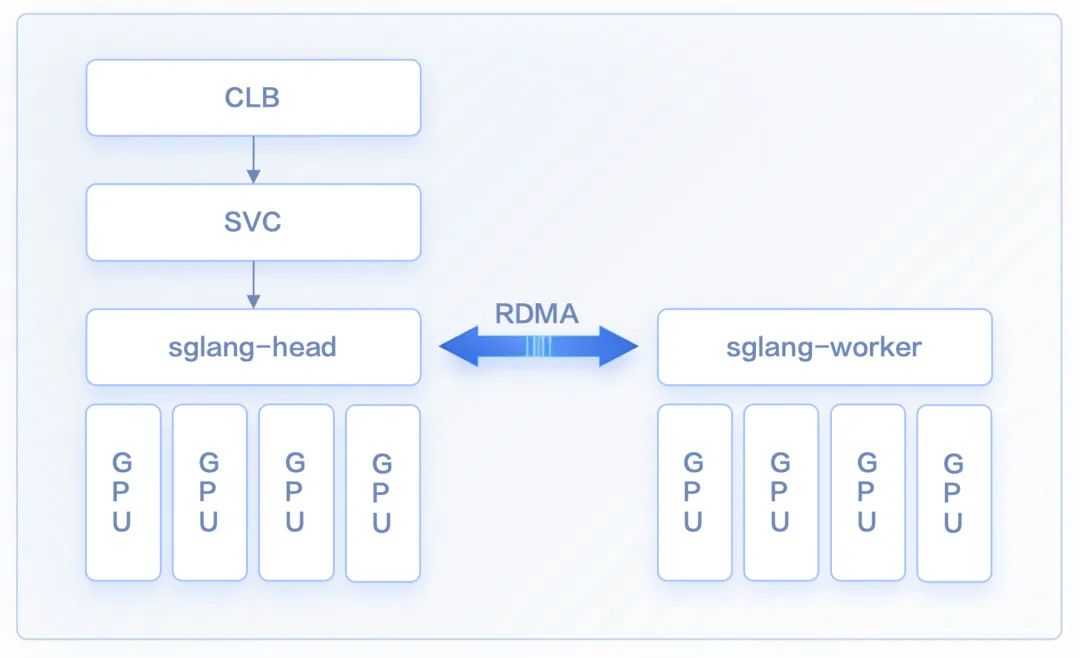
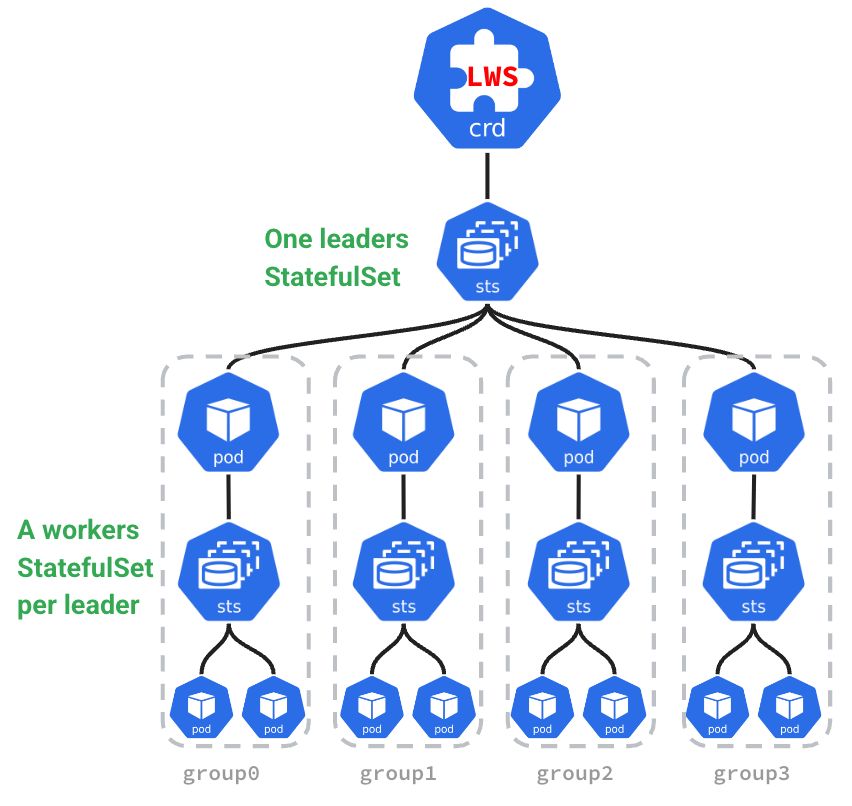
The main benefits of using the LWS API include:
-
Simplified deployment of distributed inference: LWS exposes a declarative API. You only need to define the configurations for Leaders and Workers; the Kubernetes controller then automatically manages their lifecycle. This lets you deploy complex distributed inference workloads without manually managing dependencies and replica counts between Leaders and Workers.
-
Seamless horizontal scaling: As mentioned above, distributed inference services need multiple Pods to work together. When scaling out, these Pods must be treated as an atomic group. LWS can integrate seamlessly with K8s HPA and be used directly as the HPA scaling target, enabling group-based scaling of the inference service.
-
Topology-aware scheduling: In distributed inference, different Pods need to exchange large volumes of data. To minimize communication latency, the LWS API incorporates topology-aware scheduling so that Leader and Worker Pods are scheduled onto nodes that are as close as possible in the RDMA network topology.
安装 LWS API 的 CRDVERSION=v0.5.1kubectl apply --server-side -f https://github.com/kubernetes-sigs/lws">https://github.com/kubernetes-sigs/lws/releases/download/$VERSION/manifests.yaml
检查LWS 资源kubectl get pods -n lws-systemkubectl get svc -n lws-systemkubectl api-resources |grep -i lwsDeploy DeepSeek-R1
apiVersion: leaderworkerset.x-k8s.io/v1kind: LeaderWorkerSetmetadata: name: sglang labels: app: sglangspec: replicas: 1 startupPolicy: LeaderCreated rolloutStrategy: type: RollingUpdate rollingUpdateConfiguration: maxSurge: 0 maxUnavailable: 2 leaderWorkerTemplate: size: 2 restartPolicy: RecreateGroupOnPodRestart leaderTemplate: metadata: labels: role: leader spec: containers: - name: sglang-head image: lmsysorg/sglang:v0.4.3.post2-cu124 imagePullPolicy: IfNotPresent workingDir: /sgl-workspace command: ["sh", "-c"] args: - > cd /sgl-workspace && python3 -m sglang.launch_server --model-path /mnt/catcat_data/model/DeepSeek-R1 --served-model-name deepseek-r1 --tp 16 --dist-init-addr $LWS_LEADER_ADDRESS:20000 --nnodes $LWS_GROUP_SIZE --node-rank 0 --trust-remote-code --context-length 131072 --enable-metrics --host 0.0.0.0 --port 8000 env: - name: GLOO_SOCKET_IFNAME value: eth0 - name: NCCL_IB_HCA value: "mlx5_0,mlx5_1,mlx5_4,mlx5_5" - name: NCCL_P2P_LEVEL value: "NVL" - name: NCCL_IB_GID_INDEX value: "0" - name: NCCL_IB_CUDA_SUPPORT value: "1" - name: NCCL_IB_DISABLE value: "0" - name: NCCL_SOCKET_IFNAME value: "eth0" - name: NCCL_DEBUG value: "INFO" - name: NCCL_NET_GDR_LEVEL value: "2" - name: POD_NAME valueFrom: fieldRef: fieldPath: metadata.name - name: SGLANG_USE_MODELSCOPE value: "true" ports: - containerPort: 8000 name: http protocol: TCP - containerPort: 20000 name: distributed protocol: TCP resources: limits: cpu: "128" memory: "1Ti" nvidia.com/gpu: "8" rdma/ib: "4" requests: cpu: "128" memory: "1Ti" nvidia.com/gpu: "8" rdma/ib: "4" securityContext: capabilities: add: - IPC_LOCK - SYS_PTRACE volumeMounts: - mountPath: /mnt/catcat_data/model name: model-volume - mountPath: /dev/shm name: shm-volume - name: localtime mountPath: /etc/localtime readOnly: true readinessProbe: tcpSocket: port: 8000 initialDelaySeconds: 120 periodSeconds: 30 volumes: - name: model-volume hostPath: path: /mnt/catcat_data/model - name: shm-volume emptyDir: sizeLimit: 512Gi medium: Memory - name: localtime hostPath: path: /etc/localtime type: File schedulerName: volcano workerTemplate: metadata: name: sglang-worker spec: containers: - name: sglang-worker image: lmsysorg/sglang:v0.4.3.post2-cu124 imagePullPolicy: IfNotPresent workingDir: /sgl-workspace command: ["sh", "-c"] args: - > cd /sgl-workspace && python3 -m sglang.launch_server --model-path /mnt/catcat_data/model/DeepSeek-R1 --served-model-name deepseek-r1 --tp 16 --dist-init-addr $LWS_LEADER_ADDRESS:20000 --nnodes $LWS_GROUP_SIZE --node-rank $LWS_WORKER_INDEX --trust-remote-code --context-length 131072 --enable-metrics --host 0.0.0.0 --port 8000 env: - name: GLOO_SOCKET_IFNAME value: eth0 - name: NCCL_IB_HCA value: "mlx5_0,mlx5_1,mlx5_4,mlx5_5" - name: NCCL_P2P_LEVEL value: "NVL" - name: NCCL_IB_GID_INDEX value: "0" - name: NCCL_IB_CUDA_SUPPORT value: "1" - name: NCCL_IB_DISABLE value: "0" - name: NCCL_SOCKET_IFNAME value: "eth0" - name: NCCL_DEBUG value: "INFO" - name: NCCL_NET_GDR_LEVEL value: "2" - name: SGLANG_USE_MODELSCOPE value: "true" - name: LWS_WORKER_INDEX valueFrom: fieldRef: fieldPath: metadata.labels['leaderworkerset.sigs.k8s.io/worker-index'] ports: - containerPort: 8000 name: http protocol: TCP - containerPort: 20000 name: distributed protocol: TCP resources: limits: cpu: "128" memory: "1Ti" nvidia.com/gpu: "8" rdma/ib: "4" requests: cpu: "128" memory: "1Ti" nvidia.com/gpu: "8" rdma/ib: "4" securityContext: capabilities: add: - IPC_LOCK - SYS_PTRACE volumeMounts: - mountPath: /mnt/catcat_data/model name: model-volume - mountPath: /dev/shm name: shm-volume - name: localtime mountPath: /etc/localtime readOnly: true volumes: - name: model-volume hostPath: path: /mnt/catcat_data/model - name: shm-volume emptyDir: sizeLimit: 512Gi medium: Memory - name: localtime hostPath: path: /etc/localtime type: File schedulerName: volcanokubectl apply -f deepseek-r1-lws-sglang.yaml
kubectl get lws -n deepseekNAME AGEsglang 1h
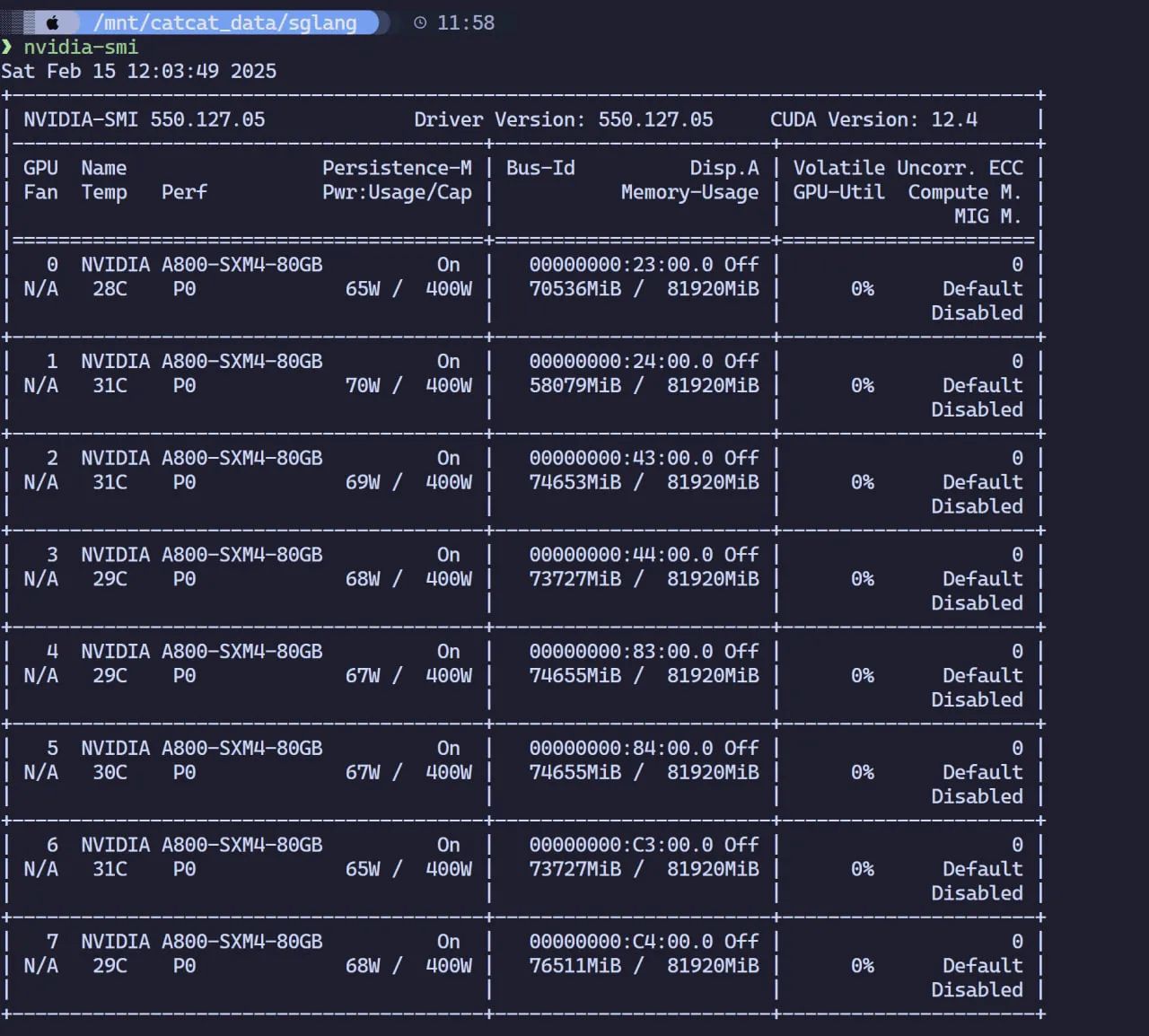
kubectl get pods -n deepseek |grep sglangsglang-0 1/1 Running 0 2hsglang-0-1 1/1 Running 0 2h##查看日志~# kubectl logs -n deepseek sglang-0[2025-02-16 12:25:49] server_args=ServerArgs(model_path='deepseek-ai/DeepSeek-R1', tokenizer_path='deepseek-ai/DeepSeek-R1', tokenizer_mode='auto', load_format='auto', trust_remote_code=True, dtype='auto', kv_cache_dtype='auto', quantization_param_path=None, quantization=None, context_length=None, device='cuda', served_model_name='deepseek-ai/DeepSeek-R1', chat_template=None, is_embedding=False, revision=None, skip_tokenizer_init=False, host='0.0.0.0', port=30000, mem_fraction_static=0.81, max_running_requests=None, max_total_tokens=None, chunked_prefill_size=4096, max_prefill_tokens=16384, schedule_policy='lpm', schedule_conservativeness=0.3, cpu_offload_gb=0, prefill_only_one_req=False, tp_size=8, stream_interval=1, stream_output=False, random_seed=773491082, constrained_json_whitespace_pattern=None, watchdog_timeout=300, download_dir=None, base_gpu_id=0, log_level='info', log_level_http=None, log_requests=False, show_time_cost=False, enable_metrics=False, decode_log_interval=40, api_key=None, file_storage_pth='sglang_storage', enable_cache_report=False, dp_size=8, load_balance_method='round_robin', ep_size=1, dist_init_addr=None, nnodes=1, node_rank=0, json_model_override_args='{}', lora_paths=None, max_loras_per_batch=8, lora_backend='triton', attention_backend='flashinfer', sampling_backend='flashinfer', grammar_backend='outlines', speculative_draft_model_path=None, speculative_algorithm=None, speculative_num_steps=5, speculative_num_draft_tokens=64, speculative_eagle_topk=8, enable_double_sparsity=False, ds_channel_config_path=None, ds_heavy_channel_num=32, ds_heavy_token_num=256, ds_heavy_channel_type='qk', ds_sparse_decode_threshold=4096, disable_radix_cache=False, disable_jump_forward=False, disable_cuda_graph=False, disable_cuda_graph_padding=False, enable_nccl_nvls=False, disable_outlines_disk_cache=False, disable_custom_all_reduce=False, disable_mla=False, disable_overlap_schedule=False, enable_mixed_chunk=False, enable_dp_attention=True, enable_ep_moe=False, enable_torch_compile=False, torch_compile_max_bs=32, cuda_graph_max_bs=160, cuda_graph_bs=None, torchao_config='', enable_nan_detection=False, enable_p2p_check=False, triton_attention_reduce_in_fp32=False, triton_attention_num_kv_splits=8, num_continuous_decode_steps=1, delete_ckpt_after_loading=False, enable_memory_saver=False, allow_auto_truncate=False, return_hidden_states=False, enable_custom_logit_processor=False, tool_call_parser=None, enable_hierarchical_cache=False, enable_flashinfer_mla=False)Downloading Model to directory: /root/.cache/modelscope/hub/deepseek-ai/DeepSeek-R1Downloading Model to directory: /root/.cache/modelscope/hub/deepseek-ai/DeepSeek-R1INFO 02-16 12:25:53 __init__.py:190] Automatically detected platform cuda.INFO 02-16 12:25:53 __init__.py:190] Automatically detected platform cuda.INFO 02-16 12:26:01 __init__.py:190] Automatically detected platform cuda.INFO 02-16 12:26:01 __init__.py:190] Automatically detected platform cuda.INFO 02-16 12:26:01 __init__.py:190] Automatically detected platform cuda.INFO 02-16 12:26:01 __init__.py:190] Automatically detected platform cuda.INFO 02-16 12:26:01 __init__.py:190] Automatically detected platform cuda.INFO 02-16 12:26:01 __init__.py:190] Automatically detected platform cuda.INFO 02-16 12:26:01 __init__.py:190] Automatically detected platform cuda.INFO 02-16 12:26:01 __init__.py:190] Automatically detected platform cuda.Check GPU Memory Usage
Service Access
Create a Service:
apiVersion: v1kind: Servicemetadata: name: sglang-api-svc labels: app: sglangspec: selector: leaderworkerset.sigs.k8s.io/name: sglang role: leader ports: - protocol: TCP port: 8000 targetPort: http name: http type: NodePortDeploy the Service:
kubectl apply -f deepseek-r1-svc.yaml -n deepseek
Curl Test
curl -X POST http://ip:port/v1/chat/completions -H "Content-Type: application/json" -d '{ "model": "/model", "messages": [ { "role": "user", "content": "你是什么模型" } ], "stream": false, "temperature": 0.8}'Deploy Open WebUI
Below is the YAML manifest; not much additional explanation is needed here.
apiVersion: v1kind: PersistentVolumeClaimmetadata: name: open-webui-data-pvcspec: accessModes: - ReadWriteOnce resources: requests: storage: 100Gi storageClassName: nfs-client
---apiVersion: apps/v1kind: Deploymentmetadata: name: open-webui-deploymentspec: replicas: 1 selector: matchLabels: app: open-webui template: metadata: labels: app: open-webui spec: containers: - name: open-webui image: ghcr.sakiko.de/open-webui/open-webui:main imagePullPolicy: Always ports: - containerPort: 8080 env: - name: OPENAI_API_BASE_URL value: "http://ip:port/v1" # 替换为SGLang API - name: ENABLE_OLLAMA_API # 禁用 Ollama API,只保留 OpenAI API value: "False" volumeMounts: - name: open-webui-data mountPath: /app/backend/data volumes: - name: open-webui-data persistentVolumeClaim: claimName: open-webui-data-pvc
---apiVersion: v1kind: Servicemetadata: name: open-webui-servicespec: type: ClusterIP ports: - port: 3000 targetPort: 8080 selector: app: open-webui