
Deploy MoviePilot v2 with Docker for Automated Movie Watching
Preface
MoviePilot v1 deployment: Docker 部署 自动化观影平台MoviePilot
I previously wrote a guide for v1, which is actually already good enough for daily use, but the author started a new major version. I was too lazy to migrate, so I stuck with v1 and never upgraded. Recently I added a new storage server, so I took the chance to see what has changed in v2.
Comparison
From a configuration perspective, v2 has changed a lot. In v1 you had a large number of environment variables in docker-compose.yaml; now v2 no longer allows many of those to be set there. Site auth and most configuration options have been moved into the visual Web UI.
Deployment
Prerequisites
Download clients
-
Qbittorrent: version >=
4.3.9 -
Transmission: version >=
3.0
Media servers
-
Emby: recommended version >=
4.8.0.45 -
Jellyfin: recommended to use the
latestbranch -
Plex: no specific version requirement
CookieCloud
-
CookieCloud server: Optional. MoviePilot already has a built‑in CookieCloud server. If you really need a standalone instance, refer to easychen/CookieCloud. Note: a separate installation is not recommended; using the integrated server is better in most cases.
-
CookieCloud browser extension: Regardless of whether you use a standalone CookieCloud server or the built‑in one, you must install the browser extension. Go to this page and install it into your browser.
Deployment
mkdir MoviePilotcd MoviePilotvim docker-compose.yaml非必要可以不修改yaml文件,比v1好很多docker compse up -d
services: moviepilot: stdin_open: true # 是否打开标准输入流(交互模式),为 true 时容器可以保持运行并与用户交互 tty: true # 是否分配伪终端,使容器的终端行为更像一个真实的终端 container_name: moviepilot-v2 # 容器的名称 hostname: moviepilot-v2 # 容器主机名
# 网关设置 network_mode: host # 内置的网关 # networks: # 自定义网关 # - moviepilot
# 端口映射,当network_mode的值为 host 时,将失效 # ports: # 前端 UI 显示 # - target: 3000 # 容器内部端口设置为 3000 # published: 3000 # 映射到宿主机的 3000 端口,允许外部访问 # protocol: tcp # TCP 协议,可选udp # API 接口 # - target: 3001 # 容器内部端口设置为 3001 # published: 3001 # 映射到宿主机的 3001 端口,允许外部访问 # protocol: tcp # TCP 协议,可选udp
# 目录映射:宿主机目录:容器内目录 volumes: - './media:/media' # 媒体库或下载库路径 - './moviepilot-v2/config:/config' # moviepilot 的配置文件存放路径 - './moviepilot-v2/core:/moviepilot/.cache/ms-playwright' # 浏览器内核存放路径 - '/var/run/docker.sock:/var/run/docker.sock:ro' # 用于获取宿主机的docker管理权,一般用于UI页面重启或自动更新
# 环境变量:- '变量名=值‘ environment: - 'NGINX_PORT=3000' # UI页面的内部监听端口 - 'PORT=3001' # API接口的内部监听端口 - 'PUID=0' # 设置应用运行时的用户 ID 为 0(root 用户) - 'PGID=0' # 设置应用运行时的组 ID 为 0(root 组) - 'UMASK=000' # 文件创建时的默认权限掩码,000 表示不限制权限 - 'TZ=Asia/Shanghai' # 设置时区为上海(Asia/Shanghai) # - 'AUTH_SITE=iyuu' # 设置认证站点,v2.0.7+版本以后可不设置,直接通过 UI 配置 # - 'IYUU_SIGN=xxxx' # 单个站点密钥,配合 AUTH_SITE 使用 - 'SUPERUSER=admin' # 设置超级用户为 admin # - 'API_TOKEN=无需手动配置,系统会自动生成。如果需要自定义配置,必须为16位以上的复杂字符串'
# 重启模式: restart: always # 始终重启 image: jxxghp/moviepilot-v2:latest
# 当使用内置网关时,可不启用# networks:# moviepilot: # 定义一个名为 moviepilot 的自定义网络# name: moviepilot # 网络的名称Reverse proxy
If you want to access MoviePilot via a domain name, you need to set up a reverse proxy. Using nginx as an example, you must add the following configuration, otherwise some features may not work (ip:port should be replaced with your actual values):
location / { proxy_pass http://ip:port; proxy_set_header Host $http_host; proxy_set_header X-Real-IP $remote_addr; proxy_set_header X-Forwarded-For $proxy_add_x_forwarded_for; proxy_set_header X-Forwarded-Proto $scheme;}When using SSL with a reverse proxy, you must also enable http2, otherwise log loading may be extremely slow or fail completely:
server { listen 443 ssl; http2 on; # ...}Set a sufficiently long timeout on the proxy (for example 10 minutes) to avoid the proxy forcibly terminating long‑running requests.
Usage
Open the Web UI
Visit IP:3000 or the domain name configured in your reverse proxy.
The default login user is admin; you can get the password via docker logs moviepilot-v2.
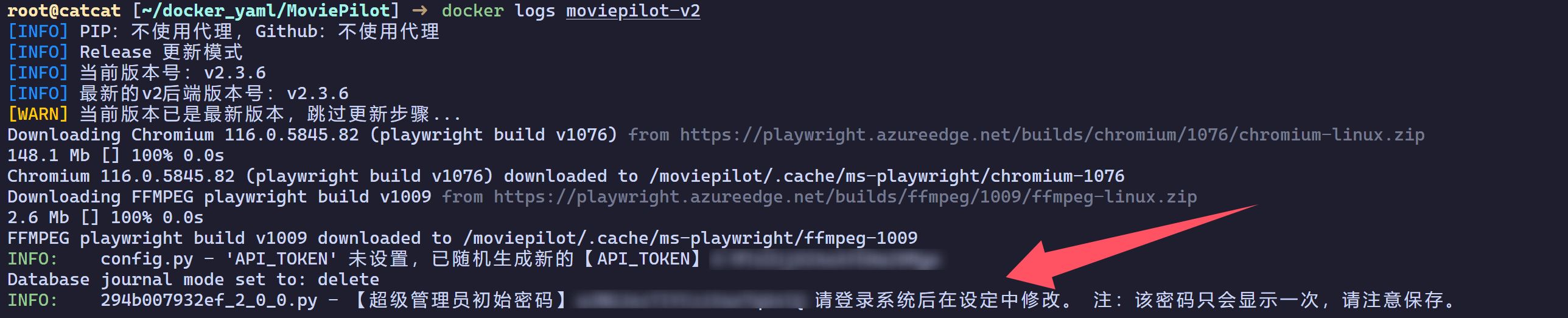
Authentication
After logging in, click the avatar in the upper‑right corner, then choose User Authentication from the dropdown to configure site authentication.
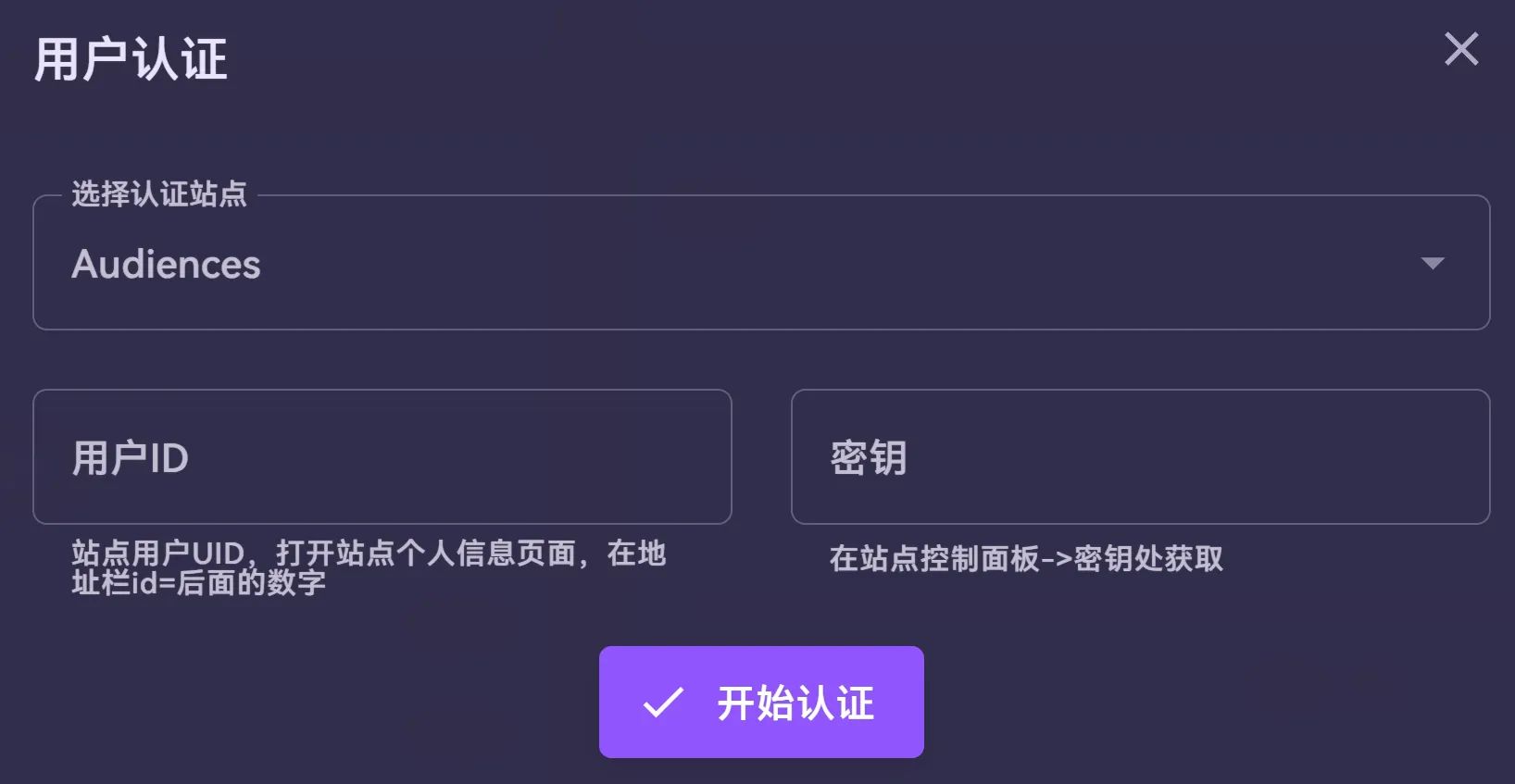
- Configure
AUTH_SITEand the corresponding auth parameters for each site according to the table below:
| Site | AUTH_SITE | Environment variables |
|---|---|---|
| IYUU | iyuu | IYUU_SIGN: IYUU login token |
| 憨憨 | hhclub | HHCLUB_USERNAME: username HHCLUB_PASSKEY: passkey |
| 观众 | audiences | AUDIENCES_UID: user ID AUDIENCES_PASSKEY: passkey |
| 高清杜比 | hddolby | HDDOLBY_ID: user ID HDDOLBY_PASSKEY: passkey |
| 织梦 | zmpt | ZMPT_UID: user ID ZMPT_PASSKEY: passkey |
| 自由农场 | freefarm | FREEFARM_UID: user ID FREEFARM_PASSKEY: passkey |
| 红豆饭 | hdfans | HDFANS_UID: user ID HDFANS_PASSKEY: passkey |
| 冬樱 | wintersakura | WINTERSAKURA_UID: user ID WINTERSAKURA_PASSKEY: passkey |
| 红叶PT | leaves | LEAVES_UID: user ID LEAVES_PASSKEY: passkey |
| 1PTBA | ptba | PTBA_UID: user ID PTBA_PASSKEY: passkey |
| 冰淇淋 | icc2022 | ICC2022_UID: user ID ICC2022_PASSKEY: passkey |
| 杏坛 | xingtan | XINGTAN_UID: user ID XINGTAN_PASSKEY: passkey |
| 象站 | ptvicomo | PTVICOMO_UID: user ID PTVICOMO_PASSKEY: passkey |
| AGSVPT | agsvpt | AGSVPT_UID: user ID AGSVPT_PASSKEY: passkey |
| 麒麟 | hdkyl | HDKYL_UID: user ID HDKYL_PASSKEY: passkey |
| 青蛙 | qingwa | QINGWA_UID: user ID QINGWA_PASSKEY: passkey |
| 蝶粉 | discfan | DISCFAN_UID: user ID DISCFAN_PASSKEY: passkey |
| 海胆之家 | haidan | HAIDAN_ID: user ID HAIDAN_PASSKEY: passkey |
| Rousi | rousi | ROUSI_UID: user ID ROUSI_PASSKEY: passkey |
| Sunny | sunny | SUNNY_UID: user ID SUNNY_PASSKEY: passkey |
| 咖啡 | ptcafe | PTCAFE_UID: user ID PTCAFE_PASSKEY: passkey |
| PTZone | ptzone | PTZONE_UID: user ID PTZONE_PASSKEY: passkey |
| 库非 | kufei | KUFEI_UID: user ID KUFEI_PASSKEY: passkey |
| YemaPT | yemapt | YEMAPT_UID: user ID YEMAPT_AUTH: passkey Note: requires v2.2.0 or later |
| 回声 | hspt | HSPT_UID: user ID HSPT_AUTH: passkey |
| 星陨阁 | xingyunge | XINGYUNGE_UID: user ID XINGYUNGE_PASSKEY: passkey |
| 财神 | cspt | CSPT_UID: user ID CSPT_PASSKEY: passkey |
| 唐门 | tmpt | TMPT_UID: user ID TMPT_PASSKEY: passkey |
| 雨 | raingfh | RAINGFH_UID: user ID RAINGFH_PASSKEY: passkey |
| GTK | gtkpw | GTKPW_UID: user ID GTKPW_PASSKEY: passkey |
| PTLGS | ptlgs | PTLGS_UID: user ID PTLGS_PASSKEY: passkey |
| HDBAO | hdbao | HDBAO_UID: user ID HDBAO_PASSKEY: passkey |
| 下水道 | sewerpt | SEWERPT_UID: user ID SEWERPT_PASSKEY: passkey |
Advanced configuration
In v1, some advanced settings had to be configured via a config file (otherwise defaults were used). The file is called app.env and should be placed in the config root directory. Click here to download a template.
Here are a few options I enabled. My config file is at moviepilot-v2/config/app.env.
PS: I later noticed these can also be set in the Web UI.
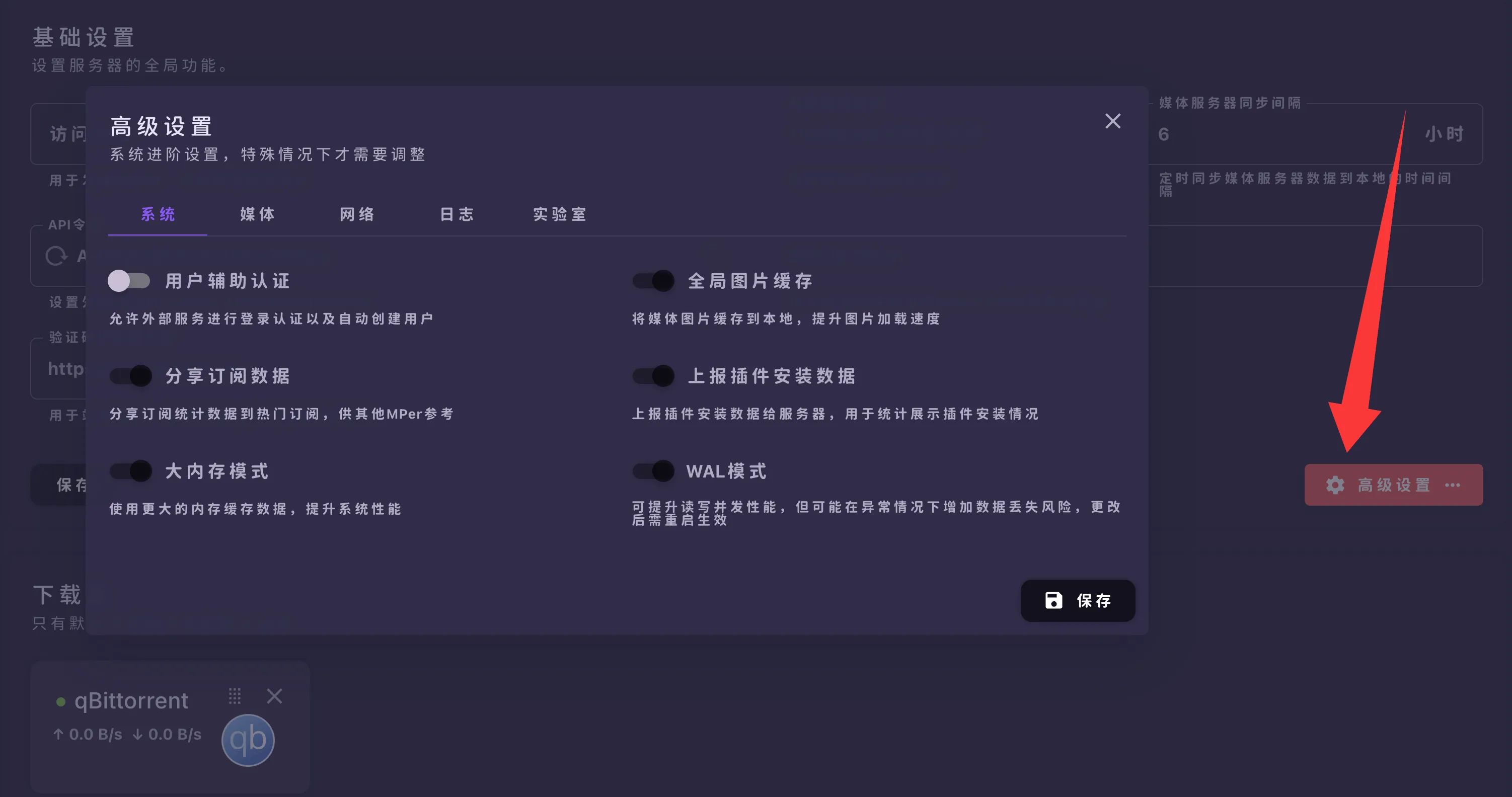
Other options can be adjusted according to your own preferences.
# BIG_MEMORY_MODE 大内存模式,开启后会增加缓存数量,但会占用更多内存# PLUGIN_MARKET 插件市场仓库地址,多个地址使用","分隔,保留最后的/#SEARCH_MULTIPLE_NAME 搜索多个名称,true/false,为true时搜索时会同时搜索中英文及原始名称,搜索结果会更全面,但会增加搜索时间;为false时其中一个名称搜索到结果或全部名称搜索完毕即停止#AUTO_UPDATE_RESOURCE 启动时自动检测和更新资源包(站点索引及认证等),true/false,默认true,需要能正常连接Github,仅支持Docker镜像BIG_MEMORY_MODE=truePLUGIN_MARKET=https://github.com/jxxghp/MoviePilot-Plugins/,https://github.com/thsrite/MoviePilot-Plugins/,https://github.com/honue/MoviePilot-Plugins/,https://github.com/InfinityPacer/MoviePilot-Plugins/,https://github.com/dandkong/MoviePilot-Plugins/,https://github.com/Aqr-K/MoviePilot-Plugins/,https://github.com/AnjoyLi/MoviePilot-Plugins/,https://github.com/WithdewHua/MoviePilot-Plugins/,https://github.com/HankunYu/MoviePilot-Plugins/,https://github.com/baozaodetudou/MoviePilot-Plugins/,https://github.com/almus2zhang/MoviePilot-Plugins/,https://github.com/Pixel-LH/MoviePilot-Plugins/,https://github.com/lightolly/MoviePilot-Plugins/,https://github.com/suraxiuxiu/MoviePilot-Plugins/,https://github.com/gxterry/MoviePilot-Plugins/,https://github.com/hotlcc/MoviePilot-Plugins-Third/,https://github.com/boeto/MoviePilot-Plugins/,https://github.com/xiangt920/MoviePilot-Plugins/SEARCH_MULTIPLE_NAME=trueAUTO_UPDATE_RESOURCE=trueAfter editing, restart the container: docker restart moviepilot-v2.
CSS themes
body, #app, .v-application { height: 100% !important; min-height: initial !important; background: none !important; backdrop-filter: blur(20px); /* 增加背景模糊效果 */ transition: transform 0.5s ease, box-shadow 0.5s ease; /* 设定过渡效果 */ box-shadow: 0 0 5px rgba(0,0,0,0.3); /* 添加阴影效果 */ border-radius: 10px; /* 设置圆角 */ animation: bodyFadeIn 1s; /* 应用淡入动画 */}/* 设置 body, #app 和 .v-application 的样式,包括高度、背景、模糊效果、过渡效果、阴影、圆角和动画 */
@keyframes bodyFadeIn { from { opacity: 0; } to { opacity: 1; }}/* 定义一个淡入动画 */
.layout-wrapper { height: 100%; overflow: auto;}::-webkit-scrollbar-thumb { background: rgba(var(--v-theme-perfect-scrollbar-thumb),0.8) !important; transition: background 0.3s ease-in-out;}/* 自定义滚动条滑块样式及其过渡效果 */
::-webkit-scrollbar-thumb:hover { background: #a1a1a1bb !important;}/* 设置滚动条滑块悬停时的样式 */* { font-weight: bold; /* 所有文字加粗 */}/* 设置所有文字加粗 */
.v-application, .v-card--variant-elevated, .v-list { background: none !important; transition: transform 0.3s ease-in-out, box-shadow 0.3s ease-in-out; border-radius: 10px;}/* 设置 .v-application 和 .v-card--variant-elevated .v-list 的样式,包括背景、过渡效果、阴影和圆角 */
.layout-nav-type-vertical .layout-vertical-nav { background: rgba(var(--v-theme-background),0.3); transition: transform 0.3s ease-in-out, box-shadow 0.3s ease-in-out; box-shadow: 0 0 5px rgba(0,0,0,0.3); border-radius: 10px;}/* 设置垂直导航栏的背景、过渡效果、阴影和圆角 */
.v-card, .v-field--variant-solo, .v-field--variant-solo-filled, .v-field--variant-solo-inverted { background: rgba(var(--v-theme-background),0.3); transition: transform 0.3s ease-in-out, box-shadow 0.3s ease-in-out; box-shadow: 0 0 5px rgba(0,0,0,0.3); border-radius: 10px; transition: all 0.3s ease-in-out;}/* 设置卡片、列表项和表单域的样式,包括背景、过渡效果、阴影和圆角 */
.v-card:hover, .v-field--variant-solo:hover, .v-field--variant-solo-filled:hover, .v-field--variant-solo-inverted:hover { transform: scale(1.01); box-shadow: 0 0 25px rgba(0,0,0,0.8);}/* 设置卡片、列表项和表单域的悬停效果,包括缩放和增强阴影 */
.v-dialog .v-card { background: rgba(var(--v-theme-background),0.5); transition: transform 0.3s ease-in-out, box-shadow 0.3s ease-in-out; box-shadow: 0 0 5px rgba(0,0,0,0.3); border-radius: 10px;}/* 设置对话框中卡片的样式,包括背景、过渡效果、阴影和圆角 */
.v-toolbar { background: rgba(var(--v-table-header-background),0.3) !important; transition: transform 0.3s ease-in-out, box-shadow 0.3s ease-in-out; box-shadow: 0 0 5px rgba(0,0,0,0.3); border-radius: 10px;}/* 设置工具栏的背景、过渡效果、阴影和圆角 */
.v-application .fc { background: rgba(var(--v-theme-surface),0.3) !important; transition: transform 0.3s ease-in-out, box-shadow 0.3s ease-in-out; box-shadow: 0 0 5px rgba(0,0,0,0.3); border-radius: 10px;}/* 设置列表和应用程序表面的背景、过渡效果、阴影和圆角 */
.v-application .fc .fc-scrollgrid-section-sticky > * { background: rgba(var(--v-theme-surface),0.2) !important; transition: transform 0.3s ease-in-out, box-shadow 0.3s ease-in-out; box-shadow: 0 0 5px rgba(0,0,0,0.3); border-radius: 10px;}/* 设置滚动网格粘性部分的背景、过渡效果、阴影和圆角 */
.navbar-blur.layout-navbar .navbar-content-container, .v-table { background: none !important; /* transition: transform 0.3s ease-in-out, box-shadow 0.3s ease-in-out; */ /* box-shadow: 0 0 5px rgba(0,0,0,0.3); */ /* border-radius: 10px; */}/* 设置导航栏和表格的背景、过渡效果、阴影和圆角 */
.v-data-table th, .v-data-table td { background: rgba(var(--v-theme-surface),0.4) !important; transition: transform 0.3s ease-in-out, box-shadow 0.3s ease-in-out; box-shadow: 0 0 5px rgba(0,0,0,0.3); border-radius: 10px;}/* 设置数据表格单元格的背景、过渡效果、阴影和圆角 */
.v-skeleton-loader { background: rgba(var(--v-theme-surface),0.2) !important; transition: transform 0.3s ease-in-out, box-shadow 0.3s ease-in-out; box-shadow: 0 0 5px rgba(0,0,0,0.3); border-radius: 10px;}/* 设置骨架加载器的背景、过渡效果、阴影和圆角 */
.bg-primary { background-color: rgba(0, 0, 0, 0.6) !important; transition: transform 0.3s ease-in-out, box-shadow 0.3s ease-in-out; box-shadow: 0 0 5px rgba(0,0,0,0.3); border-radius: 10px;}/* 设置主要背景颜色、过渡效果、阴影和圆角 */
@media (max-width: 600px) { body, #app, .v-application { backdrop-filter: blur(4px); }
.v-card, .v-field--variant-solo, .v-field--variant-solo-filled, .v-field--variant-solo-inverted { box-shadow: 0 0 3px rgba(0,0,0,0.3); }
.v-card:hover, .v-field--variant-solo:hover, .v-field--variant-solo-filled:hover, .v-field--variant-solo-inverted:hover { transform: scale(1.01); box-shadow: 0 0 20px rgba(0,0,0,0.8); }}/* 响应式设计,针对宽度小于600px的设备,设置不同的模糊效果和阴影 */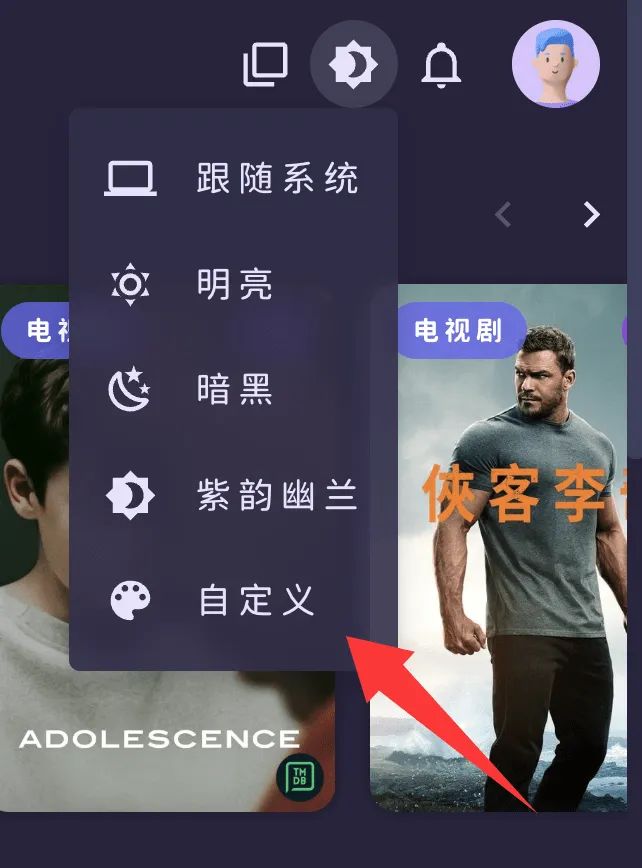
Media library configuration
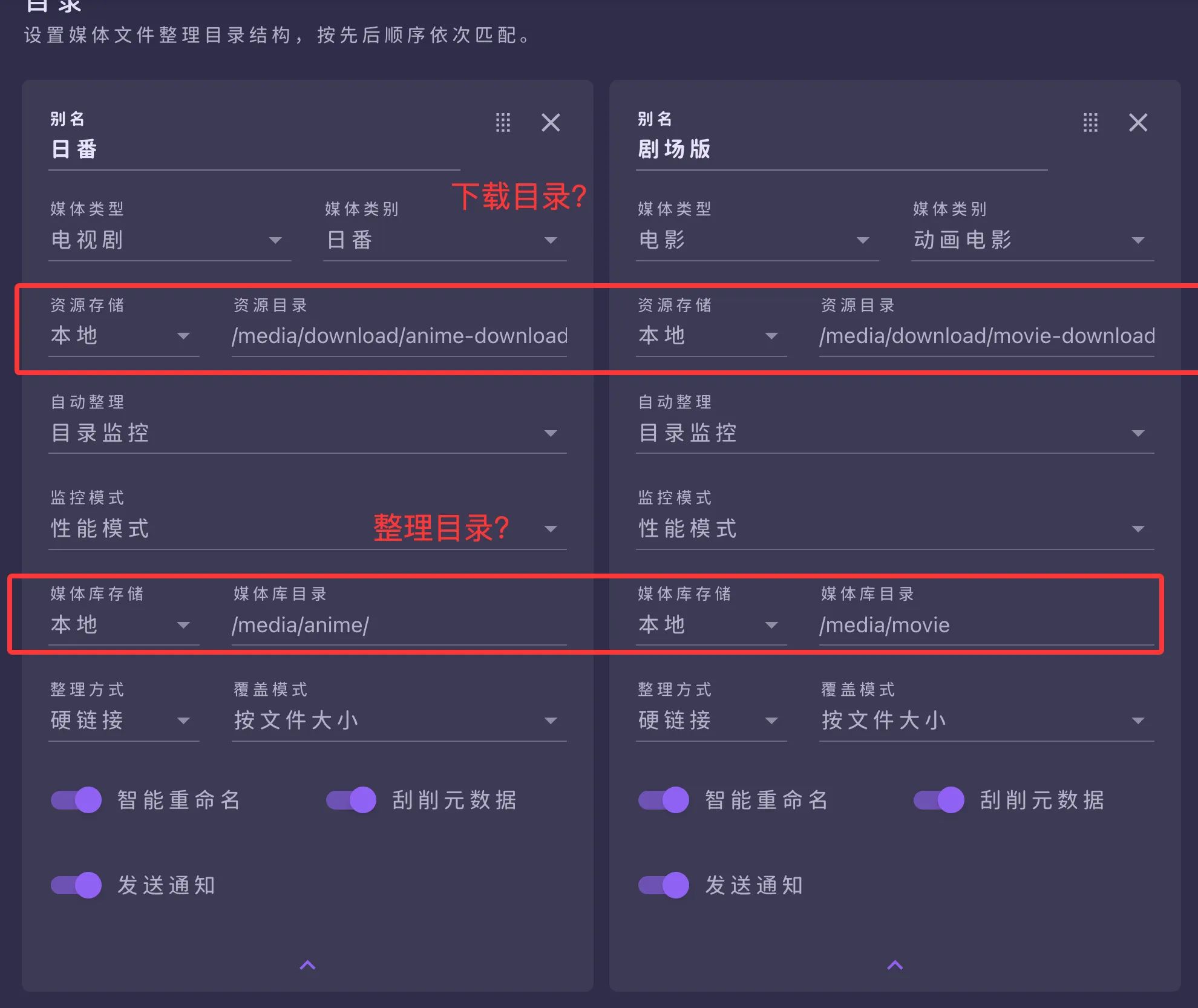
Basic settings and logic are similar to v1, except that download and media paths are now configured together in a single place.
If you need secondary directories, install the secondary directory plugin; usage is the same as in v1.
QB configuration
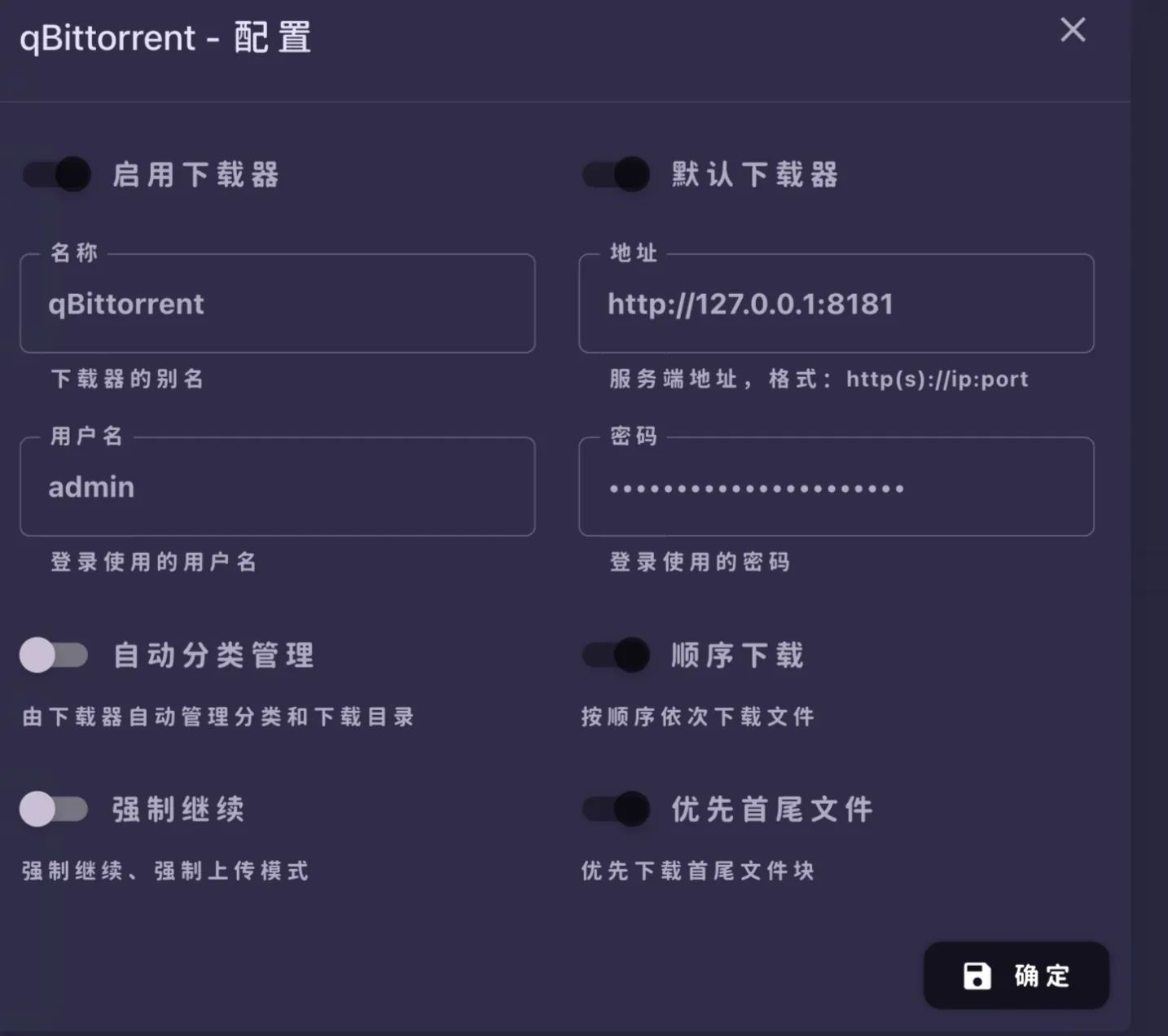
It’s recommended to disable automatic category assignment in qBittorrent, so the final download paths stay consistent with the media library layout above.
CookieCloud configuration
Basically unchanged, refer to the v1 guide.
Wordlist configuration
The following content comes from the Internet.
Custom recognition words
Custom release/subtitle groups
喵萌奶茶屋风车字幕组银色子弹字幕组枫叶字幕组诸神字幕组❀拨雪寻春❀VARYGAI-RawsANiSweetSubLoliHouseVCB-Studio7³ACGOPFans枫雪动漫SilverBulletAPTX4869Snow-RawsB-GlobalCRKKTVBahaMyVideoAMZNKKTVfriDayDisney+LINETVNFViuCrunchyrollNetflixAmazonMAXAppleTV+HMAXBiliBiliAbemaCatchPlayiTunesRemuxADWebNTbFLUXDSNP银色子弹字幕组RLWebBreeze@SunnyRain@SunnyRLeavesCustom placeholders
\b(简繁内封|简繁日内封|简繁日英内封|简繁官字内封|官简内封|简日双语|简体内封|简体内嵌|繁体内嵌|简英双语|简繁外挂|简体|HDR|DoVi)\bFile‑organizing exclude words
__\w{6}/Special Ending Movie\[((TV|BD|\bBlu-ray\b)?\s*CM\s*\d{2,3})\]\[Teaser.*?\]\[PV.*?\]\[NC[OPED]+.*?\]\[S\d+\s+Recap(\s+\d+)?\]MenuPreview\b(CDs|SPs|Scans|Bonus|映像特典|映像|specials|特典CD|Menu|Logo|Preview|/mv)\b\b(NC)?(Disc|片头|OP|OVA|OAD|SP|ED|Advice|Trailer|BDMenu|片尾|PV|CM|Preview|MENU|Info|EDPV|SongSpot|BDSpot)(\d{0,2}|_ALL)\bWiKi.sampleRule configuration
Custom rules
MoviePilot-V2 adds support for custom rules, where you can write your own rule list for resource filtering. These rules are mainly used to manage classification and filtering conditions. Each rule entry has an id, name, include and exclude fields, etc. The custom rule list helps you more precisely and efficiently find high‑quality resources that match your preferences, greatly enhancing MoviePilot’s subscription capabilities.
[{"id":"Complete","name":"Complete","include":"(全|共)\\d(集|期)|完结|合集|Complete","exclude":""},{"id":"filterGlobal","name":"filterGlobal","include":"","exclude":"(?i)日语无字|先行|DV|MiniBD|DIY原盘|iPad|UPSCALE|AV1|BDMV|RMVB|DVD|vcd|480p|OPUS","seeders":""},{"id":"filerGroup","name":"filerGroup","include":"","exclude":"(?i)SubsPlease|Up to 21°C|VARYG|TELESYNC|NTb|sGnb|BHYS|DBD|HDH|COLLECTiVE|SRVFI|HDSPad"},{"id":"filterMovie","name":"filterMovie","include":"","exclude":"","seeders":"","size_range":"0-22000"},{"id":"filterSeries","name":"filterSeries","include":"","exclude":"","size_range":"0-102400"},{"id":"AnimeGroup","name":"AnimeGroup","include":"7³ACG|VCB-Studio","exclude":"","size_range":""},{"id":"Audiences","name":"Audiences","include":"ADE|ADWeb","exclude":"","seeders":""},{"id":"HHWEB","name":"HHWEB","include":"HHWEB","exclude":""},{"id":"Crunchyroll","name":"Crunchyroll","include":"CR|Crunchyroll","exclude":""},{"id":"Netflix","name":"Netflix","include":"Netflix|NF","exclude":""},{"id":"B-Global","name":"B-Global","include":"B-Global|BG","exclude":""},{"id":"AMZN","name":"AMZN","include":"AMZN|Amazon","exclude":""},{"id":"HQ","name":"HQ","include":"HQ|高码|EDR","exclude":"","size_range":""},{"id":"DDP","name":"DDP","include":"DDP","exclude":""}]-
Complete: Filters for complete or finished series. The
includefield matches(全|共)\\d(集|期)|完结|合集|Complete, i.e., releases with these keywords. -
filterGlobal: Global filter used to exclude unwanted resources. The
excludefield contains many keywords (such as “日语无字”, “先行”, etc.) and filters out matching torrents. -
filerGroup: Excludes unwanted encoder or group releases; the
excludefield lists group names (such as “SubsPlease”, “Up to 21°C”, etc.). -
filterMovie: Movie‑specific rule with
size_rangeset to0-22000MB. -
filterSeries: Series‑specific rule with
size_rangeset to0-102400MB. -
AnimeGroup: Matches releases from specific anime groups such as
7³ACGandVCB-Studio. -
Audiences: Matches resources containing audience‑related keywords like
ADEandADWeb. -
HHWEB: Matches resources with the
HHWEBkeyword. -
Crunchyroll: Matches resources with
CRorCrunchyrollkeywords. -
Netflix: Matches resources with
NetflixorNF. -
B-Global: Matches resources with
B-GlobalorBG. -
AMZN: Matches resources with
AMZNorAmazon. -
HQ: Matches high‑quality releases that contain
HQ,高码, orEDR. -
DDP: Matches resources with the
DDPkeyword.
Priority rules
MoviePilot-V2 also overhauls highly customizable priority rules, enabling advanced users to hand‑craft subscription logic that perfectly fits their needs. This upgrade refines rules by media_type (movie, series) and category (your own second‑level categories). For example, you can define one set of rules for movies, and a separate one for Chinese‑language movies under a sub‑category.
[{"name":"前置过滤","rule_string":"filterGlobal& !BLU & !REMUX & !3D & !DOLBY &filerGroup","media_type":"","category":""},{"name":"动画电影","rule_string":" SPECSUB & 4K & BLURAY & H265 > CNSUB & 4K & BLURAY & H265 > CNSUB & 4K & BLURAY > CNSUB & 1080P & BLURAY > CNSUB & 4K > CNSUB & 1080P ","media_type":"电影","category":"动画电影"},{"name":"华语电影","rule_string":" 4K & BLURAY & H265 > 1080P & BLURAY > 4K > 1080P ","media_type":"电影","category":"华语电影"},{"name":"外语电影","rule_string":" SPECSUB & 4K & BLURAY & H265 &filterMovie> CNSUB & 4K & BLURAY & H265 &filterMovie> CNSUB & 1080P & BLURAY &filterMovie> CNSUB & 4K &filterMovie> CNSUB & 1080P &filterMovie","media_type":"电影","category":"外语电影"},{"name":"日番","rule_string":"AnimeGroup& CNSUB & BLURAY & 1080P >Audiences& H265 & BLURAY & 1080P >Audiences&AMZN&HHWEB& CNSUB & 1080P >Audiences&Crunchyroll& CNSUB & 1080P >Audiences&Netflix&HHWEB& CNSUB & 1080P >Audiences&B-Global& 4K & CNSUB >Audiences&B-Global& 1080P & CNSUB >Audiences&HHWEB& CNSUB & 1080P > CNSUB & BLURAY & 1080P > 1080P & CNSUB > 1080P ","media_type":"电视剧","category":"日番"},{"name":"国漫","rule_string":" 4K &Audiences&HHWEB&DDP> 4K &Audiences&HHWEB> 1080P &Audiences&HHWEB> 4K > 1080P > 720P ","media_type":"电视剧","category":"国漫"},{"name":"纪录片","rule_string":" 4K & BLURAY > 1080P & BLURAY > 4K > 1080P ","media_type":"电视剧","category":"纪录片"},{"name":"综艺","rule_string":" 4K & WEBDL &Complete> 4K & WEBDL &HHWEB> WEBDL & 1080P &HHWEB> 4K & WEBDL &Audiences> 1080P &Audiences& WEBDL > 1080P ","media_type":"电视剧","category":"综艺"},{"name":"国产剧","rule_string":" 4K & WEBDL &HQ> 4K & WEBDL > 4K & WEBDL > 1080P > 720P ","media_type":"电视剧","category":"国产剧"},{"name":"欧美剧","rule_string":" SPECSUB & 1080P & BLURAY &filterSeries> 1080P & WEBDL & CNSUB &filterSeries> CNSUB &filterSeries","media_type":"电视剧","category":"欧美剧"},{"name":"日韩剧","rule_string":" SPECSUB & 1080P & BLURAY &filterSeries> CNSUB & 1080P &filterSeries> 1080P & CNSUB &filterSeries> CNSUB &filterSeries ","media_type":"电视剧","category":"日韩剧"},{"name":"现场","rule_string":" CNSUB & 4K > CNSUB & 1080P > 4K > 1080P > !720P ","media_type":"电影","category":"现场"}]-
前置过滤 (Pre‑filter): Runs before other filters.
rule_stringincludesfilterGlobaland excludesBLU,REMUX,3D, andDOLBY, as well as groups infilerGroup. -
动画电影 (Animated movies): Priority order:
- 4K H265 Blu‑ray with external subs (
SPECSUB) - 4K H265 Blu‑ray with Chinese internal subs (
CNSUB) - 4K Blu‑ray with Chinese internal subs
- 1080P Blu‑ray with Chinese internal subs
- 4K/1080P with Chinese internal subs
- 4K H265 Blu‑ray with external subs (
-
华语电影 (Chinese‑language movies): Priority order:
- 4K H265 Blu‑ray
- 1080P Blu‑ray
- 4K or 1080P
-
外语电影 (Foreign‑language movies): Combines with
filterMovie, priority order:- 4K H265 Blu‑ray with external subs
- 4K H265 Blu‑ray with Chinese internal subs
- 1080P Blu‑ray with Chinese internal subs
- 4K or 1080P with Chinese internal subs
-
日番 (Japanese anime series): Priority order:
- AnimeGroup releases with Chinese internal subs in 1080P Blu‑ray
- Audiences releases, 1080P H265 Blu‑ray with subs or platform‑specific 1080P
- Various platform releases in 4K/1080P
-
国漫 (Chinese anime): Priority order:
- 4K with Audiences + HHWEB + DDP (preferred)
- Then 4K/1080P with Audiences + HHWEB
- Finally other 4K/1080P/720P
-
纪录片 (Documentaries): Priority order:
- 4K Blu‑ray
- 1080P Blu‑ray
- Other 4K and 1080P
-
综艺 (Variety shows): Priority order:
- Complete 4K WEBDL packs
- 4K/1080P WEBDL from HHWEB or Audiences
-
国产剧 (Chinese dramas): Priority order:
- High‑bitrate 4K WEBDL with
HQ - Other 4K, then 1080P, then 720P WEBDL
- High‑bitrate 4K WEBDL with
-
欧美剧 (Western dramas): With
filterSeriesapplied, priority order:- 1080P Blu‑ray with external subs
- 1080P WEBDL with Chinese internal subs
- Other releases with Chinese internal subs
-
日韩剧 (Japanese/Korean dramas): Priority order:
- 1080P Blu‑ray with external subs
- 1080P with Chinese internal subs
-
现场 (Live performances): Priority order:
- 4K with Chinese internal subs
- 1080P with Chinese internal subs
- 4K
- 1080P
- Exclude 720P