
Deploy the Automated Movie Platform MoviePilot with Docker
- Updated on July 11, 2024: rewrote the docker-compose.yaml file to match the new parameter style.
[admonition color=“red”]MoviePilot is a new project by the author of NasTools, a NAS media library automation tool. It is provided solely for learning and交流; do not promote this project on domestic platforms.[/admonition]
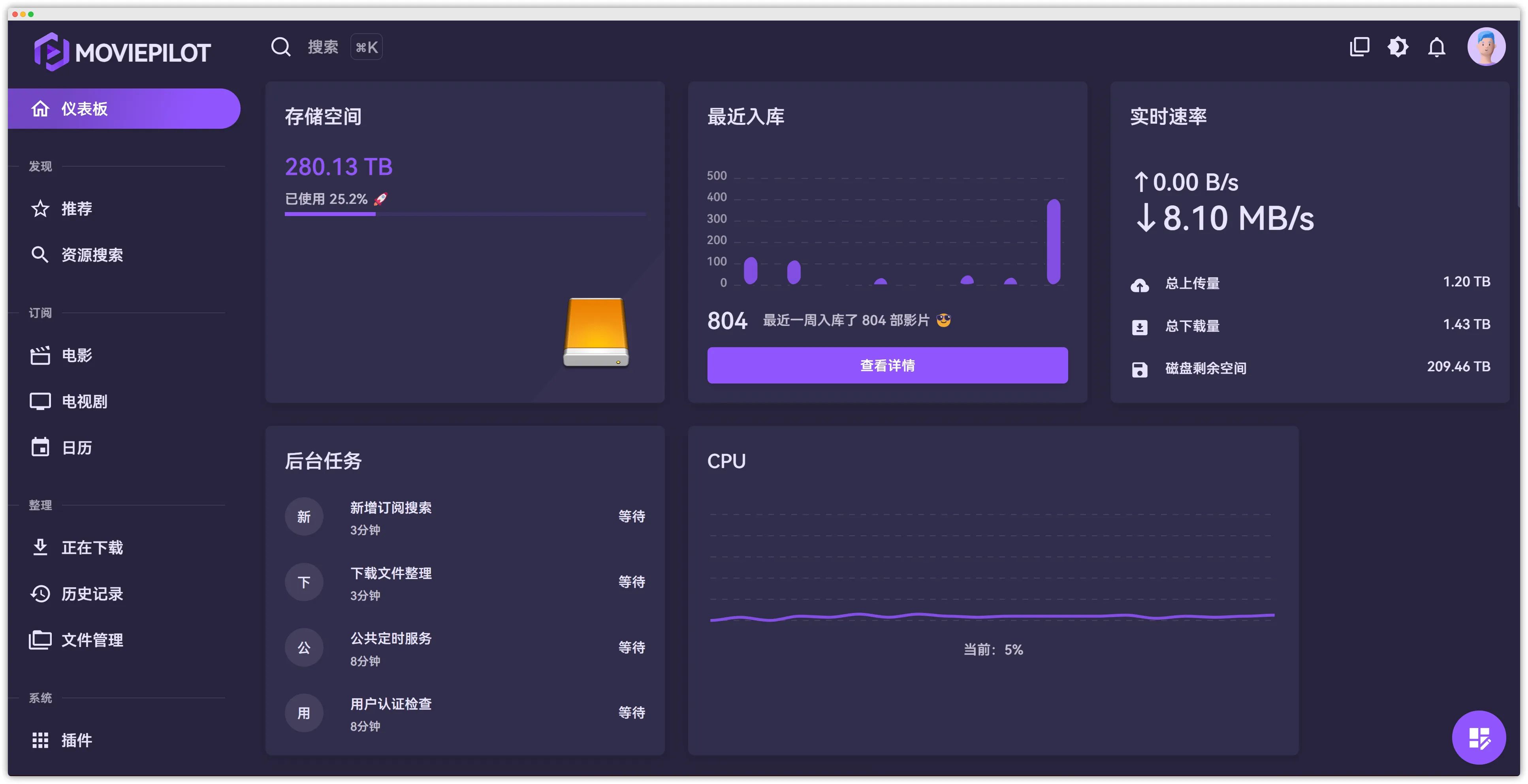
Because MoviePilot depends on multiple services and some foundational concepts, deployment requires a certain level of technical skill. Before installing, it’s assumed you already understand or are familiar with the following:
-
Docker
- Installation and basic commands
- Docker Compose installation and usage
-
Linux-related knowledge and commands
- UID
id -u - GID
id -g - Check port usage:
lsof -i:<port> - Soft links and hard links
- Cron expressions
- Check host IP:
ifconfig
- UID
-
PT downloaders
- qBittorrent
- Transmission
-
Media servers
- Emby
- Plex
- Jellyfin
-
- You must have at least one PT site supported by MoviePilot, otherwise the rest of this guide is not applicable.
Installation
This guide assumes you’re installing and deploying on Debian 12 Linux. NAS users should adapt the configuration and variables as needed for your system.
Get UID and GID
SSH into your server and run id -u id -g to get UID and GID respectively.
- UID=0
- GID=0
Create directories
1. MoviePilot directory
You need three directories to store configuration, core data, and media data.
Create the following directory structure under the MoviePilot directory:
/MoviePilot/moviepilot/config→ config data/MoviePilot/moviepilot/core→ core data/hdd/media→ media data (hard-link target directory)
2. QBitTorrent directory
You need two directories: one mapped as the download path, and one for qBittorrent’s configuration.
Create the following directory structure under the MoviePilot directory:
/MoviePilot/qbittorrent→ config data/MoviePilot/media/downloads→ downloaded data
4. Emby directory
You need two directories: one mapped as the media directory, and one for configuration.
Create the following directory structure under the MoviePilot directory:
/MoviePilot/emby→ config data/MoviePilot/media→ media data (hard-link target directory)
File tree overview:
MoviePilot├── emby├── media│ └── downloads├── moviepilot│ ├── config│ └── core└── qbittorrentInstall dependencies
1. Install CookieCloud (not recommended; prefer using MoviePilot’s built-in CookieCloud, see red note below)
CookieCloud is a small tool that syncs cookies to your own server. It can sync browser Cookies and Local Storage to your phone and the cloud. It supports end-to-end encryption and configurable sync intervals. Here it’s mainly used to sync cookies from major PT sites so MoviePilot can import them automatically.
docker run -d --name=cookiecloud -p 8088:8088 --restart=always easychen/cookiecloud:latest[Test the installation]
Open http://<ip>:8088. If you see a “hello world” message, the server is running successfully.

[Install the browser extension]
Make sure you are already logged in to your PT sites — you must log in first, otherwise MoviePilot might not see site data when it starts.
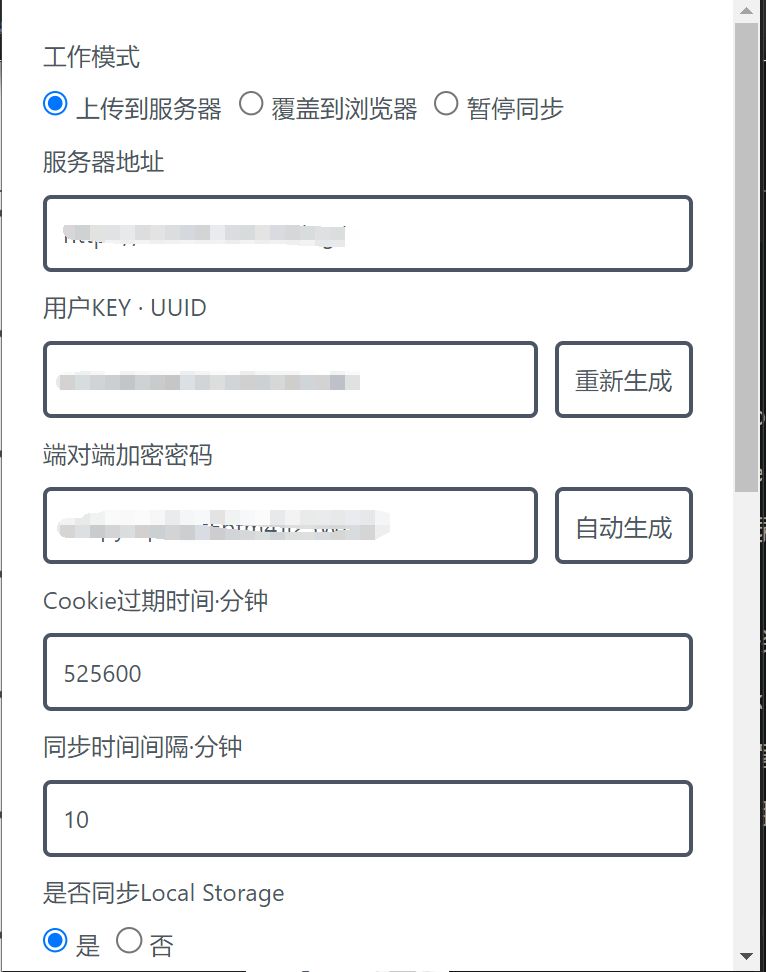
Install the extension from the Chrome Web Store, then configure the parameters and save. Manually test whether sync works.
Server Address: if in LAN, usehttp://<ip>:8088; if you have public access, use your public addressUser KEY: can be customized or use the default; will be needed laterEnd-to-end encryption password: can be customized or use the default; will be needed later
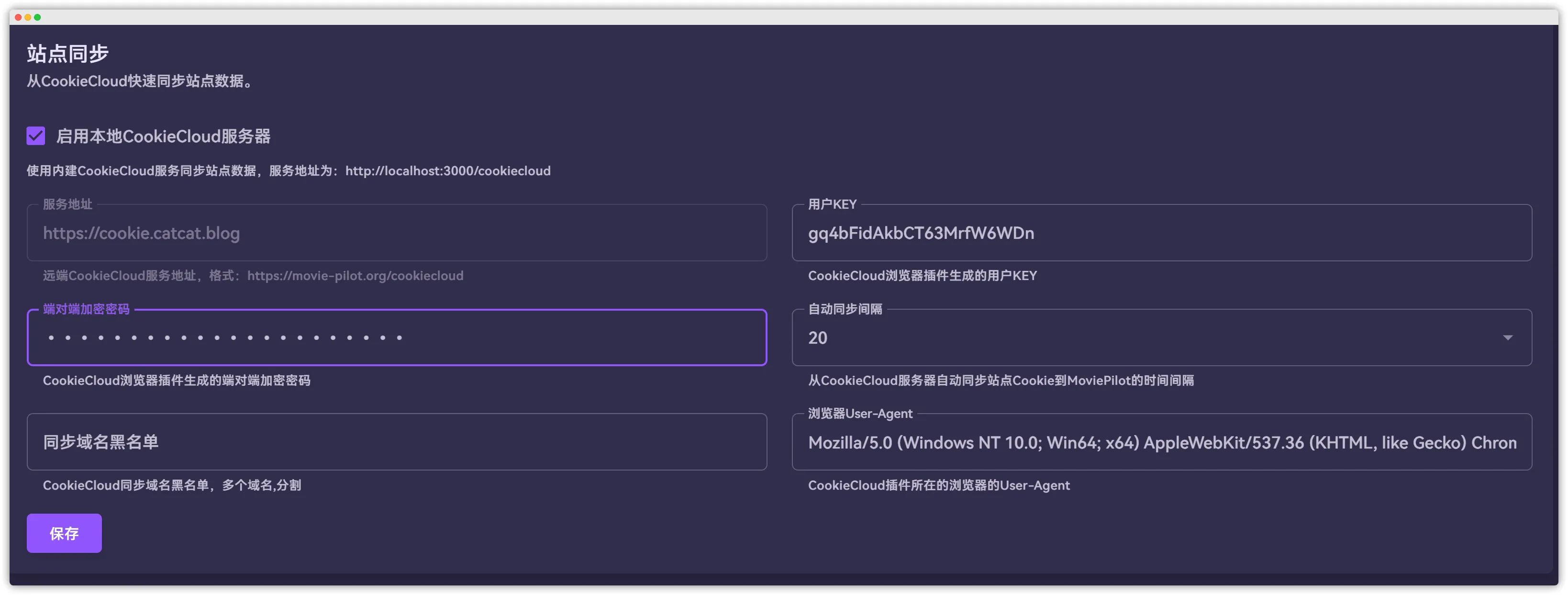
Because external CookieCloud instances are very unstable and often fail to sync cookies or establish connections, it is not recommended to use a self-hosted CookieCloud setup. Prefer MoviePilot’s built-in CookieCloud module instead. The configuration is the same as the external one; just change the server address accordingly to http(s)://<your-MoviePilot-IP>:<port>/cookiecloud.
2. Install MoviePilot, Emby, qBittorrent
Below is the full docker-compose file; you need to modify the variables yourself.
version: '3.3'
# MoviePilot repo: https://github.com/jxxghp/MoviePilot
services: qbittorrent: image: 'linuxserver/qbittorrent:latest' container_name: qbittorrent restart: always tty: true hostname: qbittorrent volumes: - '/root/MoviePilot/qbittorrent/config:/config' # directory created in advance - '/hdd/media/download:/media/download' # directory created in advance tmpfs: - '/tmp' environment: - 'QB_USERNAME=你的名称' # change accordingly - 'QB_PASSWORD=你的密码' # change accordingly - 'BT_PORT=49678' - 'PUID=0' - 'PGID=0' ports: - target: 8080 published: 8080 protocol: tcp - target: 49678 published: 49678 protocol: tcp - target: 49678 published: 49678 protocol: udp network_mode: bridge
emby: container_name: emby ports: - target: 8096 published: 8096 protocol: tcp - target: 8920 published: 8920 protocol: tcp - target: 11900 published: 11900 protocol: udp - target: 7359 published: 7359 protocol: udp volumes: - '/root/MoviePilot/emby/config:/config' # directory created in advance - '/hdd/media:/data' # directory created in advance environment: - TZ=Asia/Shanghai restart: always hostname: emby network_mode: bridge image: 'amilys/embyserver:latest'
moviepilot: ports: - target: 3000 published: 3000 protocol: tcp environment: # WEB service port, default 3000; can be changed but must not conflict with the API port - 'NGINX_PORT=3000' # API service port, default 3001; can be changed but must not conflict with the WEB port - 'PORT=3001' # UID of the user running the app, default 0 - 'PUID=0' # GID of the user running the app, default 0 - 'PGID=0' # Umask, default 000; you may consider 022 - 'UMASK=000' # Time zone - 'TZ=Asia/Shanghai' # Auto-update on restart: true/release/dev/false, default release; requires access to GitHub. Note: if you have network issues, configure PROXY_HOST. - 'MOVIEPILOT_AUTO_UPDATE=true' # Network proxy for accessing themoviedb or for restart updates. Format: http(s)://ip:port, socks5://user:pass@host:port - 'PROXY_HOST=' # Audience auth - 'AUTH_SITE=audiences' - 'AUDIENCES_UID=你的id' # fill with your id - 'AUDIENCES_PASSKEY=你的key' # Super admin username, default admin. Used to log in to the admin UI. Note: changing this after first startup has no effect unless you delete the DB file! - 'SUPERUSER=admin' # API token, default moviepilot. You must append ?token=<this> in media server Webhook, WeChat callback URLs, etc. Recommended to change to a complex string. - 'API_TOKEN=moviepilot' # Big memory mode, default false. When enabled it increases cache size, uses more memory, but is faster. - 'BIG_MEMORY_MODE=true' # DNS over HTTPS switch: true/false, default true. When enabled, uses DOH for domains like api.themoviedb.org to reduce DNS poisoning and improve connectivity. - 'DOH_ENABLE=true' # Metadata recognition cache TTL (hours). If unset or 0, uses system default (7 days in big memory mode, otherwise 3 days). Increasing this reduces requests to themoviedb. - 'META_CACHE_EXPIRE=' # GitHub token to raise rate limits for auto-update, plugin installs, etc. Format: ghp_**** - 'GITHUB_TOKEN=' # Developer mode true/false, default false. When enabled, all scheduled tasks are paused. - 'DEV=false' # Debug mode; when enabled will output debug logs. - 'DEBUG=true' # Auto-check and update resource bundles (site indices, auth, etc.) on startup. true/false, default true; requires access to GitHub. - 'AUTO_UPDATE_RESOURCE=true' # TMDB API domain, default api.themoviedb.org. You can use api.tmdb.org, tmdb.movie-pilot.org or any other proxy that works. - 'TMDB_API_DOMAIN=api.themoviedb.org' # TMDB image domain, default image.tmdb.org. You can set a proxy to speed up image loading, e.g. static-mdb.v.geilijiasu.com - 'TMDB_IMAGE_DOMAIN=image.tmdb.org' # Login page wallpaper: tmdb/bing, default tmdb - 'WALLPAPER=tmdb' # Media recognition source: themoviedb/douban, default themoviedb. Douban does not support secondary classification. - 'RECOGNIZE_SOURCE=themoviedb' # Fanart switch true/false, default true. Disabling it reduces scraped image types significantly. - 'FANART_ENABLE=true' # Source for scraping metadata and images: themoviedb/douban, default themoviedb - 'SCRAP_SOURCE=themoviedb' # Whether library items should follow TMDB updates, true/false, default true. When false, scraping uses the original TMDB snapshot even if it has changed. - 'SCRAP_FOLLOW_TMDB=true' # User ID(s) for auto-preferred downloads in remote interactive search (IDs from message channels). Multiple IDs separated by commas; set to all for all users. If unset, you must pick results manually or reply 0. - 'AUTO_DOWNLOAD_USER=all' # OCR server for captcha recognition (to auto-login and fetch cookies). Format: http(s)://ip:port. If unset, defaults to built-in https://movie-pilot.org - 'OCR_HOST=https://movie-pilot.org' # Download subtitles from sites, true/false, default true - 'DOWNLOAD_SUBTITLE=true' # Movie rename format - 'MOVIE_RENAME_FORMAT={{title}}{% if year %} ({{year}}){% endif %}/{{title}}{% if year %} ({{year}}){% endif %}{% if part %}-{{part}}{% endif %}{% if videoFormat %} - {{videoFormat}}{% endif %}{{fileExt}}' # TV rename format - 'TV_RENAME_FORMAT={{title}}{% if year %} ({{year}}){% endif %}/Season {{season}}/{{title}} - {{season_episode}}{% if part %}-{{part}}{% endif %}{% if episode %} - 第 {{episode}} 集{% endif %}{{fileExt}}' # Plugin marketplace repos, only GitHub main branches supported; multiple addresses separated by commas - 'PLUGIN_MARKET=https://github.com/jxxghp/MoviePilot-Plugins/,https://github.com/thsrite/MoviePilot-Plugins/,https://github.com/honue/MoviePilot-Plugins/,https://github.com/InfinityPacer/MoviePilot-Plugins/,https://github.com/dandkong/MoviePilot-Plugins/,https://github.com/Aqr-K/MoviePilot-Plugins/,https://github.com/AnjoyLi/MoviePilot-Plugins/,https://github.com/WithdewHua/MoviePilot-Plugins/,https://github.com/HankunYu/MoviePilot-Plugins/,https://github.com/baozaodetudou/MoviePilot-Plugins/,https://github.com/almus2zhang/MoviePilot-Plugins/,https://github.com/Pixel-LH/MoviePilot-Plugins/,https://github.com/lightolly/MoviePilot-Plugins/,https://github.com/suraxiuxiu/MoviePilot-Plugins/,https://github.com/gxterry/MoviePilot-Plugins/'
restart: always tty: true volumes: - '/root/MoviePilot/moviepilot/config:/config' - '/root/MoviePilot/moviepilot/core:/moviepilot' - '/var/run/docker.sock:/var/run/docker.sock:ro' - '/hdd/media:/media' network_mode: bridge hostname: moviepilot container_name: moviepilot image: 'jxxghp/moviepilot:latest'Below are explanations for some of the parameters.
There are many parameters and environment variables to configure; refer to the official docs. It’s recommended to copy from there and adjust.
-
Container name: can be anything, or just use the default -
Enable
Auto-restart -
Port mapping - Host port: set to3000 -
Storagemappings/MoviePilot/moviepilot/config→/config/MoviePilot/moviepilot/core→/moviepilot/var/run/docker.sock→/var/run/docker.sock: map the host docker.sock into the container to support internal restart operations/MoviePilot/media→/media
-
Environment variables (key=value)
PUID=0use the actual UID you obtained; wrong value will cause file permission issuesPGID=0use the actual GID you obtained; wrong value will cause file permission issuesUMASK=022TZ=Asia/Shanghaitime zoneMOVIEPILOT_AUTO_UPDATE=releaseauto-update on restartNGINX_PORT=3000WEB service portSUPERUSER=xxxxsuper admin username, define it yourselfSUPERUSER_PASSWORD=xxxxxxsuper admin password; define it yourself. In new versions it’s generated under logs by default; you’ll need to check there.WALLPAPER=tmdblogin page poster source:tmdb/bing, defaulttmdbAPI_TOKEN=moviepilotAPI key; append?token=<value>in media server Webhook, WeChat callback URLs, etc.PROXY_HOST=network proxy (optional)TMDB_API_DOMAIN=api.themoviedb.orgTMDB API domainDOWNLOAD_PATH=/media/downloadsdownload path, do not changeDOWNLOAD_MOVIE_PATH=/media/downloads/moviesmovie download directory, do not changeDOWNLOAD_TV_PATH=/media/downloads/tvTV download directory, do not changeDOWNLOAD_ANIME_PATH=/media/downloads/animeanime download directory, do not changeDOWNLOAD_SUBTITLE=falsedownload subtitles from sitesDOWNLOAD_CATEGORY=falsesecondary download directory switchDOWNLOADER_MONITOR=truedownloader monitoringSUBSCRIBE_MODE=spidersubscription mode, defaultspiderSUBSCRIBE_RSS_INTERVAL=30RSS refresh interval in minutesSCRAP_METADATA=truescrape metadata for items added to the librarySCRAP_FOLLOW_TMDB=truewhether newly added items follow TMDB updatesTORRENT_TAG=MOVIEPILOTdownloader torrent tagLIBRARY_PATH=/mediamedia library root directoryLIBRARY_MOVIE_NAME=moviesmovie library directory nameLIBRARY_TV_NAME=tvTV library directory nameLIBRARY_ANIME_NAME=animeanime library directory nameLIBRARY_CATEGORY=falsesecondary category switch for libraryTRANSFER_TYPE=linkfile organization/transfer method. Supportslink/copy/move/softlink/rclone_copy/rclone_move. Hard link (link) is recommended.OVERWRITE_MODE=sizetransfer overwrite mode, defaultsize. Options:nerver/size/always/latest, meaningnever overwrite same-named files/overwrite based on file size (bigger overwrites smaller)/always overwrite same-named files/keep only latest version (delete older versions including different names).COOKIECLOUD_HOST=http://<ip>:8088CookieCloud server addressCOOKIECLOUD_KEY=xxxkey set in the CookieCloud browser extensionCOOKIECLOUD_PASSWORD=xxxend-to-end encryption password from the CookieCloud extensionCOOKIECLOUD_INTERVAL=20CookieCloud sync interval (minutes)USER_AGENT=Mozilla/5.0 (Windows NT 10.0; Win64; x64) AppleWebKit/537.36 (KHTML, like Gecko) Chrome/98.0.4758.102 Safari/537.36browser UA corresponding to CookieCloud (optional). Setting this can improve site connectivity; after syncing, you can change it in the admin UI.SUBSCRIBE_SEARCH=falsesubscription searchtrue/false, defaultfalsePLUGIN_MARKET=https://raw.githubusercontent.com/jxxghp/MoviePilot-Plugins/main/MESSAGER=telegrammessage notification channels. Supportstelegram/wechat/slack/synologychat. Use commas to enable multiple channels. You must also configure corresponding variables; others can be removed.telegramis recommended. Optional: if not set, no notifications will be sent.TELEGRAM_TOKEN=xxxxTelegram Bot Token (guide)TELEGRAM_CHAT_ID=xxxxxTelegram Chat IDDOWNLOADER=qbittorrentdownloader type:qbittorrent/transmissionQB_HOST=http://<ip>:8080qBittorrent URL, set according to your configQB_USER=adminqBittorrent usernameQB_PASSWORD=adminadminqBittorrent passwordQB_CATEGORY=falseqBittorrent category auto-managementQB_SEQUENTIAL=trueqBittorrent sequential downloadQB_FORCE_RESUME=falseqBittorrent ignore queue limits and force resumeMEDIASERVER=embymedia server:emby/jellyfin/plexEMBY_HOST=http://<ip>:8096Emby server URLEMBY_API_KEY=xxxxxxxEmby API key, generated under EmbySettings -> Advanced -> API Keys. You can leave it empty for now and fill it later, then update the container.MEDIASERVER_SYNC_INTERVAL=6AUTH_SITE=hdfansauth site, very important! You must use a PT site supported by MoviePilot. See the official list. If you don’t have a site, ask in the Telegram group.HDFANS_UID=<site-id>HDFANS_PASSKEY=<site-passkey>BIG_MEMORY_MODE=falsebig memory modeMOVIE_RENAME_FORMAT={{title}}{% if year %} ({{year}}){% endif %}/{{title}}{% if year %} ({{year}}){% endif %}{% if part %}-{{part}}{% endif %}{% if videoFormat %} - {{videoFormat}}{% endif %}{{fileExt}}movie rename formatTV_RENAME_FORMAT={{title}}{% if year %} ({{year}}){% endif %}/Season {{season}}/{{title}} - {{season_episode}}{% if part %}-{{part}}{% endif %}{% if episode %} - 第 {{episode}} 集{% endif %}{{fileExt}}TV rename format
[Test]
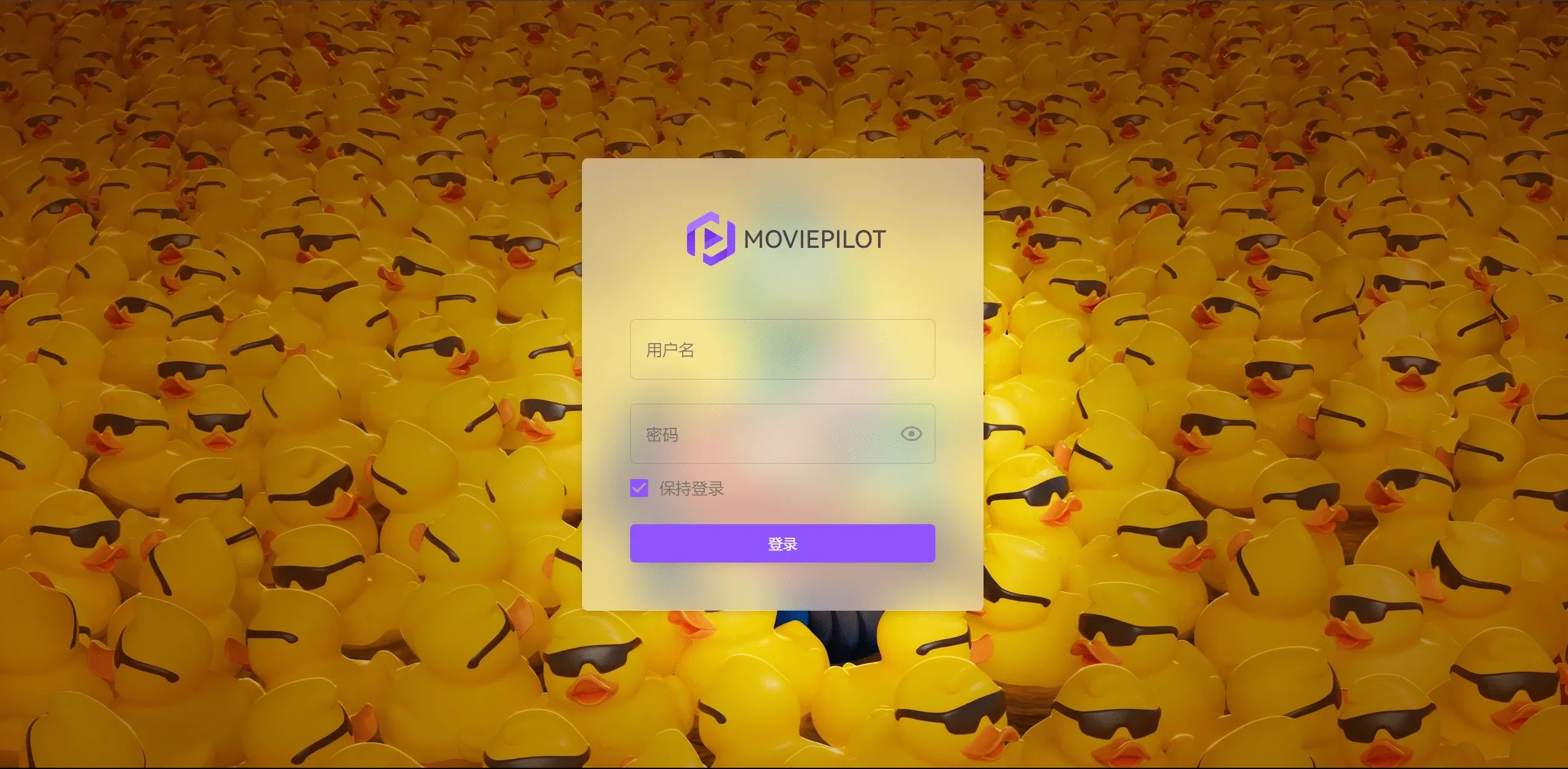
Open http://<ip>:3000 to log in. Retrieve the password via docker logs moviepilot.
Usage
Secondary category plugin installation
Go to the Plugins section and install the Secondary Classification Strategy - Configuration plugin.
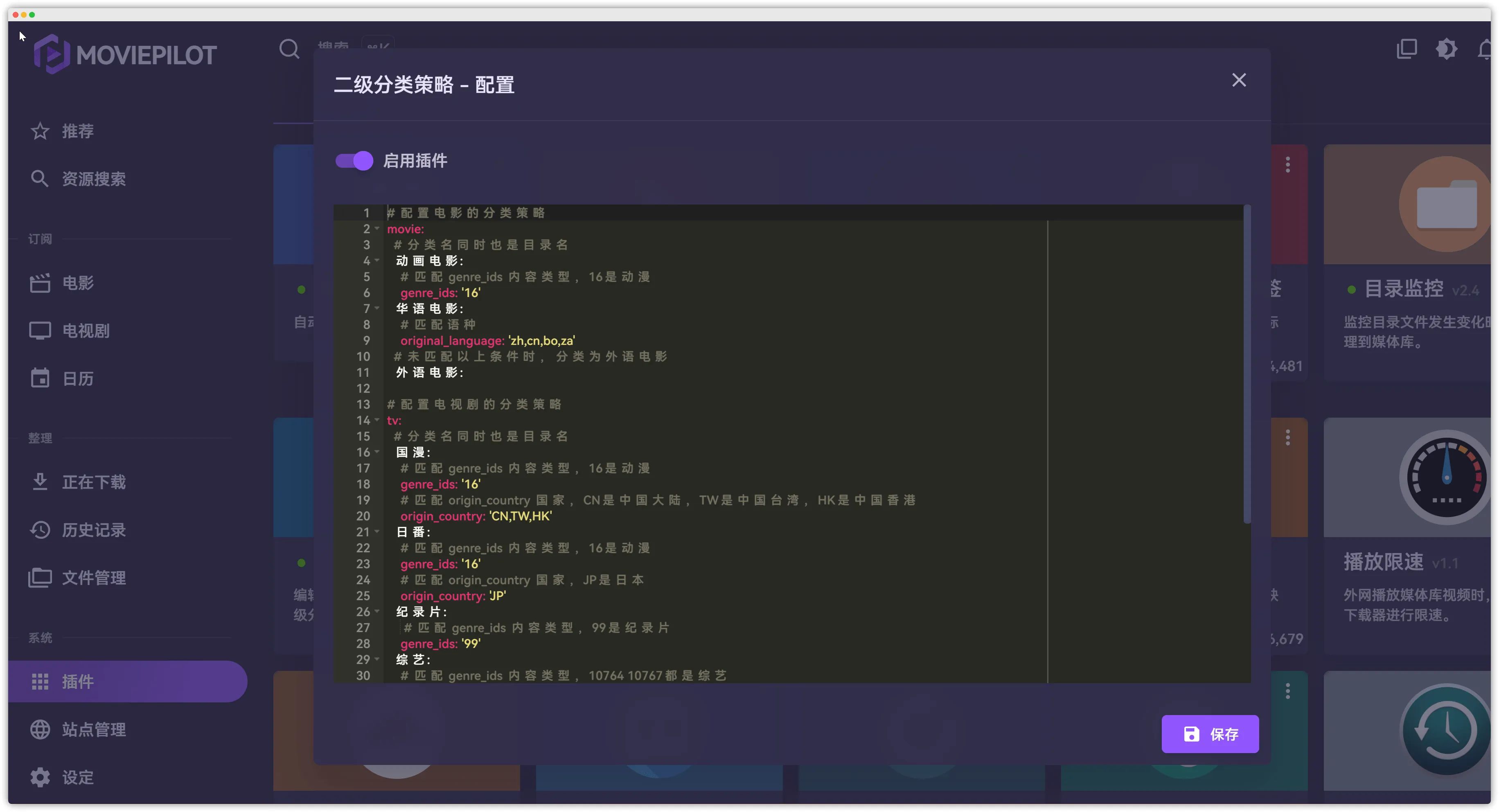
# Classification strategy for moviesmovie: # Category name is also the directory name 动画电影: # Match genre_ids, 16 is animation genre_ids: '16' 华语电影: # Match language original_language: 'zh,cn,bo,za' # Anything not matching above rules falls into Foreign Movies 外语电影:
# Classification strategy for TV showstv: # Category name is also the directory name 国漫: # Match genre_ids, 16 is animation genre_ids: '16' # Match origin_country: CN = Mainland China, TW = Taiwan, HK = Hong Kong origin_country: 'CN,TW,HK' 日番: # Match genre_ids, 16 is animation genre_ids: '16' # Match origin_country: JP = Japan origin_country: 'JP' 纪录片: # Match genre_ids, 99 is documentary genre_ids: '99' 综艺: # Match genre_ids, 10764 and 10767 are variety shows genre_ids: '10764,10767' 儿童: # Match genre_ids, 10762 is children genre_ids: '10762' 国产剧: # Match origin_country: CN = Mainland China, TW = Taiwan, HK = Hong Kong origin_country: 'CN,TW,HK' 欧美剧: # Match origin_country: main European and American countries origin_country: 'US,FR,GB,DE,ES,IT,NL,PT,RU,UK' 日韩剧: # Match origin_country: main Asian countries origin_country: 'JP,KP,KR,TH,IN,SG' # Anything not matching above rules falls into Uncategorized 未分类:Directory configuration
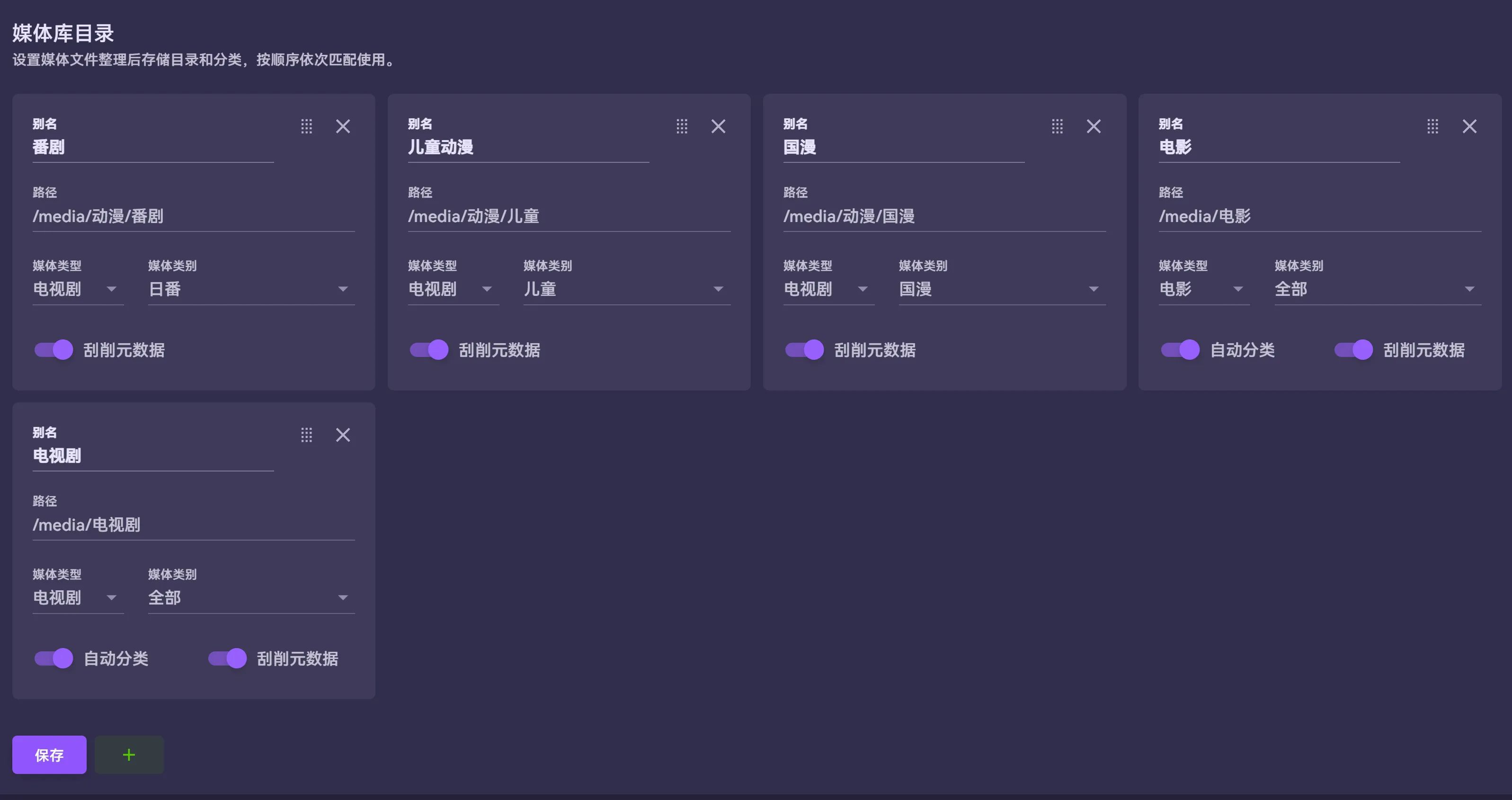
In the Directory settings, adjust paths according to your download directories and desired scraping target directories.
My directory structure:
media├── download│ ├── AV│ ├── 动漫│ ├── 手动整理│ ├── 电影│ └── 电视剧├── 动漫│ ├── 儿童│ └── 番剧├── 电影│ ├── 动画电影│ ├── 华语电影│ └── 外语电影└── 电视剧 ├── 国产剧 ├── 日韩剧 ├── 未分类 ├── 欧美剧 ├── 纪录片 └── 综艺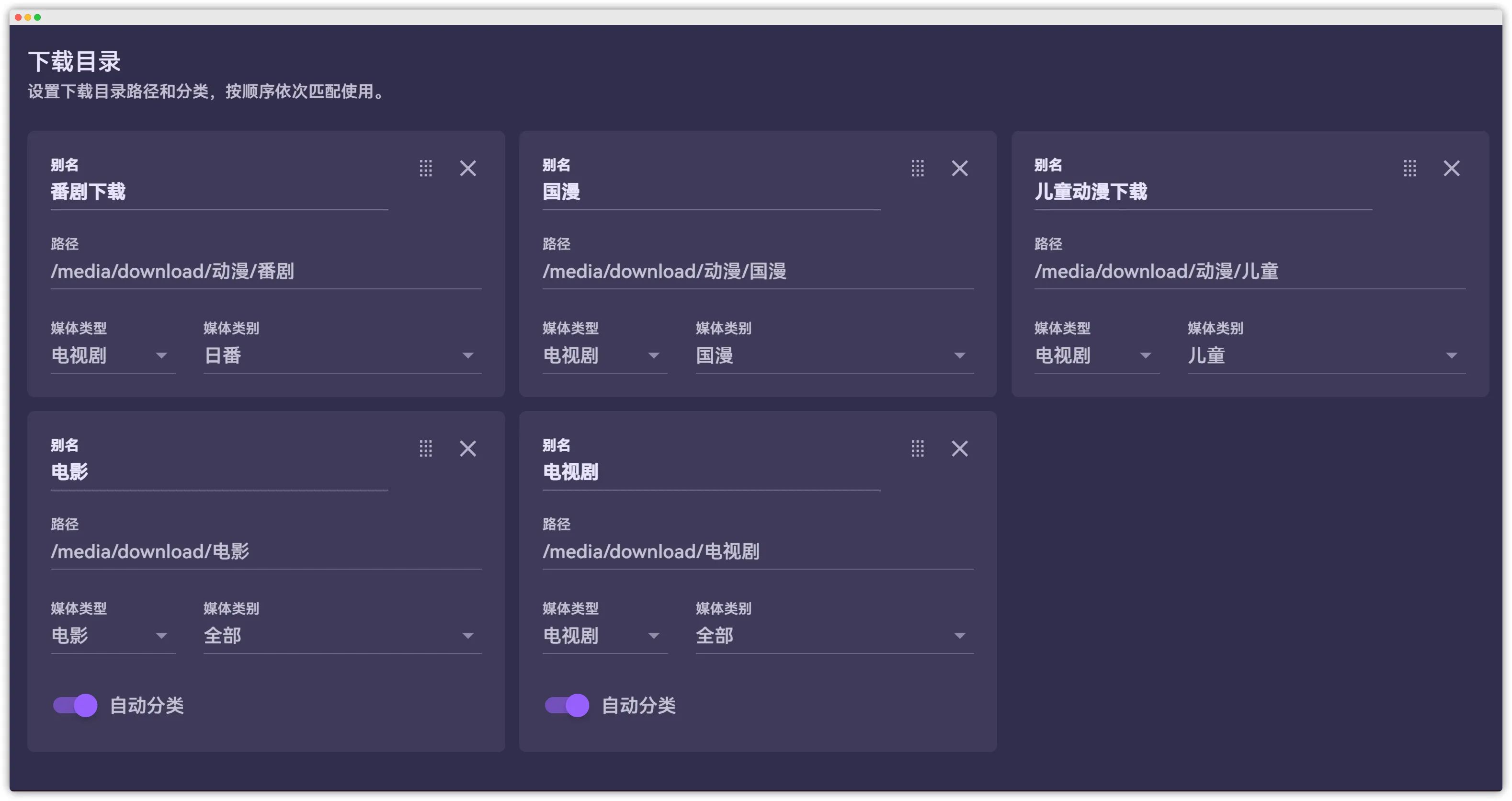
Site sync
Configure CookieCloud according to the red note above.
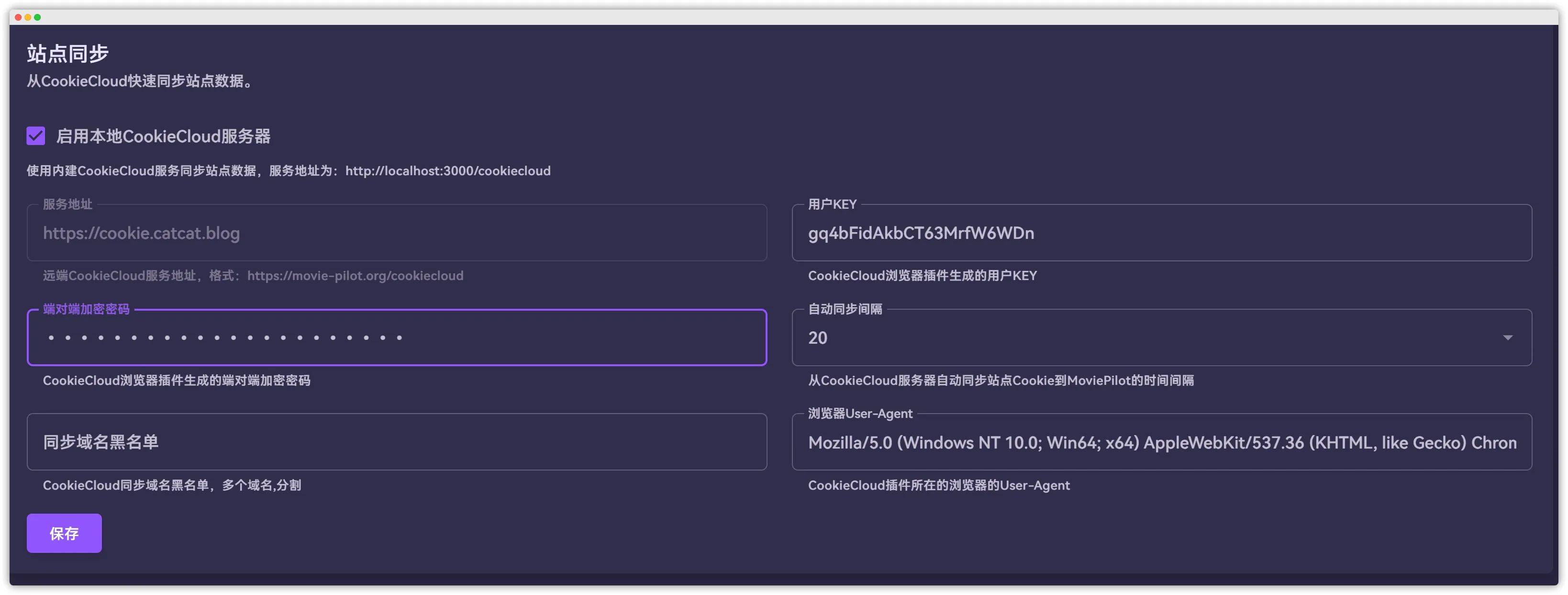
If you’ve completed all the steps above, you’ve most likely finished your setup. Now you can sync sites to test.
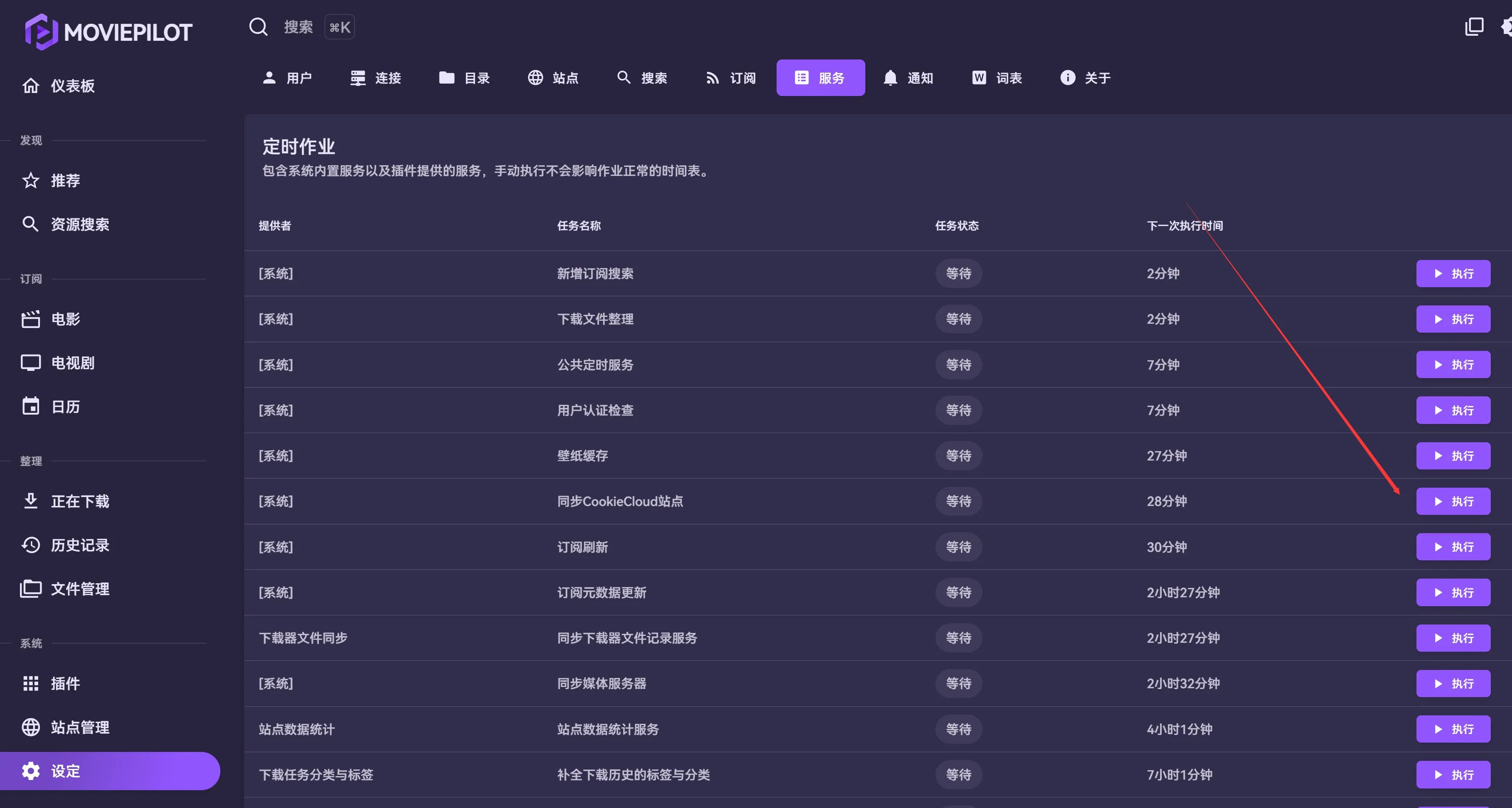
If sync succeeds, you should see corresponding sites listed under Site Management.
Downloader and media server
This part should be straightforward: configure them according to how you’ve deployed your services.
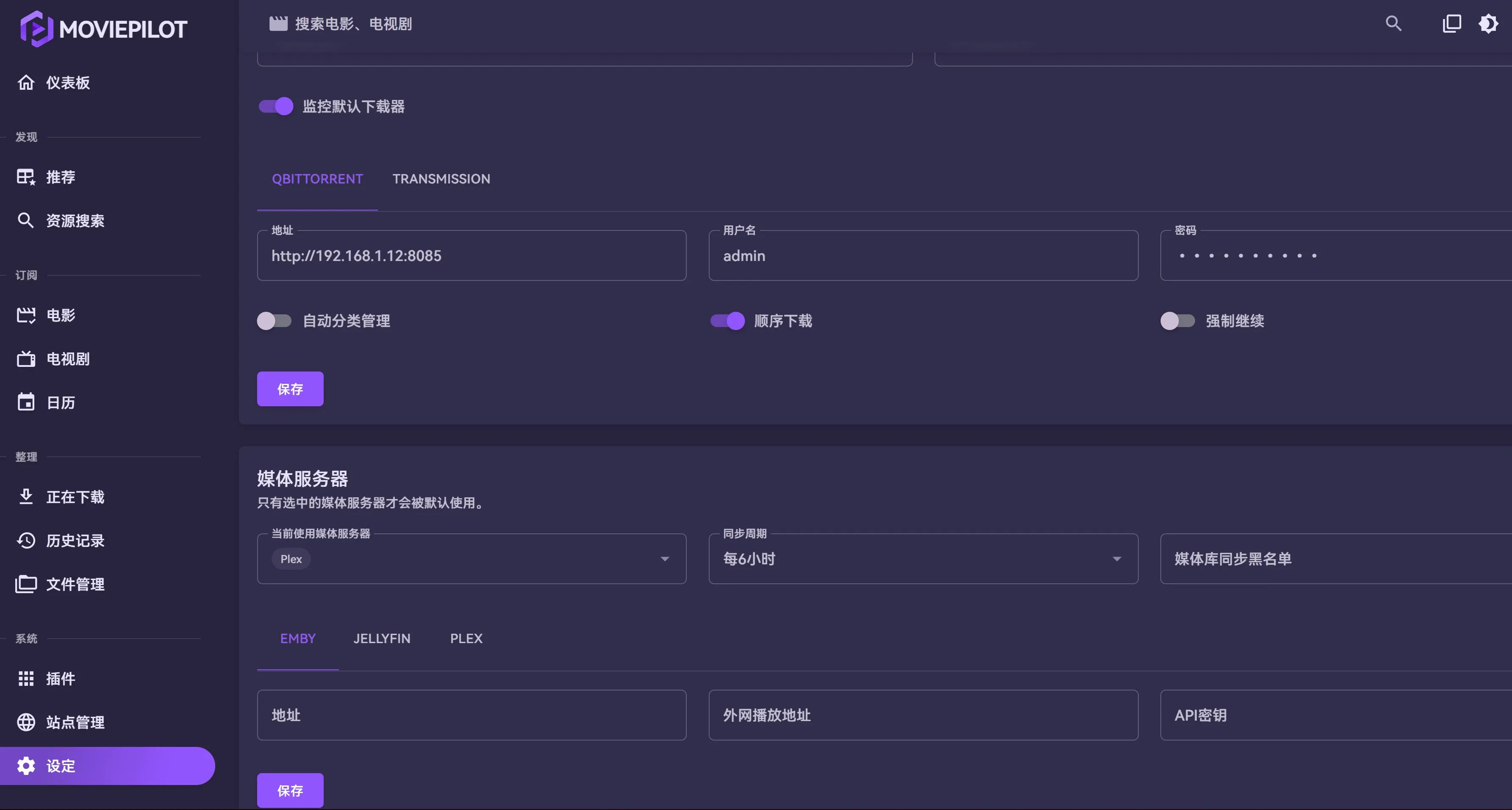
At this point, a basic MoviePilot setup is complete. The rest is up to you to explore.