Kubernetes Notes
1. Introduction to Kubernetes
Kubernetes is a portable, extensible open source platform for managing containerized workloads and services, facilitating declarative configuration and automation. Kubernetes has a large and rapidly growing ecosystem, with broad adoption of its services, support, and tooling.
The name Kubernetes comes from Greek, meaning “helmsman” or “pilot”. The abbreviation “k8s” comes from the eight letters between “k” and “s”. Google open‑sourced the Kubernetes project in 2014. Kubernetes is built on over a decade of Google’s experience running production workloads at scale, combined with the best ideas and practices from the community.
1.1 Evolution of Application Deployment Models
The way we deploy applications has gone through three main stages:
- Traditional deployment: in the early Internet era, applications were deployed directly on physical machines.
Advantages: simple, no other technologies involvedDisadvantages: no resource boundaries for applications, making it hard to allocate compute resources properly; applications easily affect each other- Virtualized deployment: multiple virtual machines can run on a single physical machine, each VM being an isolated environment.
Advantages: runtime environments are isolated from one another, providing a certain level of securityDisadvantages: an additional operating system layer is added, wasting some resources- Containerized deployment: similar to virtualization, but the OS is shared.
Advantages: ensures each container has its own filesystem, CPU, memory, process space, etc. All resources needed by the application are packaged into the container and decoupled from the underlying infrastructure. Containerized applications can be deployed across cloud providers and across Linux distributions.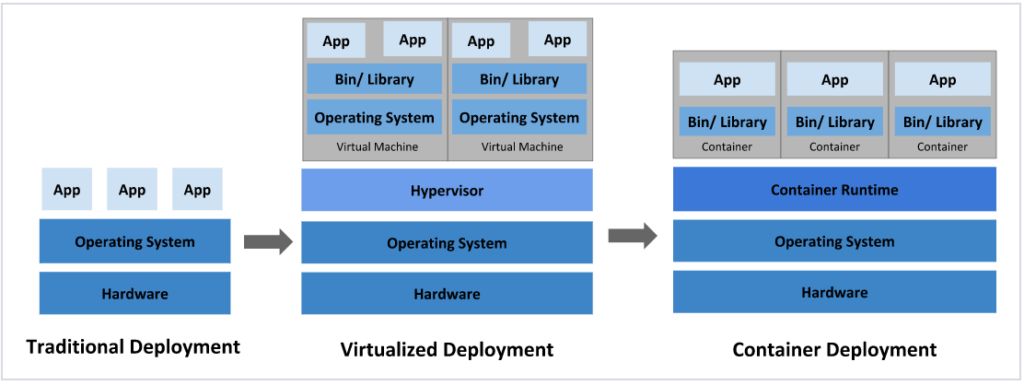
Containerized deployment brings many conveniences, but also raises new questions, such as:
When a container fails and stops, how do we immediately start another container to replace it?
When concurrent traffic spikes, how do we horizontally scale out the number of containers?
These container management issues are collectively known as container orchestration. To solve them, several container orchestration systems have emerged:
-
Swarm: Docker’s own container orchestration tool
-
Mesos: An Apache project for unified resource management, typically used together with Marathon
-
Kubernetes: Google’s open source container orchestration tool
1.2 The Birth of Kubernetes
Kubernetes is a brand‑new, container‑based leading solution for distributed architectures. It is the open source version of Borg, Google’s secret weapon for over a decade, and had its first version released in September 2014, with the first stable release in July 2015.
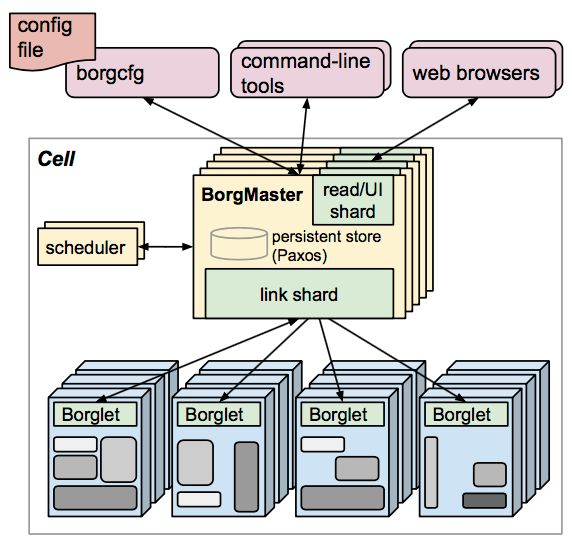
Borg System
At its core, Kubernetes is a server cluster. It runs specific programs on each node in the cluster to manage the containers on those nodes. Its goal is to automate resource management, and it mainly provides the following capabilities:
-
Self‑healing: if a container crashes, a new one can be started within about one second
-
Elastic scaling: automatically adjusts the number of running containers in the cluster as needed
-
Service discovery: services can automatically discover and locate the services they depend on
-
Load balancing: if a service is backed by multiple containers, requests are automatically load balanced
-
Version rollback: if a newly released application version has issues, you can immediately roll back to the previous version
-
Storage orchestration: storage volumes can be automatically created according to the needs of containers
1.3 Kubernetes Components
A Kubernetes cluster is primarily composed of control plane nodes (masters) and worker nodes (nodes). Different components are installed on each type of node.
Master: the cluster control plane, responsible for cluster decisions (management)
ApiServer: the single entry point for resource operations; receives user commands; provides authentication, authorization, API registration and discoveryScheduler: responsible for cluster resource scheduling; assigns Pods to appropriate nodes based on scheduling policiesControllerManager: responsible for maintaining the cluster state, such as rollout planning, failure detection, auto‑scaling, rolling updates, etc.Etcd: stores information about all resource objects in the clusterNode: the cluster data plane, providing the runtime environment for containers (does the real work)
Kubelet: maintains container lifecycles; interacts with Docker (or other runtimes) to create, update, and destroy containersKubeProxy: provides in‑cluster service discovery and load balancingDocker: handles all container operations on the node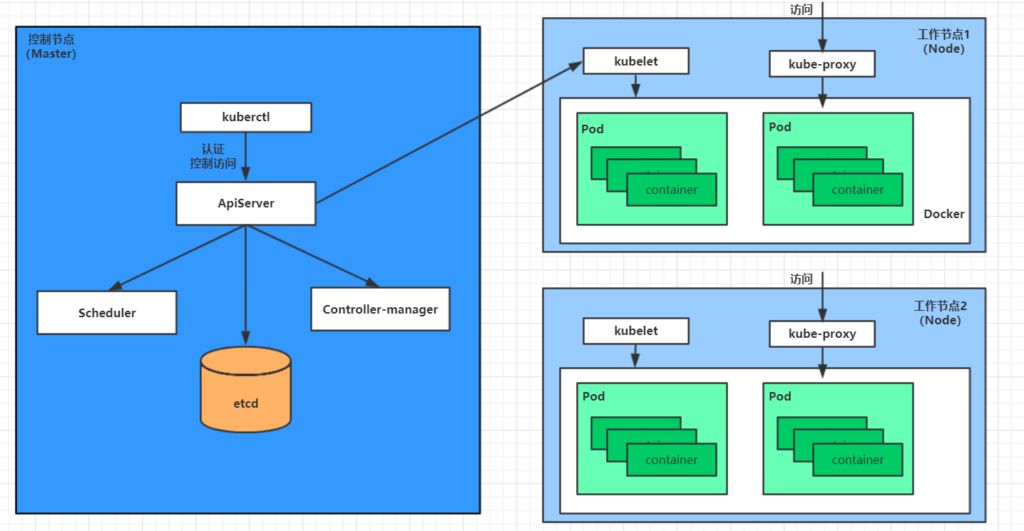
Below is how deploying an Nginx service demonstrates the interactions between Kubernetes components:
-
First, once the Kubernetes environment is up, both master and node store their own information in the etcd database.
-
A deployment request for an Nginx service is first sent to the ApiServer component on the master node.
-
ApiServer then calls the Scheduler component to decide which node should host this service.
-
At this point, the Scheduler reads information about all nodes from etcd, selects one according to a scheduling algorithm, and returns the result to ApiServer.
-
ApiServer calls Controller Manager to coordinate installing the Nginx service on the chosen Node.
-
After Kubelet receives the instruction, it notifies Docker, which then starts a Pod running Nginx.
-
A Pod is the smallest deployable unit in Kubernetes; containers must run inside a Pod.
-
At this point, the Nginx service is up and running. To access Nginx, traffic goes through kube‑proxy, which proxies access to the Pod.
1.4 Core Kubernetes Concepts
1.4.1 Types of Services
-
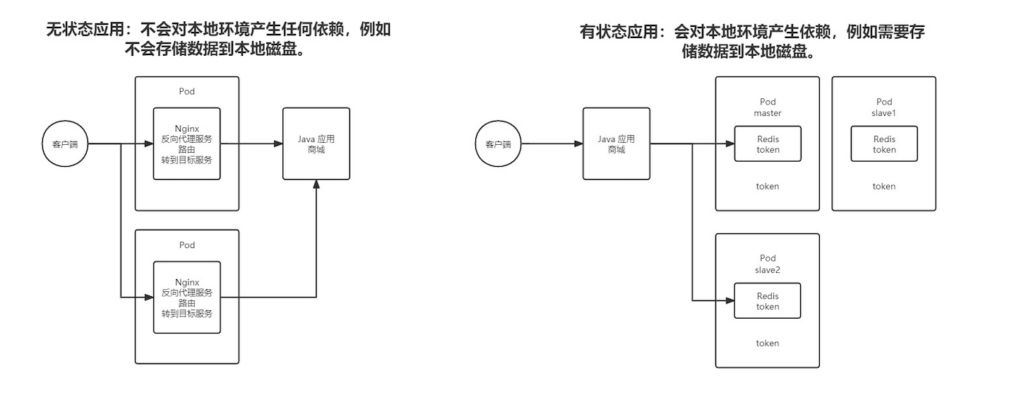
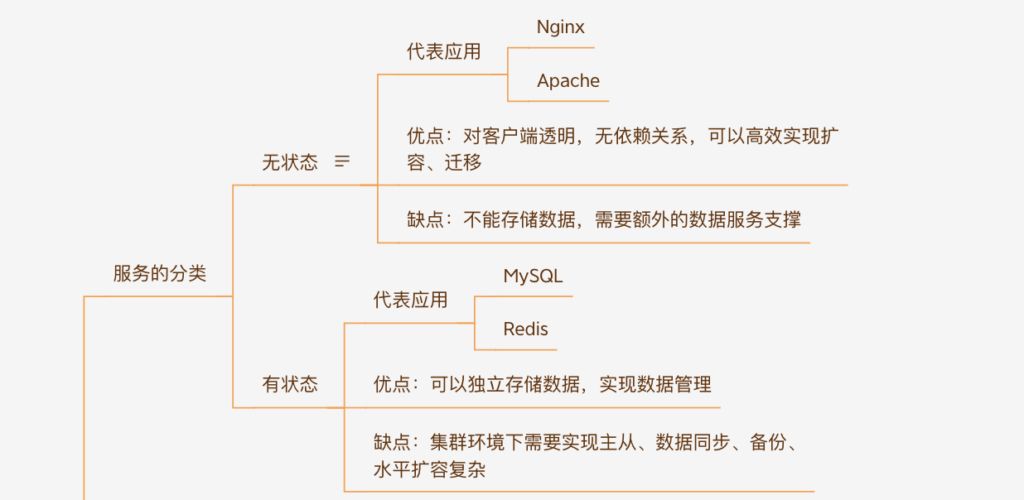
Stateless applications: do not depend on the local environment, for example, they do not persist data to local disk.
-
Stateful applications: do depend on the local environment, for example, they need to store data on disk.
1.4.2 Resources and Objects
In Kubernetes, everything is abstracted as a resource: Pods, Services, Nodes, etc. are all resources. An object is an instance of a resource and is a persistent entity, such as a specific Pod or a specific Node. Kubernetes uses these entities to represent the overall state of the cluster.
Creating, deleting, and modifying objects is done through the Kubernetes API, exposed by the Api Server component as RESTful endpoints, aligning with the K8s philosophy that “everything is an object”. The command‑line tool kubectl also talks to Kubernetes by invoking this API.
There are many resource types in K8s. kubectl can create these objects from configuration files, which essentially describe object properties. Config files can be in JSON or YAML format; YAML is most commonly used.
1.4.2.1 Object Spec and Status
-
Spec: the
_spec_field is short for “specification”. It is required and describes the object’s desired state—the characteristics you want the object to have. When creating a Kubernetes object, you must provide its spec to describe its desired state and basic metadata (such as name). -
Status: represents the object’s actual state. This field is maintained by Kubernetes itself. Kubernetes uses a set of controllers to manage objects and continuously reconcile the actual state towards the desired state.
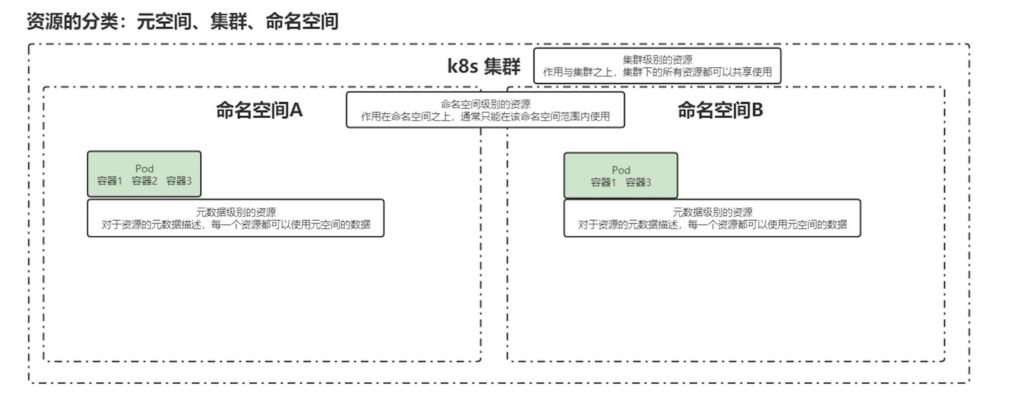
1.4.2.2 Categories of Resources
-
Cluster: physical‑level scope that applies to the entire cluster; resources here are shared across all workloads.
-
Namespace: a logical cluster; resources within a namespace are scoped to that namespace and can only consume resources within that scope.
-
Metadata: descriptive metadata for resources; every resource can use metadata from this scope.