
637 字
3 分钟
NVIDIA A800-SXM4-80GB 8-GPU Benchmark
Background
NVIDIA A800-SXM4-80GB is a high-performance GPU server based on the NVIDIA Ampere architecture, equipped with 80GB of HBM per GPU. It is designed for high performance computing, AI, and machine learning workloads. I recently had a project that required benchmarking the performance of an A800-SXM4-80GB cluster, which led to the tests summarized here.
Benchmark Environment
- Server: NVIDIA A800-SXM4-80GB
- Operating System: Ubuntu 22.04
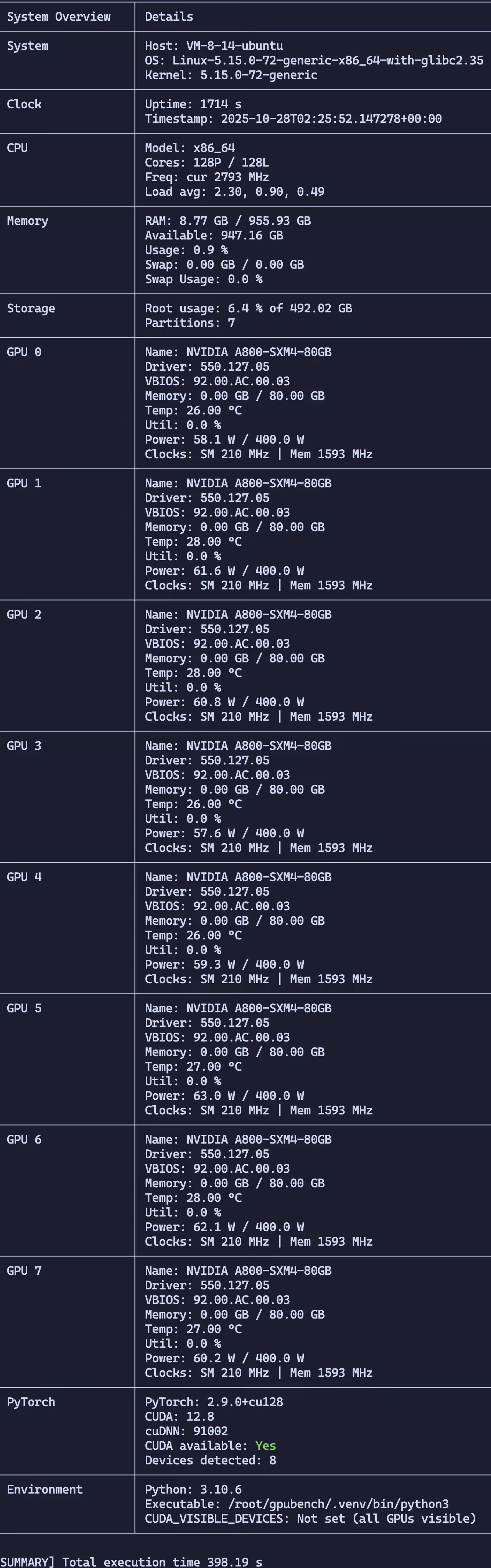
- GPUs: NVIDIA A800-SXM4-80GB × 8
- GPU Memory: 80GB × 8 = 640GB
- CPU: 2 × Intel(R) Xeon(R) Platinum 8362 CPU @ 2.80GHz
- System Memory: 956GB DDR4-3200MT/s
Benchmarks
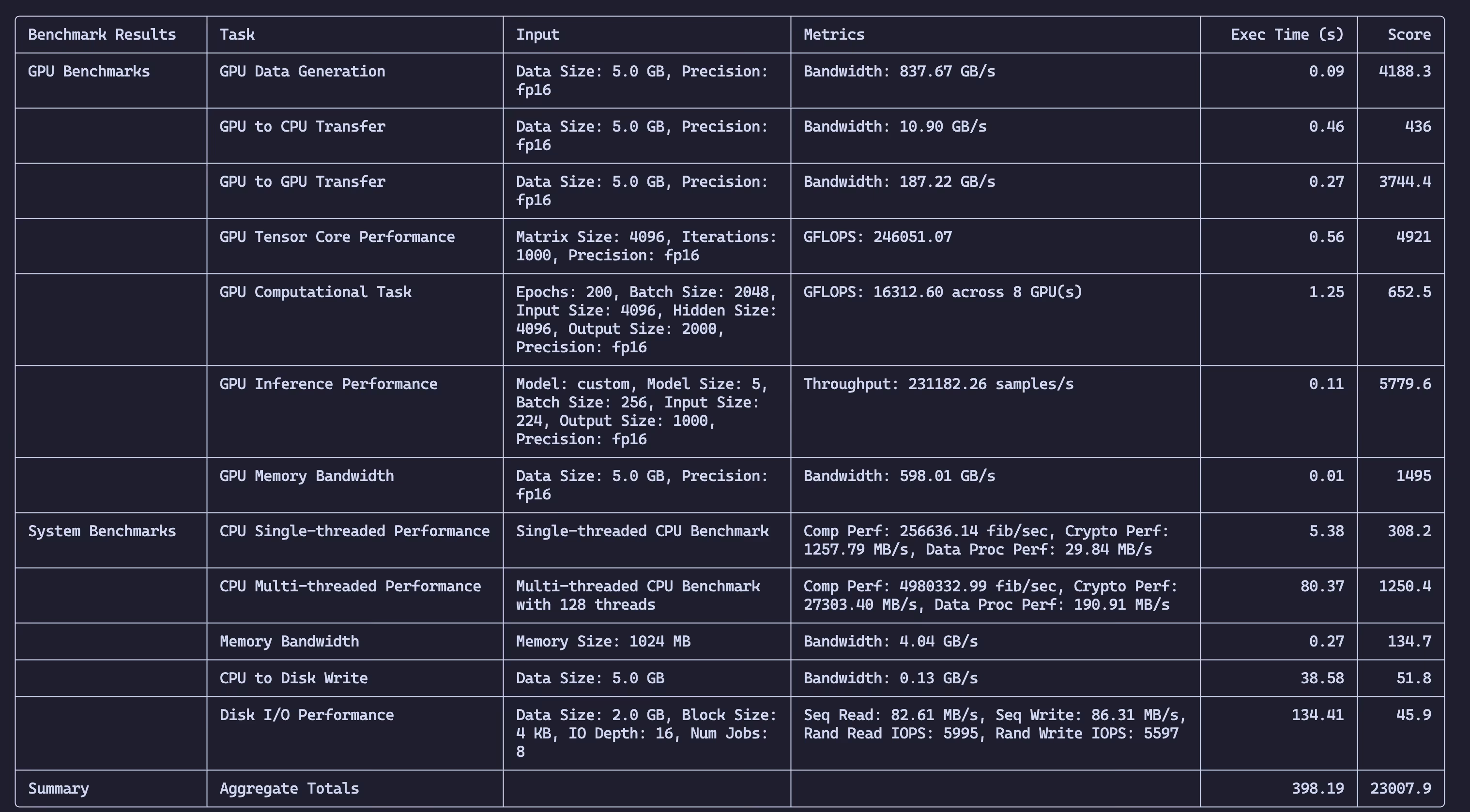
- GPU Memory Bandwidth: Measure memory allocation performance and bandwidth across multiple GPUs.
- GPU to CPU Transfer: Test PCIe transfer speeds between GPU and CPU.
- GPU to GPU Transfer: Evaluate inter-GPU data transfer rates.
- Disk I/O: Benchmark read/write performance of the system storage.
- Computationally Intensive Tasks: Run deep learning models and synthetic workloads to test compute performance.
- Model Inference: Benchmark common AI models such as ResNet, BERT, and GPT-2 for inference throughput and latency.
- CPU Performance: Evaluate both single-threaded and multi-threaded CPU performance.
- Memory Bandwidth: Measure system memory performance.
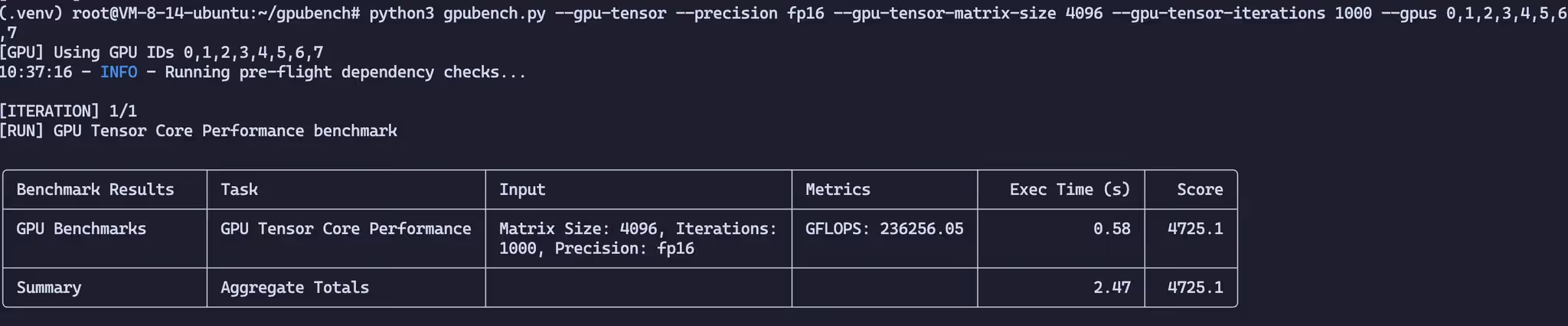
- Tensor Core Performance: Benchmark GPU Tensor Core capabilities.
- System Overview Snapshot: Capture OS, CPU, GPU telemetry, storage, and environment metadata for reproducible benchmarking.
Requirements
System Requirements
- OS: Ubuntu 22.04/24.04 or Rocky/Alma Linux 9
- Disk Space: At least 10GB of free disk space for benchmarking operations.
- fio: Flexible I/O tester used for disk I/O benchmarking.
- nvidia-smi: NVIDIA System Management Interface for GPU monitoring (typically installed with CUDA).
- CUDA Libraries: Required for GPU operations (installed with the CUDA Toolkit).
Python Dependencies
- torch: PyTorch framework for deep learning workloads.
- numpy: For numerical computation.
- psutil: System and process utilities.
- GPUtil: Monitor GPU utilization.
- tabulate: Format output as tables.
- transformers: For Transformer models such as BERT and GPT used in inference benchmarks.
- torchvision: For ResNet and other image-related tasks.
Command-Line Options
General Options
--json: Output results in JSON format.--detailed-output: Show detailed benchmark results and print an extended system overview (disk partitions, network links, environment variables).--num-iterations N: Number of times to run each benchmark (default: 1).--log-gpu: Enable GPU logging during benchmarks.--gpu-log-file FILE: Specify GPU log filename (default:gpu_log.csv).--gpu-log-metrics METRICS: Comma-separated list of GPU metrics to log.--gpus GPU_IDS: Comma-separated list of GPU IDs to use (e.g.,0,1,2,3).--precision {fp16,fp32,fp64,bf16}: Precision to use for computations (default:fp16).
GPU Benchmarks
--gpu-data-gen: Run GPU data generation benchmark.--gpu-to-cpu-transfer: Run GPU-to-CPU transfer benchmark.--gpu-to-gpu-transfer: Run GPU-to-GPU transfer benchmark.--gpu-memory-bandwidth: Run GPU memory bandwidth benchmark.--gpu-tensor: Run GPU Tensor Core performance benchmark.--gpu-compute: Run GPU compute workload benchmark.--gpu-data-size-gb N: Data size (in GB) for GPU benchmarks (default: 5.0).--gpu-memory-size-gb N: Memory size (in GB) for GPU memory bandwidth benchmark (default: 5.0).--gpu-tensor-matrix-size N: Matrix size for GPU Tensor Core benchmark (default: 4096).--gpu-tensor-iterations N: Number of iterations for GPU Tensor Core benchmark (default: 1000).--gpu-comp-epochs N: Number of epochs for GPU compute workload (default: 200).--gpu-comp-batch-size N: Batch size for GPU compute workload (default: 2048).--gpu-comp-input-size N: Input size for GPU compute workload (default: 4096).--gpu-comp-hidden-size N: Hidden size for GPU compute workload (default: 4096).--gpu-comp-output-size N: Output size for GPU compute workload (default: 2000).
GPU Inference Benchmarks
--gpu-inference: Run GPU inference throughput and latency benchmarks.--gpu-inference-model {custom,resnet50,bert,gpt2}: Select the model for inference benchmarking (default:custom).--model-size N: Depth of the custom inference model (default: 5).--batch-size N: Batch size for inference benchmarks (default: 256).--input-size N: Input feature size for inference benchmarks (default: 224).--output-size N: Output dimension for inference benchmarks (default: 1000).--iterations N: Number of inference iterations to execute (default: 100).
CPU Benchmarks
--cpu-single-thread: Run single-threaded CPU performance benchmark.--cpu-multi-thread: Run multi-threaded CPU performance benchmark.--cpu-to-disk-write: Run CPU-to-disk write throughput benchmark.--memory-bandwidth: Run memory bandwidth benchmark.--cpu-num-threads N: Number of threads for multi-threaded CPU benchmarks (default: all logical cores).--data-size-gb-cpu N: Data size (in GB) for CPU-to-disk write benchmark (default: 5.0).--memory-size-mb-cpu N: Memory size (in MB) for CPU memory bandwidth benchmark (default: 1024).
Disk I/O Benchmarks
--disk-io: Run disk I/O benchmark (usingfio).--disk-data-size N: Data size (in GB) for disk I/O benchmark (default: 2.0).--disk-block-size N: Block size (in KB) for disk I/O benchmark (default: 4).--disk-io-depth N: Queue depth for disk I/O benchmark (default: 16).--disk-num-jobs N: Number of concurrent jobs to run (default: 8).--disk-path PATH: Target directory for temporary files used in the disk benchmark (default: current directory).
Benchmark Results
NVIDIA A800-SXM4-80GB 8-GPU Benchmark
https://catcat.blog/en/nvidia-a800-sxm4-80gb-benchmark.html