
245 字
1 分钟
Tinkering Log: Converting RAID1 to RAID0 on OP Du Fu with mdadm

Full command set – do NOT blindly copy-paste; adjust according to your own disk layoutlsblkdf -hcat /proc/mdstat # check current RAID level and member disksmdadm /dev/md1 --fail /dev/sdb2 # tell the system this disk has failedmdadm /dev/md1 --remove /dev/sdb2 # hot-remove the diskSince RAID1 mirrors data, removing either disk after sync completes will not cause downtimeCheck whether your array is /dev/md1 or /dev/md2 using lsblk or df -h; mine happens to be md1wipefs -a /dev/sdb2 ## wipe the partition data on sdb2 – adapt to your own output!mdadm --grow /dev/md1 --level=0 # convert to RAID0# Add the previously removed disk as the second device and start the conversionmdadm --grow /dev/md1 --level=0 --raid-devices=2 --add /dev/sdb2
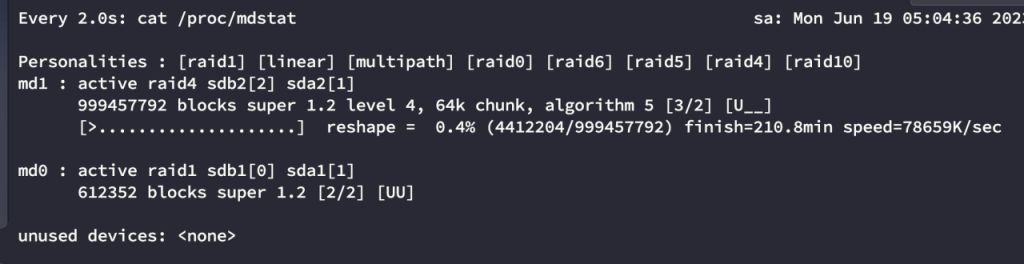
## Once you run these commands, the conversion starts in the background and will take quite a whileDuring this period you can use `watch cat /proc/mdstat` to monitor progress. It will first convert to RAID4,then to RAID0. This takes a long time, so it’s best to let it run overnight and check it in the morning.cat /proc/mdstat # check conversion progress and RAID levelwatch cat /proc/mdstatcat /proc/mdstatresize2fs /dev/md1 ## recalculate filesystem sizedf -h ## verify successreboot ## reboot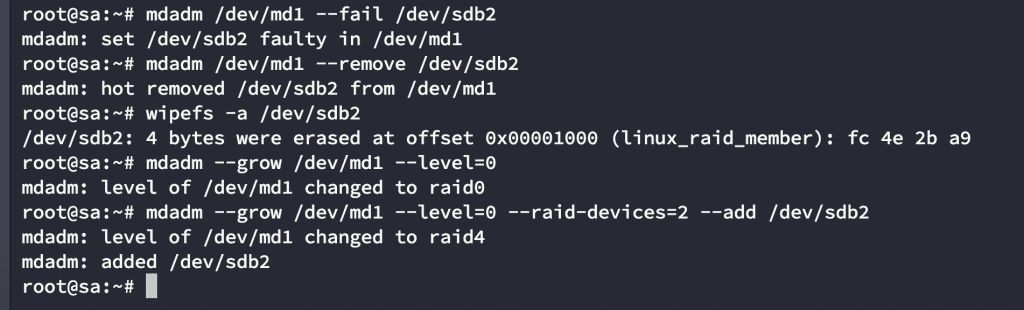
Tinkering Log: Converting RAID1 to RAID0 on OP Du Fu with mdadm
https://catcat.blog/en/op-raid1-to-raid0.html