
PT Seedbox Guide & How to Race Torrents for Upload
- Updated on April 27, 2024: Mantou’s limit that upload is counted up to at most three times the torrent size now also applies to unfinished torrents. Partial-pack racing has officially exited the stage.
Before You Start
With domestic upload bandwidth getting increasingly locked down and ISPs blocking PCDN, using home broadband for upload racing is no longer a good option. A few days ago, on my telecom home line, despite my PT qB instance only having accumulated 20 TB upload (over more than a year), the ISP still blocked the ONT due to “excessive upload”. The account manager said that regardless of the reason, once you are throttled, you will only get one chance at unblocking. If it’s triggered again, you bear the consequences yourself. If you insist on using home broadband to race, you must limit your speed.
Key Points for Racing
Network connectivity (preferably on the same internal network), disk I/O (SSD as a baseline), and a CPU plus RAM that are not too weak.
Choosing and Buying a Box
(This part is mostly collected from others.)
First, you need to clarify which tracker you want to race on, whether you need a dedicated machine or shared environment, and whether you care more about price/performance or about peak speed.
SeedBox (Don’t buy unless you really need to)
What is it?
As the name suggests, a shared box means multiple users share one server, one public IP, and the same disk.
What are the downsides?
- Most shared boxes are a big gamble. If you have a mischievous neighbor constantly hammering the disk I/O, you’re done.
- Bandwidth/traffic is often capped.
- You can’t hack around much on the server yourself.
- Most domestic trackers don’t allow shared boxes.
Below is a consolidated throttle matrix for major trackers:
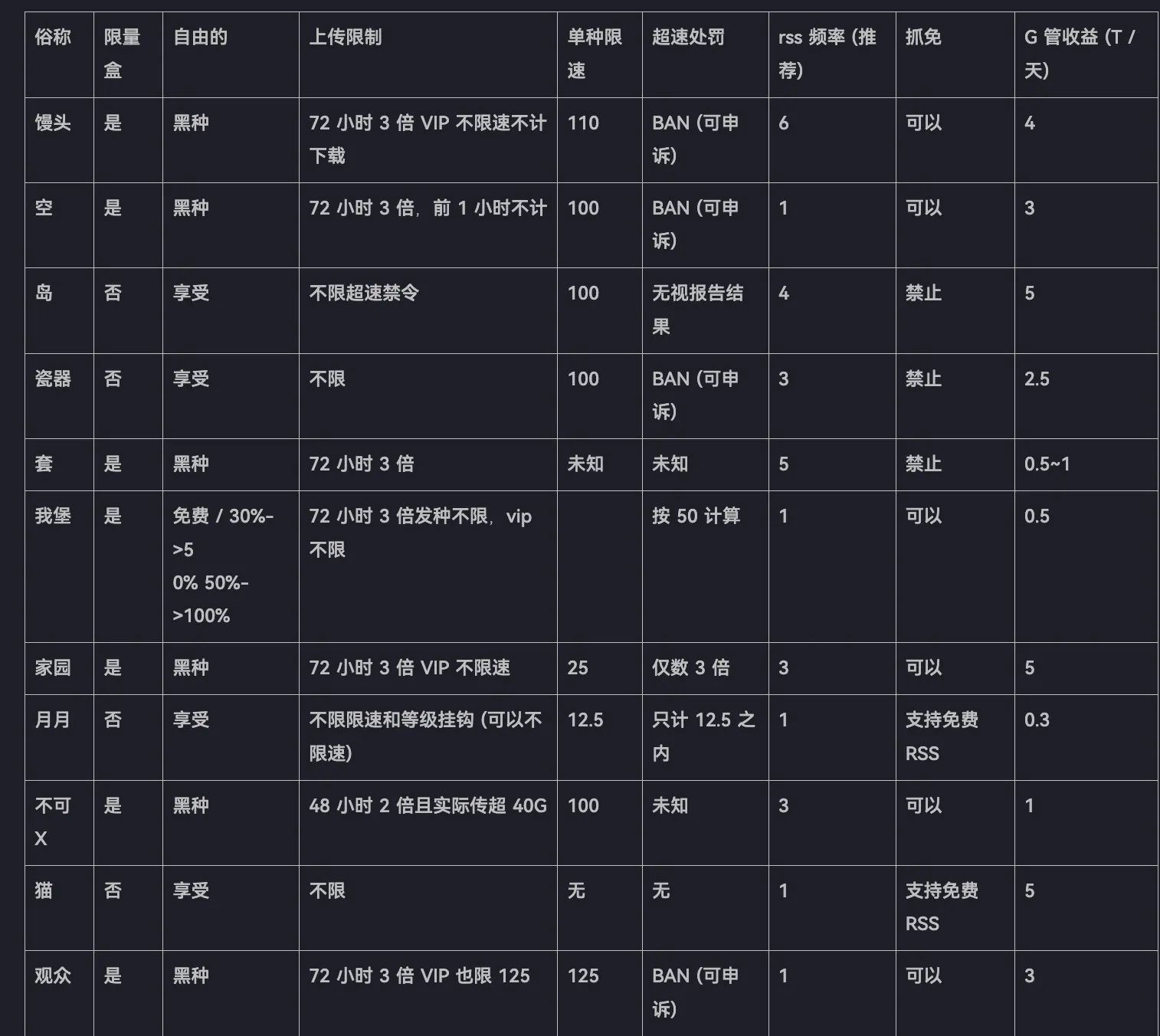
If most domestic trackers don’t support SeedBox and there are so many drawbacks, why buy one?
- Cheap
- Cheap
- Cheap
- For just a few dozen RMB you can get 10G or even 20G bandwidth.
- Network quality is usually excellent. For example, sh uses Leaseweb’s network. Under the same configuration, Leaseweb can guarantee higher priority, which in plain words means your ratio on a single torrent is higher.
- Very efficient for LAN cross-seeding.
Where can you buy one?
I’ll only recommend the ones I’ve personally used.
Nicknamed sh. Low traffic quota, average disk size, decent for racing. After exceeding the traffic cap, it’s limited to 100 Mbps. Supports installing rTorrent/ruTorrent, starting from 6 EUR. They also offer dedicated servers for rent, but they are almost always out of stock. Their SSD plans are said to race very well and are often seen on foreign trackers. Supports credit cards and PayPal.
Formerly seedbox.io, now renamed. Servers are the same as seedhost, located at Leaseweb (previously NFOrce). They resell Leaseweb and Hetzner dedicated servers. Racing power is decent, but popular plans need to be snatched. Works extremely well on foreign trackers.
Virtual Servers
A Virtual Private Server (VPS) is an isolated virtual environment on a physical server owned and operated by a cloud or web hosting provider. VPS hosting uses virtualization technology to split one physical machine into multiple dedicated environments sharing the same hardware resources.
For domestic PT trackers, the most commonly used ones are BuyVM, Hetzner Cloud, and Netcup.
BuyVM Overview
BuyVM was founded in 2010 and is a VPS brand under FRANTECH SOLUTIONS LTD (company no. 07743806, registered in the UK), a well-known veteran provider. They mainly offer KVM VPS (with their self-developed Stallion panel) in New York, Las Vegas, Miami, and Luxembourg. Features include up to 10 Gbps unmetered bandwidth, 1 IPv4 and /48 IPv6, free snapshots, and Windows support. In all these locations, BuyVM also provides Block Storage Slabs (attachable storage blocks) at just $1.25/month per 256 GB.
Before 2023, BuyVM was very popular due to Alipay CAD billing, 10G unmetered, and Luxembourg’s DMCA resistance. After 2023, however, it switched to USD-only billing, price/performance dropped, the 10G “unmetered” became mostly theoretical (you need to use the VPS for at least 3 months before upgrade), and block storage requires camping the daily restock.
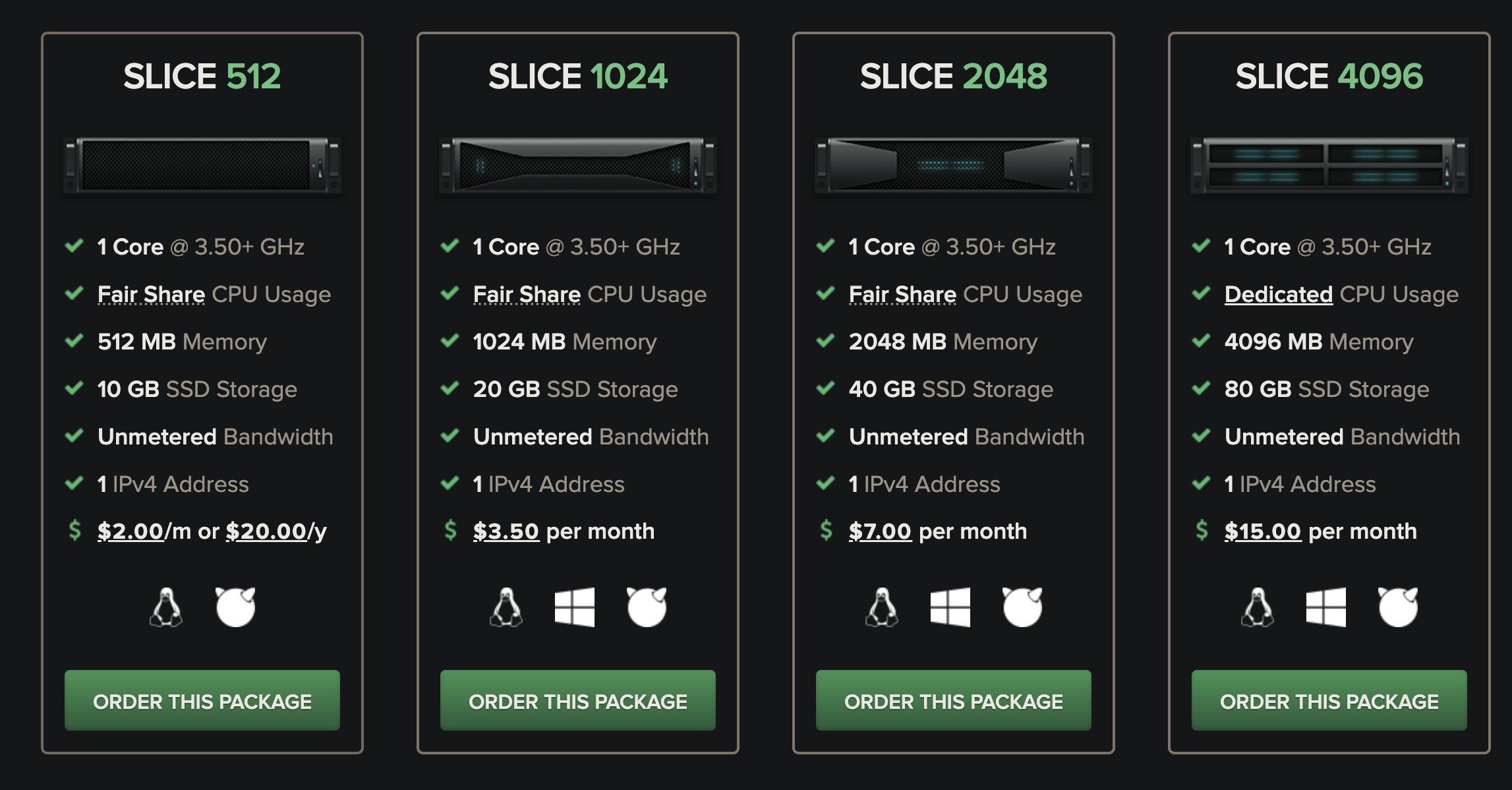
With this spec and price, you won’t out-race others. Once a race heats up, CPU and RAM limits will often crash qB or Deluge. Frankly, even for long-term seeding the price/performance isn’t that great.
Basic System Information:---------------------------------Uptime : 68 days, 11 hours, 10 minutesProcessor : AMD Ryzen 9 5900X 12-Core ProcessorCPU cores : 1 @ 3693.058 MHzAES-NI : ✔ EnabledVM-x/AMD-V : ✔ EnabledRAM : 461.3 MiBSwap : 0.0 KiBDisk : 9.8 GiBDistro : Debian GNU/Linux 11 (bullseye)Kernel : 5.10.0-26-amd64VM Type : KVMIPv4/IPv6 : ✔ Online / ✔ Online
IPv6 Network Information:---------------------------------ISP : FranTech SolutionsASN : AS53667 FranTech SolutionsHost : FranTech SolutionsLocation : Luxembourg, Luxembourg (LU)Country : Luxembourg
fio Disk Speed Tests (Mixed R/W 50/50) (Partition /dev/vda1):---------------------------------Block Size | 4k (IOPS) | 64k (IOPS) ------ | --- ---- | ---- ----Read | 407.38 MB/s (101.8k) | 1.75 GB/s (27.4k)Write | 408.46 MB/s (102.1k) | 1.76 GB/s (27.6k)Total | 815.85 MB/s (203.9k) | 3.52 GB/s (55.0k) | |Block Size | 512k (IOPS) | 1m (IOPS) ------ | --- ---- | ---- ----Read | 2.07 GB/s (4.0k) | 2.05 GB/s (2.0k)Write | 2.18 GB/s (4.2k) | 2.19 GB/s (2.1k)Total | 4.25 GB/s (8.3k) | 4.24 GB/s (4.1k)
iperf3 Network Speed Tests (IPv4):---------------------------------Provider | Location (Link) | Send Speed | Recv Speed | Ping----- | ----- | ---- | ---- | ----Clouvider | London, UK (10G) | 1.11 Gbits/sec | 951 Mbits/sec | 14.6 msScaleway | Paris, FR (10G) | 1.11 Gbits/sec | 974 Mbits/sec | 10.1 msHetzner Cloud
Also known as HZ, it has become extremely popular thanks to Mantou’s adult mega-torrents. Billing is hourly by default; you can spin up and destroy instances as you go. There’s a 20 TB traffic cap, LAN cross-seeding is supported. Using a referral link for a new account gives 20 EUR credit, and there’s an additional 20 EUR trial from the forum. Combined, that 40 EUR is enough to push hundreds of TB on Mantou.
But there is a key issue here: partial packs.
What is “partial pack” (拆包)?
Partial pack: Only downloading some files within a big torrent. Except for Mantou’s adult mega-torrents, this is heavily cracked down on across trackers. Especially automated partial pack behavior: using a box’s high upload and low download from partial packs to get massive ratio while contributing nothing meaningful to the torrent itself.
[admonition color=“red”]!!!! Do NOT use this behavior anywhere except Mantou adult mega-torrents!!!![/admonition]
How to register
Official site: Hetzner Cloud (using this link for your first registration or purchase gives you a 20 EUR credit valid for one month — enough to test various VPS plans.)
For 2024, the community promo code has been updated: enter HCC24-L7ST92 for another 20 EUR.
ARM instances are recommended for racing, as they’re slightly cheaper.
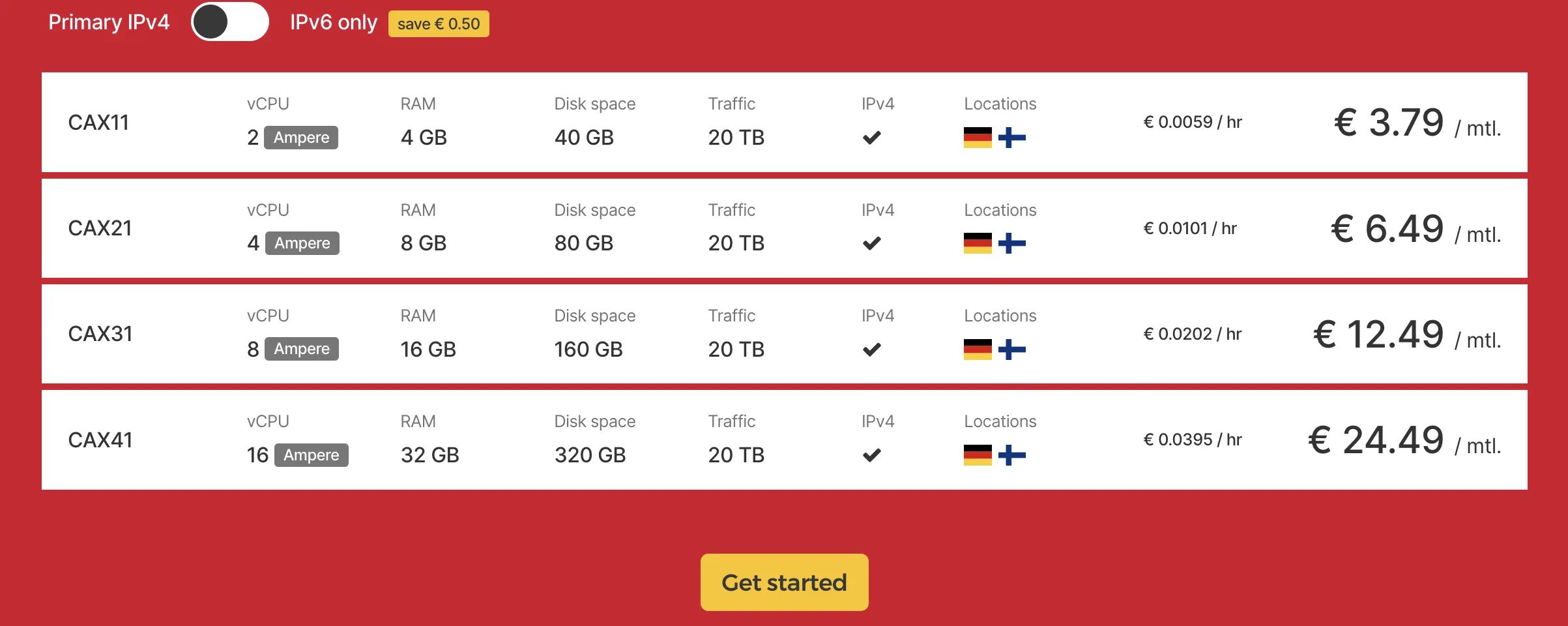
Basic System Information:---------------------------------Uptime : 0 days, 0 hours, 3 minutesProcessor : Neoverse-N1CPU cores : 2 @ ??? MHzAES-NI : ✔ EnabledVM-x/AMD-V : ❌ DisabledRAM : 3.7 GiBSwap : 0.0 KiBDisk : 37.5 GiBDistro : Ubuntu 22.04.3 LTSKernel : 5.15.0-79-genericVM Type : KVMIPv4/IPv6 : ✔ Online / ✔ Online
IPv6 Network Information:---------------------------------ISP : Hetzner Online GmbHASN : AS24940 Hetzner Online GmbHHost : HetznerLocation : Nuremberg, Bavaria (BY)Country : Germany
fio Disk Speed Tests (Mixed R/W 50/50):---------------------------------Block Size | 4k (IOPS) | 64k (IOPS) ------ | --- ---- | ---- ----Read | 146.45 MB/s (36.6k) | 1.22 GB/s (19.1k)Write | 146.36 MB/s (36.5k) | 1.26 GB/s (19.6k)Total | 292.81 MB/s (73.2k) | 2.48 GB/s (38.8k) | |Block Size | 512k (IOPS) | 1m (IOPS) ------ | --- ---- | ---- ----Read | 2.09 GB/s (4.0k) | 2.10 GB/s (2.0k)Write | 2.27 GB/s (4.4k) | 2.34 GB/s (2.2k)Total | 4.36 GB/s (8.5k) | 4.44 GB/s (4.3k)
Geekbench 6 BenchMark Test:---------------------------------Test | Value |Single Core | 1074Multi Core | 1908Full Test | https://browser.geekbench.com/v6/cpu/2942919Netcup
Another German provider. Netcup accounts are stricter: you can only register when ordering a product, and the account must be verified with ID. Acceptable documents include: international flight tickets, driver’s license, and VISA bank cards. Compared to HZ, the registration difficulty is lower. Prices are not exactly cheap, but a 2.5 G port + 120 TB of high-speed traffic + 320 GB disk still gives decent price/performance.
Another point worth mentioning: Netcup has repeatedly won “Europe’s Best Loved Web Host”. They care a lot about reputation and their service is very good. However, since European cloud providers usually bill post-paid (use now, pay later), many bad actors have tried to abuse them. Netcup even hired a local company in China to sue those “use but don’t pay” customers. So if it’s a contract server, finish the contract; think carefully before ordering.
Below are some caveats — read them carefully. ⚠️
1. Contract duration
If you order from the official site, VPS products have a default billing period of 6 months, meaning you must prepay 6 months. You can switch to hourly billing with a one-month billing cycle, but the price is higher.
The Root-Server series also defaults to a 6-month billing period, with a minimum contract term of 12 months. In simple terms: at least a one-year commitment, paying every 6 months. You can switch to monthly billing with a minimum one-month contract term, but again at a higher price.
2. Cancellation
To cancel a running VPS, you must submit the cancellation at least 31 days before the next renewal date—essentially at least one month in advance. If your VPS is billed monthly and you only want to use it for a single month, you must hit “Cancel product” in the control panel on the very first day after payment; otherwise, you slide into the next billing cycle and end up paying for at least 2 months.
Of course, if you’re not sure about dates, the control panel’s Cancellation page clearly shows when the contract would end if you cancel now. That’s your final usable date.
3. Legal issues
Germans take rules very seriously—some might say rigidly. They strictly enforce contracts, but their products are solid, prices reasonable, and there’s no classic overselling. Very stable and trustworthy.
As mentioned above, some buyers overlooked cancellation rules, then refused to renew and stopped paying, and later received lawyer demand letters. Netcup reportedly has a legal team in China.
So it’s best to avoid legal issues from payment default. So far there seems to be only one widely reported case of someone getting a lawyer letter online (unclear if true), and it might be hype. But we should still avoid breach of contract and be compliant customers.
4. Datacenter locations
There are mainly two facilities: Nuremberg and Vienna. For connectivity from mainland China, Nuremberg is generally better.
5. Bandwidth and traffic (critical)
Regular VPS: 80 TB of traffic with 1 Gbps bandwidth. Beyond 80 TB, the bandwidth is capped at 100 Mbps, but traffic remains unlimited with no extra charges.
Root-Server series: truly unmetered. Root servers have a 2.5 Gbps port, with each VPS guaranteed at least 1 Gbps. To ensure fairness, bandwidth is limited to 200 Mbps only if both of the following conditions are met:
- You exceed 120 TB of traffic within a month.
- You continuously use more than 1 Gbit/s for over 60 minutes.
The first condition is easy to understand; the second feels a bit tricky, so here’s the breakdown: your VPS pushes more than 128 MB/s * 3600 s = 460,800 MB ≈ 460 GB in one hour. In other words, as long as your hourly traffic doesn’t exceed 460 GB, you can keep running at 2.5 Gbps.
For most users, especially PT racing, hitting these two thresholds, especially the second, is quite rare. (Note that the 1 Gbit/s here is up + down combined. When racing, it’s easy to get there, so use speed limits.)
If you’re worried about dropping to 200 Mbps after 120 TB, there’s a simple trick: once you reach 120 TB, cap the port at 1 Gbit/s yourself. Then you’ll always run at 1 Gbit/s indefinitely with no worries. (The limited 1 G is up + down combined.)
Dedicated Servers
These are comparable to a local PC in your hands. Everything is dedicated (network may not be), and multiple VPSs are run on each dedicated server. Compared to VPS, dedicated servers offer better customization, stronger performance, and no noisy neighbors fighting for bandwidth or I/O. You can tinker endlessly, but the price is often several times that of a VPS.
Common dedicated providers for private trackers: OVH, Hetzner, Leaseweb, Scaleway, and OP (OneProvider), etc.
Oneprovider
A well-known middleman. They have no hardware of their own and just resell others, pocketing the margin. Some models had decent price/performance before price hikes, so if you’re really strapped for cash, you might consider them. (Although if you’re that broke, why are you racing torrents?)
The only model that’s still reasonable for racing is:
OneProvider France Paris (Xeon E3-1220 v2 or better) 24.99€ (renewal now up to 34.49€)

-------------------- A Bench.sh Script By Teddysun ------------------- Version : v2023-06-10 Usage : wget -qO- bench.sh | bash---------------------------------------------------------------------- CPU Model : Intel(R) Xeon(R) CPU E3-1240 V2 @ 3.40GHz CPU Cores : 8 @ 3648.482 MHz CPU Cache : 8192 KB AES-NI : Enabled VM-x/AMD-V : Enabled Total Disk : 1.8 TB (13.5 GB Used) Total Mem : 31.3 GB (10.4 GB Used) System uptime : 123 days, 14 hour 28 min Load average : 0.13, 0.16, 0.17 OS : Debian GNU/Linux 11 Arch : x86_64 (64 Bit) Kernel : 6.0.0-0.deb11.6-amd64 TCP CC : bbrx Virtualization : Dedicated IPv4/IPv6 : Online / Online Organization : AS12876 SCALEWAY S.A.S. Location : Paris / FR Region : Île-de-France---------------------------------------------------------------------- I/O Speed(1st run) : 371 MB/s I/O Speed(2nd run) : 186 MB/s I/O Speed(3rd run) : 153 MB/s I/O Speed(average) : 236.7 MB/s---------------------------------------------------------------------- Node Name Upload Speed Download Speed Latency Speedtest.net 891.81 Mbps 902.67 Mbps 1.44 ms Los Angeles, US 591.72 Mbps 912.54 Mbps 150.74 ms Dallas, US 569.03 Mbps 909.23 Mbps 123.03 ms Montreal, CA 774.07 Mbps 907.34 Mbps 92.86 ms Paris, FR 926.51 Mbps 835.23 Mbps 1.39 ms Amsterdam, NL 851.90 Mbps 876.90 Mbps 13.77 ms Shanghai, CN 452.05 Mbps 629.72 Mbps 275.31 ms Nanjing, CN 439.45 Mbps 852.80 Mbps 226.86 ms Hongkong, CN 681.50 Mbps 830.52 Mbps 252.80 ms Singapore, SG 275.68 Mbps 202.97 Mbps 238.84 ms Tokyo, JP 354.98 Mbps 894.00 Mbps 228.99 ms---------------------------------------------------------------------- Finished in : 5 min 33 sec Timestamp : 2023-06-18 15:43:17 CST----------------------------------------------------------------------Hetzner
Introduced above already. Default port is symmetric 1 Gbps with unmetered traffic, so in theory you could push 270 TB upload per month. Upgrading to 10 Gbps requires an extra setup fee, and traffic then becomes 10 TB, with 1 EUR/TB overage.
Standard servers outside promotions have a setup fee starting at 34 EUR, so they’re mid-to-high-end. Most people buy their auction servers; prices fluctuate and sometimes you can get real “heirloom” machines. Hetzner also supports server transfers in their panel, so many people on hostloc flip them for arbitrage.
Your card is not charged on purchase; the invoice comes after 14 days. If you use the server for less than 14 days you can get a no-questions-asked refund. Don’t abuse this or you may get banned.
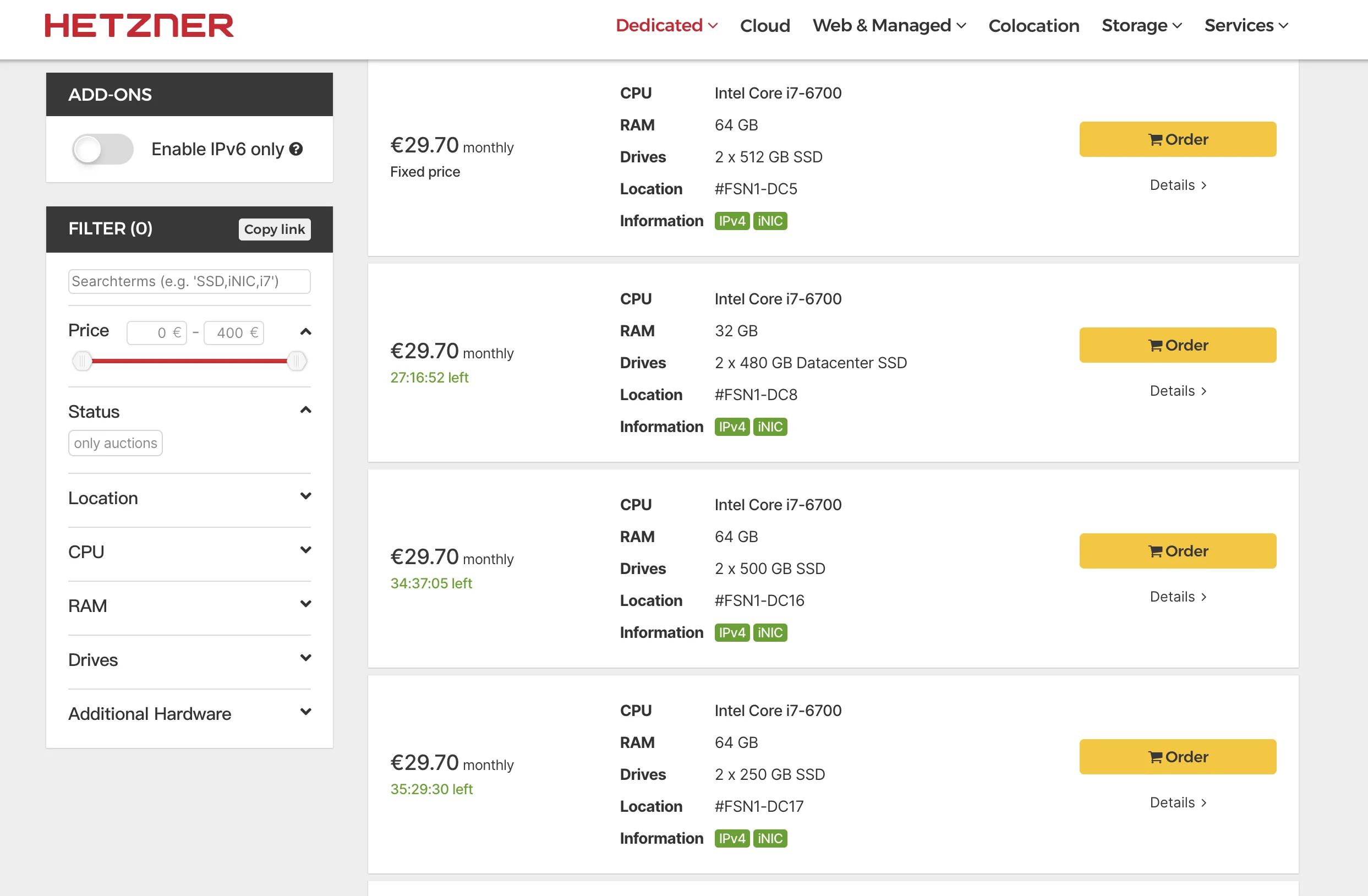
For a Hetzner usage tutorial, see:
hostingby.design
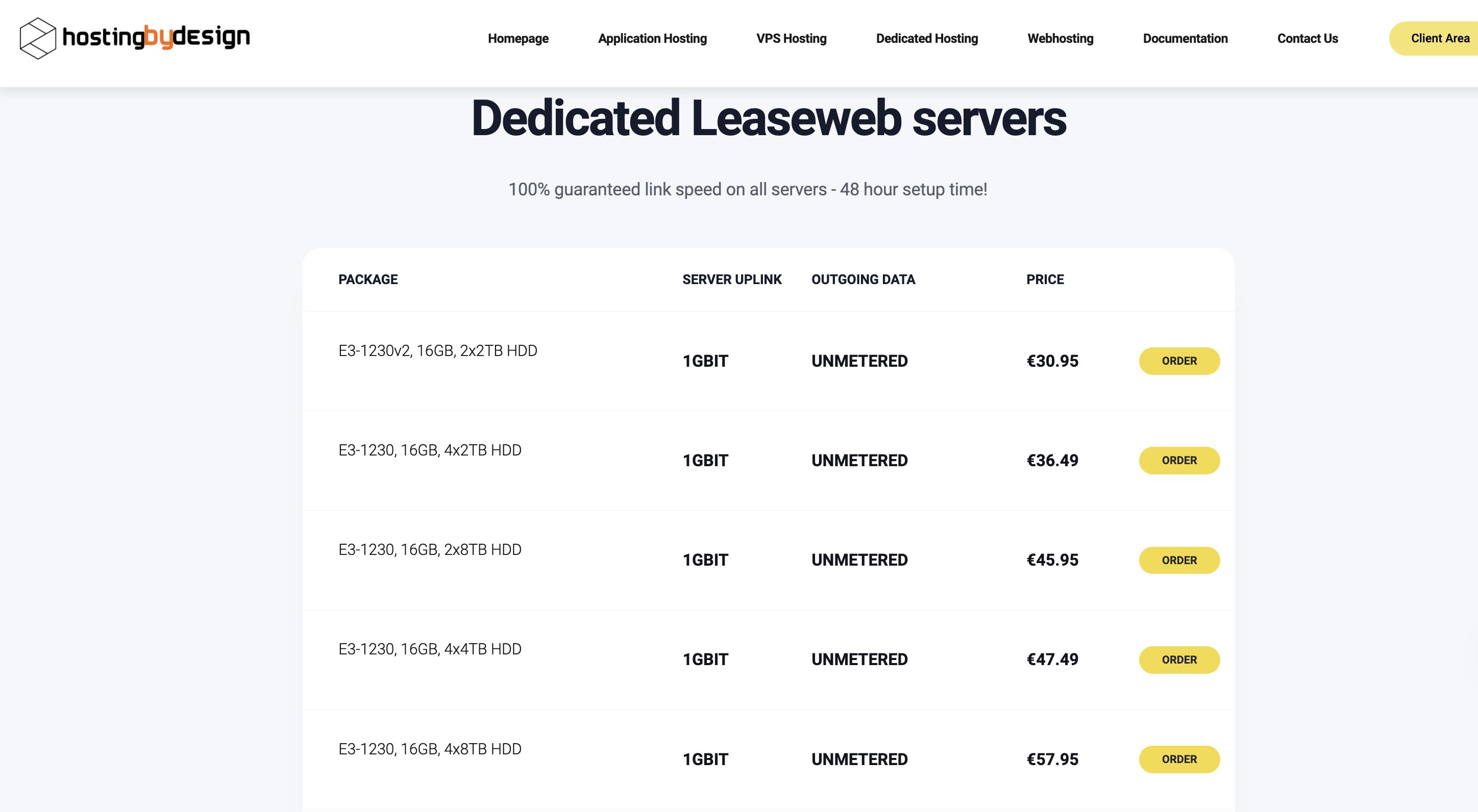
Also mentioned above; another reseller. But they are a “box provider” by trade and know their racing tricks. They have some custom-tuned Swizzin parameters. Leaseweb’s network connectivity is top-tier: under identical race conditions, your share ratio will usually beat other boxes.
Default provisioning takes up to 48 hours. If you want them to tune the box for you, add another 24 hours.
How to Max Out Your Line
Install the Software (three common script options)
Dedicated-Seedbox (Jerry’s script)
quickbox (EFS script)
I typically use the latter two, which provide a web UI for centralized management. The first one is fine for throwaway use on VPS, e.g., Mantou’s weekly mega-torrents where you quickly create an image and clone it. Deployment is fast.
For installation, follow the official docs; it’s usually a one-liner script and then filling in some prompts. If anyone really wants a walkthrough, I can add it later.
Torrent Clients for Racing
There are currently two main “racing” clients: Deluge and qBittorrent. They’re great for aggressive racing but not suitable for holding a huge number of torrents — they get very sluggish.
Transmission: suited for long-term seeding. Personally I’ve kept 16,000 torrents in TR with no lag.
Deluge Optimization
There’s no single “correct” config, but here’s a direction.
If you’re using Deluge, just enable HPS.
HPS is a preset in ltconfig, short for High Performance Seed. How to enable it? See below:
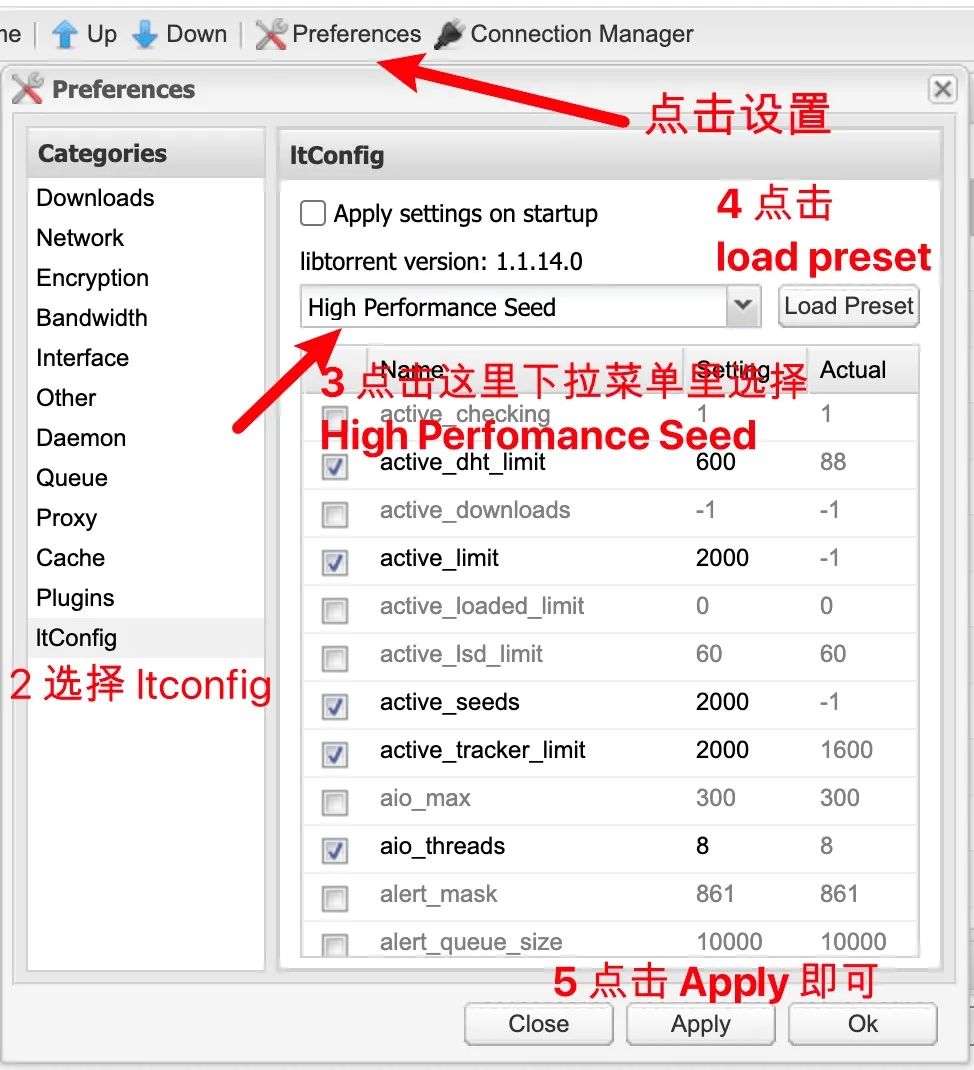
ltconfig settings
You can go here for exact details. Below is what I use. ⚠️ Note: this is my config; adjust based on your own server.
You must stop Deluge, write the config, then restart Deluge for it to take effect.
By the way, you may find some options in the list that don’t exist on your machine. That’s just due to libtorrent version differences; ignore them.
Disk optimization
This touches on disk scheduling algorithms; if you want to go deeper, read up on relevant papers and articles. Prefer NVMe SSDs for racing.
Note that not all Linux kernels ship with mq-deadline. If you can’t enable mq-deadline, you may need to compile that module yourself.
qBittorrent Optimization
-
Cache size should be about 1/4 of your available RAM. If you’re on qBittorrent 4.3.x, consider potential memory leaks and set it to 1/8.
-
aio_threadsdefaults to 4, which is okay for HDDs. For SSD or NVMe servers, you can increase it to 8 or even 16.-
For qBittorrent 4.3.x–4.6.x, you can change this in the Advanced settings tab.
-
For qBittorrent 4.1.x, you can set it in
/home/$username/.config/qBittorrent/qBittorrent.confby adding under the [BitTorrent] section:Session\AsyncIOThreadsCount=8- Make sure qBittorrent is closed before editing.
-
For Deluge, install ltconfig and edit via the plugin:
aio_threads=8.
-
-
On machines with poor I/O, set
send_buffer_low_watermark,send_buffer_watermark, andsend_buffer_watermark_factorto lower values.-
For qBittorrent 4.3.x, adjust in Advanced settings.
-
For qBittorrent 4.1.x, edit
/home/$username/.config/qBittorrent/qBittorrent.confand add under [BitTorrent]:Session\SendBufferWatermark=5120Session\SendBufferLowWatermark=1024Session\SendBufferWatermarkFactor=150- Again, close qBittorrent before editing.
-
For Deluge, use ltconfig and set:
send_buffer_low_watermark=1048576send_buffer_watermark=5242880send_buffer_watermark_factor=150
-
-
tick_internaldefaults to 100, which might be too aggressive for weaker CPUs. Consider 250 or 500.-
Unfortunately qBittorrent doesn’t expose this.
-
For Deluge, again via ltconfig plugin:
tick_interval=250.
-
Automatic Torrent Removal
For auto-removing torrents there are two options: a Deluge plugin, or AutoRemoveTorrents.
I mainly use AutoRemoveTorrents (ART). Here’s a quick install and config overview.
ART can be installed in two ways.
First, via pip:
pip3 install autoremove-torrentsSecond, from GitHub:
git clone https://github.com/jerrymakesjelly/autoremove-torrents.gitcd autoremove-torrentspython3 setup.py installautoremove-torrents looks for config.yml in the current working directory. For more CLI arguments, see the table below.
| Arg name | Short | Description |
|---|---|---|
| —view | -v | Run and show which torrents would be removed, but do not actually delete them. |
| —conf | -c | Specify path to the config file. |
| —task | -t | Run the specified task. The value is the task name. |
| —log | -l | Specify path to the log file. |
For example:
autoremove-torrents --view --conf=/home/myserver/autoremove-torrents/config.ymlis equivalent to:
autoremove-torrents -v -c /home/myserver/autoremove-torrents/config.ymlTo enable automatic deletion, we first need to create the config file and the log directory.
# Create the art directorymkdir -p /root/.config/art/artlogsThen use vi /root/.config/art/config.yml to create the ART config.
After creation, write your configuration, save, and exit. For config details, see ART’s documentation.
Here’s my own config as a small reference:
delete_task: client: your client type, e.g. deluge qbittorrent host: 127.0.0.1:58846 username: your client username password: your client password strategies: bhd: trackers: - landof.tv stats: - Uploading remove: (ratio > 1.1 and seeding_time > 3600 ) delete_data: true
Next, run crontab -e:
*/15 * * * * /usr/local/bin/autoremove-torrents -c /root/.config/art/config.yml -l /root/.config/art/artlogs`Add the line above to your crontab. ART will then run every 15 minutes, apply the rules in /root/.config/art/config.yml, remove torrents accordingly, and put logs under /root/.config/art/artlogs.
After this, ART setup is complete.
Deluge Plugin-Based Auto Removal
Below is the script:
"""deluge 删种脚本,优先保留体积大、下载人数多、上传速度高、做种时间少的种子。用过一些删种工具,逻辑都比较粗暴,所以自己写了一个,每个种子综合考虑各项情况,分配加权把各项加起来,从低到高删除直到剩余空间大于指定值。40% 取当前速度和平均速度的平均值,20% 取做种中种子的上传速度按做种时间权重分配的值,剩下的 40% 中其中一部分为取做种中种子的上传速度按下载上传人数权重分配的值,另一部分为按做种人数分配的值比例取决于参数 KS,同时有考虑体积,体积越大加权越高(大约是 0.2 次方)"""
from time import sleepfrom deluge_client import LocalDelugeRPCClient, FailedToReconnectExceptionfrom loguru import loggerfrom ssl import SSLErrorfrom collections import dequefrom typing import Union, Any, Tuple, Listimport os
MIN_FREE_SPACE = 3725 # type: Union[int, float]'最小剩余空间(GiB),当下载速度未超过临界值 MAX_DR 时小于这个值删种'MIN_FREE_SPACE_LOWER = 3725 / 3 # type: Union[int, float]'''当下载速度超过临界值 MAX_DR 时小于这个值删种。硬盘空间足够的话建议两个值的差 1024(1TB) 以上'''MAX_DR = 10 * 1024 ** 2 # type: Union[int, float]'下载速度临界值'MODE = 1 # type: Any'为 1 时先删除做种中的种子,删完后再删下载中的种子;否则综合考虑一起删'KS = 0.5 # type: Union[int, float]'按做种人数分配的权重占 40% 的比例,取值范围 [0, 1],为 0 代表不考虑做种人数,这个参数的目的在于延长孤种的保种时间'INTERVAL = 600 # type: Union[int, float]'删种的时间间隔'MIN_DOWN_TIME = 3600 # type: Union[int, float]'下载时间小于这个值不删'S0 = 300 # type: Union[int, float]LOG_PATH = '' # type: strEXCLUDE_LABELS = ['seed', 'public'] # type: Union[Tuple[Any, ...], List[str]]'如果种子有这些标签,删种时会跳过'
class Deluge(LocalDelugeRPCClient): timeout = 10
def __init__(self, host: str = '127.0.0.1', port: int = 58846, username: str = '', password: str = '', decode_utf8: bool = True, automatic_reconnect: bool = True, ): super().__init__(host, port, username, password, decode_utf8, automatic_reconnect)
def call(self, method, *args, **kwargs): if not self.connected and method != 'daemon.login': for i in range(5): try: self.reconnect() logger.debug(f'Connected to deluge client on {self.host}') break except SSLError: sleep(0.3 * 2 ** i) try: return super().call(method, *args, **kwargs) except FailedToReconnectException: logger.error(f'Failed to reconnect to deluge client on {self.host}') except: raise
class AutoDel: def __init__(self, client: Deluge): self.client = client self.sur = deque(maxlen=100) self.free_space = MIN_FREE_SPACE * 1024 ** 3 self.torrent_status = {} self.ses_dr = 0 self.torrent_keys = ['active_time', 'download_payload_rate', 'name', 'state', 'seeding_time', 'total_peers', 'total_seeds', 'total_size', 'total_done', 'total_uploaded', 'upload_payload_rate', 'label' ]
def update_session(self): self.free_space = self.client.core.get_free_space() if not isinstance(self.free_space, int): raise
seed_ur = 0 up_status = self.client.core.get_torrents_status({'state': 'Seeding'}, ['upload_payload_rate']) if not isinstance(up_status, dict): raise for _id, data in up_status.items(): seed_ur += data['upload_payload_rate'] self.sur.append(seed_ur)
self.ses_dr = self.client.core.get_session_status(['download_rate'])['download_rate']
if self.free_space < MIN_FREE_SPACE * 1024 ** 3: self.torrent_status = self.client.core.get_torrents_status({}, self.torrent_keys) if not isinstance(self.torrent_status, dict): raise
def run(self): while True: try: while True: try: self.update_session() break except: pass min_space = (MIN_FREE_SPACE if self.ses_dr < MAX_DR else MIN_FREE_SPACE_LOWER) * 1024 ** 3 if self.free_space >= min_space: logger.debug(f'There is free space {self.free_space / 1024 ** 3:.3f} GiB. ' f'No need to del any torrents.') else: indicator, info = self.weight() while self.free_space < min_space: if not indicator: break i = indicator.index(min(indicator)) state = 'Failed to delete' try: self.client.core.remove_torrent(info[i]['_id'], True) state = 'Successfully deleted' except TimeoutError as e: # 正常操作,一般实际上是已经删了 logger.error(f'{e.__class__.__name__}: {e}') except Exception as e: if e.__class__.__name__ == 'InvalidTorrentError': # 正常操作,基本上也是删了 logger.error(f"{e.__module__}.{e.__class__.__name__}: " f"Torrent_id {info[i]['_id']} not in session") else: logger.exception(e) self.free_space += info[i]['done'] logger.warning(f"{state} {info[i]['state'].lower()} torrent {info[i]['_id']}, " f"name | {info[i]['name']}. ") if state == 'Successfully deleted': logger.info(f"{info[i]['done'] / 1024 ** 3:.3f} GiB space released. " f"Free space {self.free_space / 1024 ** 3:.3f} GiB.") sleep(info[i]['done'] / 1024 ** 3 / 10) del indicator[i] del info[i] except Exception as e: logger.exception(e) finally: sleep(INTERVAL)
@staticmethod def torrent_filter(state): return lambda tup: tup[1]['label'] not in EXCLUDE_LABELS and tup[1]['state'] == state
def weight(self): total_peer_weight = 0 total_time_weight = 0 total_peers = 0 num = 0 indicator = [] info = [] e_m = 0.0 av_ur = sum(self.sur) / len(self.sur) if av_ur == 0: av_ur = 1048576
for _id, data in filter(self.torrent_filter('Seeding'), self.torrent_status.items()): total_peers += data['total_peers'] num += 1
av_peer_num = total_peers / num if num > 0 else 0
for _id, data in filter(self.torrent_filter('Seeding'), self.torrent_status.items()): data['peer_weight'] = (data['total_peers'] * (1 - KS) + av_peer_num * KS) / ( data['total_seeds'] if data['total_seeds'] > 0 else 1) * data['total_size'] total_peer_weight += data['peer_weight'] k_time = data['seeding_time'] / 3600 k_size = data['total_size'] / (S0 * 1024 ** 3) data['time_weight'] = pow(1 + pow((k_time / k_size), 2), -0.5) total_time_weight += data['time_weight']
if total_time_weight > 0: for _id, data in filter(self.torrent_filter('Seeding'), self.torrent_status.items()): ur_e = data['upload_payload_rate'] * 0.4 ur_tm_p = av_ur * data['time_weight'] / total_time_weight if total_peer_weight > 0: ur_pr_p = av_ur * data['peer_weight'] / total_peer_weight ur_e += ur_pr_p * 0.4 + ur_tm_p * 0.2 else: ur_e += ur_tm_p * 0.6 sz_e = data['total_done'] / 1024 ** 3 e = ur_e * pow(sz_e, -0.8) indicator.append(e) info.append({'_id': _id, 'name': data['name'], 'done': data['total_done'], 'state': data['state']}) if MODE == 1 or av_ur == 0: e_m = max(indicator) + 1
for _id, data in filter(self.torrent_filter('Downloading'), self.torrent_status.items()): if data['active_time'] < MIN_DOWN_TIME: continue au = data['total_uploaded'] / (data['active_time'] + 1) ur = data['upload_payload_rate'] ur_e = au * 0.5 + ur * 0.5 sz_a = data['download_payload_rate'] * INTERVAL / 2 if sz_a < data['total_size'] - data['total_done']: sz_e = data['total_size'] / 1024 ** 3 else: sz_e = (sz_a + data['total_done']) / 1024 ** 3 if sz_e == 0: continue e = ur_e * pow(sz_e, -0.8) + e_m indicator.append(e) info.append({'_id': _id, 'name': data['name'], 'done': data['total_done'], 'state': data['state']})
return indicator, info
log_path = LOG_PATH or f'{os.path.splitext(__file__)[0]}.log'logger.add(level='DEBUG', sink=log_path, encoding='utf-8', rotation="5 MB")
AutoDel(Deluge()).run()You need to install Deluge’s Label plugin, tag the categories you want to auto-delete, create a scheduled task, and run this script:
python3 xx.pyCommon PT Jargon
art: auto remove torrents, an automatic torrent removal tool.
auto_feed: a Tampermonkey script for one-click cross-posting. Similar tools include easy_upload.
ban: account ban.
cf: Cloudflare. Most sites sit behind Cloudflare, which provides CDN services.
docker: Docker containers are similar to virtual machines but differ in principle. Containers virtualize the OS layer, while VMs virtualize hardware; containers are thus more portable and efficient.
emby: similar to Jellyfin and Plex; a local media server with streaming, poster walls, etc.
flexget: an advanced RSS automation tool.
free: a PT promotion where only upload is counted, not download. Likewise, 2xfree means double-counted upload with free download; 50% means normal upload but download counted at half.
H&R: hit & run — quitting right after download. To avoid this, some sites require that after reaching x% completion, you must accumulate y hours of seeding within z days, or reach a 1.0 ratio. Too many failed H&R checks can get you banned.
hosts: when you enter a URL in your browser, the system first checks the local Hosts file for a corresponding IP. If found, it opens the page directly; otherwise it sends the domain to DNS for resolution. We often tweak Hosts to fix tracker or site connectivity.
hz: Hetzner, a box provider.
io: usually disk read/write capability. If I/O can’t keep up with up/download speeds, it will cause stalls.
IYUU Plus: a tool commonly used for cross-seeding and torrent migration.
Kiwi Browser: an Android browser that can use Chrome desktop extensions like PTPP. Yandex and MonkeyFox can do similar things.
nas: network-attached storage, a home server that can provide many services.
Nastool: a tool commonly used for RSS racing, scraping, etc.
passkey: a per-user torrent key. Never leak it.
PT: private tracker, usually invitation-only.
PT_Gen: one-click tool to fetch and generate Douban-style media info often used on PT sites.
PTPP: PT Helper Plus, a browser extension. The familiar PT charts you see often come from this. Available in the Edge extension store.
qb: qBittorrent, a BT client often used for racing.
rss: scheduled auto-fetching of torrents; useful for following shows and racing.
tr: Transmission, a BT client. Lightweight and ideal for long-term seeding.
tracker: coordinates peers on a torrent and receives stats.
uid: your numeric user ID. The number at the end of your profile URL.
UPnP: automatic port forwarding. If enabled, you generally don’t need manual port forwarding.
ut: uTorrent, an old BT client. Many still use the lightweight 2.0.4 Windows version.
VPS: virtual private server; a physical machine divided into small VMs that are affected by neighbors.
八桂: the forum rules.
八级求邀: you need level 8 in Baidu’s PT bar to post an invite request.
绑定: literally “binding”, but means bumping a thread.
保号: your account will not be disabled for long inactivity. Usually gained after reaching a certain rank.
保种: seeding after completion to help others download. Torrents auto-switch to seeding when finished.
备案: registering boxes, multiple IPs, or multiple accounts on the same IP with the site.
比特彗星: BitComet, a BT client; about half of trackers support it.
毕业: reaching the highest user class on a site; some also use it for reaching the “account-safe” level.
拆包: partial pack; downloading only part of a big torrent.
超速: exceeding the site’s max upload speed. Consequences range from uncounted extra upload to warnings or bans.
船票: “boat ticket”, i.e., an invite to “the Island”.
大包: a very large torrent, often bundling many resources.
大佬: respectful way of addressing others ("boss", "pro").
德国战车: “German panzers”, referring to German box IPs.
电报: Telegram (tg), an instant messenger from Russia.
电子书战士: someone who seeds lots of ebooks to gain extra bonus points.
动态IP: dynamically assigned IP, common on residential lines.
端口转发/端口映射: port forwarding; opening a port for external access.
独服: colloquially “Du Fu”; a dedicated server, a full bare-metal box unaffected by neighbors.
独占/禁转: exclusive torrents that may not be re-uploaded elsewhere.
发种: creating a torrent from local files or reposting another tracker’s torrent. Usually the uploader gets double-counted upload and is exempt from box rules, but must meet minimum seeding times.
辅种: cross-seeding; reusing one set of data to seed multiple trackers. Typically done via IYUU.
官窑: official invites posted in the tracker’s invite forum.
官种: torrents posted by the tracker’s official team.
刮削: scraping metadata (titles, posters, etc.) from TMDB and similar sites for Emby-style poster walls.
公网IP: a public IP; if your WAN IP equals the IP shown on sites, you have one, improving connectivity.
工作组: staff working for the site.
光猫桥接: bridging the optical modem so only the router dials the connection.
黑群晖: running Synology DSM on non-Synology hardware.
黑种: torrents whose download is counted at 100% (no discount).
盒子: Seedbox; using servers to seed and race. Foreign servers usually start at 1 Gbps, so many people use boxes to quickly gain upload; a few also use them for long-term seeding.
红种、黄种: torrents with unreachable or flaky trackers (red/yellow status), requiring case-by-case analysis.
黄星: perks for donors, often double bonus points and permanent account safety.
换邀: invitation trading or exchange, strictly forbidden and bannable.
架构: tracker engine; most private trackers use NexusPHP, some use Gazelle-like alternatives.
校验: hash-checking your local files against the torrent. Skipping it is “jumping the check”.
机票: empty invites.
捐V: donating money to the site and receiving VIP as a reward.
开邀: enabling user invitations on the site.
开注: open registration.
砍树: “tree-chopping”: mass-banning invite trees (root, branches, and leaves) after one account violates rules.
连坐: collective punishment; up- or downline users get hit because of someone’s violation.
流控: traffic shaping or throttling. Some trackers freeze downloads, warn or ban for excessive short-term traffic; often triggered by mass downloading in a short period.
馒头: nickname for a tracker (others have similar food-related nicknames). “Steaming Mantou” means farming bonus points for Mantou invites.
魔力: “magic” bonus points, sometimes called “jasmine”. Typically earned from seeding and used for upload credit, badges, or invites. Older, rarer, larger torrents usually yield more. Some sites call it “shark coins”, “beans”, etc.
年中考核/年终考核: mid-year/end-year user audits; largely gone from modern private trackers.
平均做种时间: average seeding time per torrent, often raised via cross-seeding.
契约: invite contract, often stating conditions like y TB seeded in x months or z bonus points in x months.
权贵: staff and VIPs.
上家/下家: inviter (upline) and invitee (downline).
删号: account deletion; irreversible.
十二大: folk term for the “Big Twelve” influential trackers (sometimes Nine, Ten, Eleven instead).
时魔: hourly bonus points (“time magic”).
射魔: donating bonus points to someone via the bonus page. Some sites restrict this to uploaders only.
刷流: farming/upload racing.
吴昊: slang for “no account”.
限盒: box restrictions; typical measures include removing discounts (black torrents) or only counting up to 3x upload within the first 72 hours.
限转: “no re-upload” windows right after release.
新人考核: newbie exam; failing gets you banned. Criteria often include upload, download, bonus, seeding size, and average seeding time.
药: “meds”, slang for invites. 求药 = asking for invites; 发药 = giving invites.
应求: fulfilling a request; finding and uploading requested content for bonus rewards.
一贴多求: asking for multiple tracker invites in one forum post.
永V: lifetime VIP.
预注册ID: pre-registered username entered when sending an invite.
站免: global freeleech. 官免: official freeleech on staff-uploaded torrents.
种子转移: migrating torrents between clients, e.g., qB to TR, or vice versa (not the same as cross-seeding).
转种: cross-posting a torrent from one tracker to another, different from IYUU’s torrent migration.
做种积分: pure seeding points without bonuses; often required for rank-ups and not spendable.
做种体积: total size of torrents currently seeding; can be stacked across trackers.
3o/4o/5o: ultra-cheap dedicated servers priced at 3/4/5 EUR, respectively; usually similar low-end configs.
9kg: figure it out yourself.These are some of the most basic PT racing and optimization techniques. To be continued.