1052 字
5 分钟
Hostbrr Storagebox 挂载玩法
这两天在研究backup,正好和hostbrr的老板聊到了,他给我提了个醒,他们的Storagebox完全支持各种备份。
OpenAlist 挂载(Alist也是同理)
安装就不多赘述了,有一键脚本的
主要讲配置
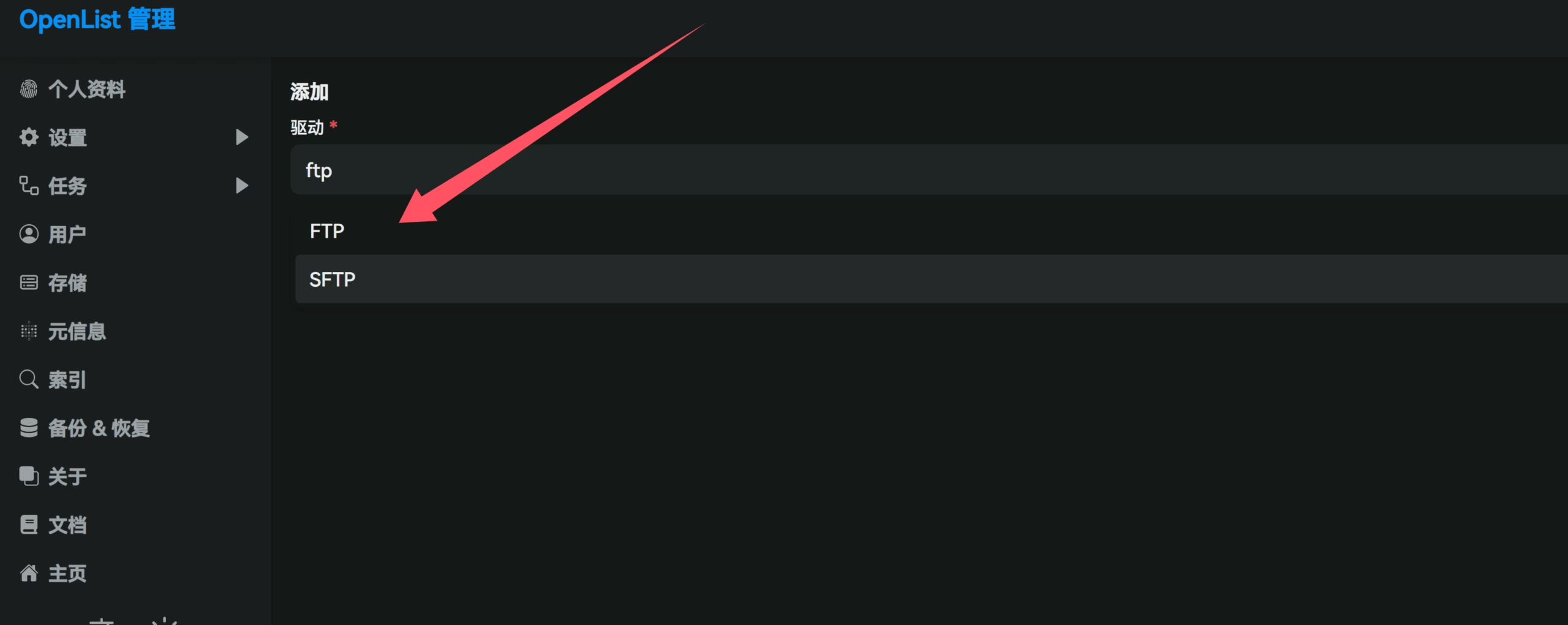

基本上挂载上去之后懂的都懂吧
后面开启webdav也就可以备份你的其他服务了
你的 Webdav 信息:
-
访问地址:http[s]://domain:port/dav/
-
用户名:Alist 登录用户名,默认大概率是
admin -
密码: Alist 登录密码
Rclone 同步
安装 Rclone
curl https://rclone.org/install.sh | bash出现如下就算安装成功。
rclone v1.70.2 has successfully installed.Now run "rclone config" for setup. Check https://rclone.org/docs/ for more details.配置
rclone config [22:23:42]2025/07/05 22:23:49 NOTICE: Config file "/root/.config/rclone/rclone.conf" not found - using defaultsNo remotes found, make a new one?n) New remotes) Set configuration passwordq) Quit confign/s/q> n
Enter name for new remote.name> hostbrr下面会列出很多东西
找到ftp
15 / Encrypt/Decrypt a remote \ (crypt)16 / Enterprise File Fabric \ (filefabric)17 / FTP \ (ftp)18 / FileLu Cloud Storage \ (filelu)19 / Files.com \ (filescom)我这里现在是17
61 / iCloud Drive \ (iclouddrive)62 / premiumize.me \ (premiumizeme)63 / seafile \ (seafile)Storage> 17下面的连接信息
Option host.FTP host to connect to.E.g. "ftp.example.com".Enter a value.host> ## 开通的时候邮件会给
Option user.FTP username.Enter a value of type string. Press Enter for the default (root).user> ## 开通的时候邮件会给
Option port.FTP port number.Enter a signed integer. Press Enter for the default (21).port>  ##默认,直接回车
Option pass.FTP password.Choose an alternative below. Press Enter for the default (n).y) Yes, type in my own passwordg) Generate random passwordn) No, leave this optional password blank (default)y/g/n> y #选YEnter the password:password: ## 开通的时候邮件会给Confirm the password:password:## 开通的时候邮件会给
Option tls.Use Implicit FTPS (FTP over TLS).When using implicit FTP over TLS the client connects using TLSright from the start which breaks compatibility withnon-TLS-aware servers. This is usually served over port 990 ratherthan port 21. Cannot be used in combination with explicit FTPS.Enter a boolean value (true or false). Press Enter for the default (false).tls>  ## 默认回车
Option explicit_tls.Use Explicit FTPS (FTP over TLS).When using explicit FTP over TLS the client explicitly requestssecurity from the server in order to upgrade a plain text connectionto an encrypted one. Cannot be used in combination with implicit FTPS.Enter a boolean value (true or false). Press Enter for the default (false).explicit_tls> ## 默认回车
Edit advanced config?y) Yesn) No (default)y/n> n ##默认回车
确认信息
Configuration complete.Options:- type: ftp- host: host- user: name- pass: *** ENCRYPTED ***Keep this "hostbrr" remote?y) Yes this is OK (default)e) Edit this remoted) Delete this remotey/e/d> y
Current remotes:
Name Type==== ====hostbrr ftp
e) Edit existing remoten) New remoted) Delete remoter) Rename remotec) Copy remotes) Set configuration passwordq) Quit confige/n/d/r/c/s/q> q到此就完成了挂载
rclone ls hostbrr:/#若前序配置无误,则执行该命令后会列出远程空间ftp用户定义的根目录文件rclone copy hostbrr:/example.txt /root/ -P#若前序配置无误,则执行该命令后会将远程空间ftp用户定义的根目录下的example.txt复制到本地/root文件夹内rclone copy /root/example.txt hostbrr:/-P#若前序配置无误,则执行该命令后会将本地/root文件夹内example.txt复制到远程空间ftp用户定义的根目录下#"-P" 参数能大概看个传输速度rclone copy /hdd/media/av/JAV hostbrr:/backup -P [22:45:37]Transferred: 2.783 GiB / 86.698 GiB, 3%, 98.724 MiB/s, ETA 14m30sChecks: 0 / 0, -, Listed 31Transferred: 10 / 23, 43%Elapsed time: 29.0sTransferring: * 明里䌷/IPZZ-599/IPZZ-599.mp4: 2% /25.031Gi, 17.634Mi/s, 23m44s * 川越にこ,浅野こころ/SONE-711/SONE-711.mkv: 1% /29.724Gi, 17.706Mi/s, 28m10s * 渚あいり,白上咲花/SONE-768/SONE-768-C.mp4: 4% /19.572Gi, 33.807Mi/s, 9m24s * 渚あいり,白上咲花/SONE-768/SONE-768-破解-C.mp4: 13% /6.357Gi, 32.225Mi/s, 2m54s挂载远程空间到本地
安装fuse3
apt updateapt install fuse3新建个对应远程空间的本地文件夹 mkdir /usr/examplehost
建立挂载服务 vim /etc/systemd/system/rclone-examplehost.service
[Unit]Description=RcloneAssertPathIsDirectory=/usr/examplehostAfter=network-online.target[Service]Type=simpleExecStart=rclone mount examplehost:/ /usr/examplehost --vfs-cache-mode writes --vfs-cache-max-age 1h --vfs-cache-max-size 10G --vfs-cache-poll-interval 10m --no-modtime --header Referer: -vExecStop=fusermount -u /usr/examplehostRestart=on-abortUser=root[Install]WantedBy=default.target然后执行
systemctl daemon-reloadsystemctl enable rclone-examplehost.servicesystemctl restart rclone-examplehost.servicesystemctl status rclone-examplehost.service查看状态正常,执行df -h 可看见挂载空间,OK,剩下的就可以按需自由发挥了。
Rsync 备份
这个就更简单了
rsync -avz —info=progress2 -e “ssh -p 端口” /root/example name@ip:/home/name/example
输入 ssh 密码直接起飞同步
Hostbrr Storagebox 挂载玩法
https://catcat.blog/hostbrr-storagebox分享文章
生成精美分享图或复制链接,与更多人分享本文。
继续阅读
最后更新于 ,距今已过 472 天
部分内容可能已过时
评论