
Complete Deployment Guide to Dokploy Security & Monitoring: CrowdSec + Traefik + Grafana
This is the third article in the Dokploy series! Here are the security rules and configurations I use.
This article documents the practical experience of building a complete security and monitoring system in a Dokploy environment, covering CrowdSec threat detection, Traefik and Cloudflare integration, and an observability platform based on Grafana/Loki/VictoriaMetrics. All configurations can be directly replicated.
Dokploy Article Series:
- Dokploy Deployment and Usage Tutorial - Part 1: Deploy Dokploy from Scratch
- Configure Dokploy Backup with Cloudflare R2 - Part 2: Automatic Backup Configuration
- This Article - Part 3: Security and Monitoring System
Architecture Overview
The entire system consists of three core modules:
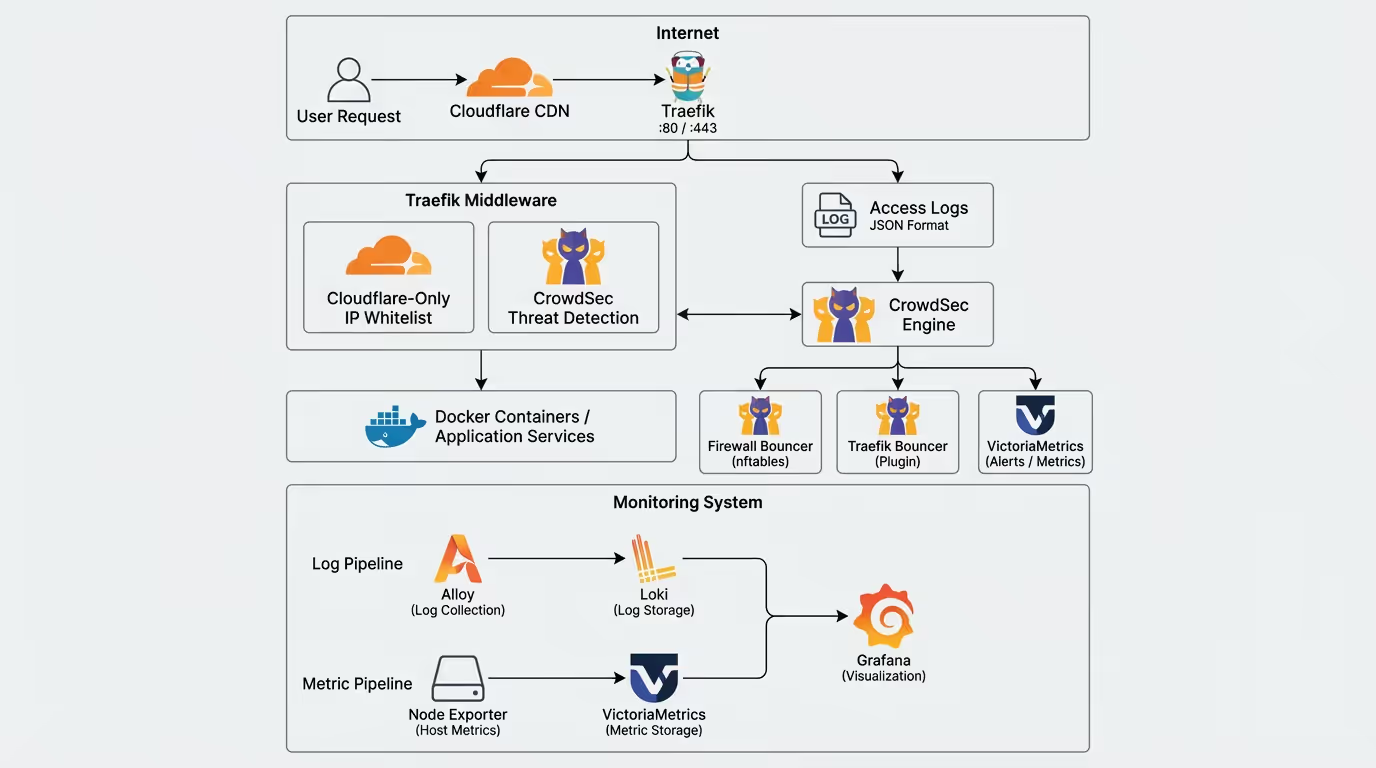
┌─────────────────────────────────────────────────────────────────────────┐│ Internet ││ User Request ──► Cloudflare CDN ──► Traefik (:80/:443) │└─────────────────────────────────────────────────────────────────────────┘ │ ┌─────────────────┴─────────────────┐ ▼ ▼ ┌───────────────────┐ ┌─────────────────┐ │ Traefik Middleware│ │ Access Log │ │ ┌───────────────┐ │ │ (JSON format) │ │ │Cloudflare-Only│ │ └────────┬────────┘ │ │ IP Allowlist │ │ │ │ └───────────────┘ │ ▼ │ ┌───────────────┐ │ ┌─────────────────┐ │ │ crowdsec │◄├─────────────────│ CrowdSec │ │ │Threat Detection│ │ │ Engine │ │ └───────────────┘ │ └────────┬────────┘ └─────────┬─────────┘ │ │ ┌──────────────┼──────────────┐ ▼ ▼ ▼ ▼ ┌─────────────────┐ ┌─────────────┐ ┌─────────────┐ ┌─────────────┐ │ Docker Containers│ │ Firewall │ │ Traefik │ │VictoriaMetrics│ │ App Services │ │ Bouncer │ │ Bouncer │ │ Alerts │ └─────────────────┘ │ (nftables) │ │ (Plugin) │ └─────────────┘ └─────────────┘ └─────────────┘
┌─────────────────────────────────────────────────────────────────────────┐│ Monitoring Stack ││ ┌─────────────┐ ┌─────────────┐ ┌─────────────┐ ││ │ Alloy │───►│ Loki │───►│ Grafana │ ││ │ Log Collector│ │ Log Storage│ │Visualization│ ││ └─────────────┘ └─────────────┘ └──────┬──────┘ ││ ┌─────────────┐ ┌─────────────┐ │ ││ │Node Exporter│───►│VictoriaMetrics│─────────┘ ││ │ Host Metrics│ │Metrics Storage│ ││ └─────────────┘ └─────────────┘ │└─────────────────────────────────────────────────────────────────────────┘Component Responsibilities
| Component | Responsibility | Data Retention |
|---|---|---|
| CrowdSec Engine | Threat detection engine, analyzes logs to identify malicious behavior | - |
| Firewall Bouncer | Host-level firewall, blocks malicious IPs using nftables | - |
| Traefik Bouncer | Application-level protection, blocks requests in real-time | - |
| Loki | Log aggregation and storage | 14 days |
| VictoriaMetrics | Time-series metrics storage | 90 days |
| Alloy | Log collector, supports multiple log sources | - |
| Node Exporter | Host performance metrics collection | - |
| Grafana | Unified visualization dashboard | - |
Part 1: CrowdSec Security Protection
1.1 Introduction to CrowdSec
CrowdSec is an open-source collaborative security engine that detects malicious behavior by analyzing logs and executes ban decisions through Bouncers. Its features include:
- Behavior Analysis: Scenario-based threat detection
- Community Sharing: Global threat intelligence sharing
- Multi-layer Protection: Supports both firewall and application-layer Bouncers
- Lightweight & Efficient: Written in Go, low resource consumption
1.2 Deploying CrowdSec in Dokploy
Create a Compose service with the following configuration:
services: crowdsec: image: crowdsecurity/crowdsec:latest environment: GID: "${GID-1000}" COLLECTIONS: "crowdsecurity/linux crowdsecurity/traefik crowdsecurity/http-cve" volumes: - crowdsec-db:/var/lib/crowdsec/data/ - crowdsec-config:/etc/crowdsec/ - ../files/acquis.yaml:/etc/crowdsec/acquis.yaml - ../files/victoriametrics.yaml:/etc/crowdsec/notifications/http_victoriametrics.yaml - ../files/profiles.yaml:/etc/crowdsec/profiles.yaml - /etc/dokploy/traefik/dynamic/access.log:/var/log/traefik/access.log:ro - /var/log/auth.log:/var/log/ssh/auth.log:ro security_opt: - no-new-privileges:true ports: - "127.0.0.1:8080:8080" # LAPI - "127.0.0.1:6060:6060" # Prometheus metrics labels: - traefik.enable=false restart: unless-stopped networks: - default - dokploy-network
networks: default: dokploy-network: external: true
volumes: crowdsec-db: crowdsec-config:Key Configuration Notes:
COLLECTIONS: Detection collections enabled, including Linux system, Traefik Web, and HTTP CVE- Mount Traefik access logs for CrowdSec analysis
- Mount SSH auth logs to detect brute force attacks
- Ports bound only to 127.0.0.1 for enhanced security
1.3 Log Acquisition Configuration
Create files/acquis.yaml to define log sources for CrowdSec to analyze:
---# Traefik access log acquisitionfilenames: - /var/log/traefik/access.logpoll_without_inotify: truelabels: type: traefik
---# SSH auth log acquisitionfilenames: - /var/log/ssh/auth.loglabels: type: syslog1.4 Decision Configuration
Create files/profiles.yaml to define ban policies:
name: default_ip_remediationfilters: - Alert.Remediation == true && Alert.GetScope() == "Ip"decisions: - type: ban duration: 4hnotifications: - http_victoriametricson_success: break---name: default_range_remediationfilters: - Alert.Remediation == true && Alert.GetScope() == "Range"decisions: - type: ban duration: 4hnotifications: - http_victoriametricson_success: breakConfiguration Notes:
- Ban malicious IPs for 4 hours upon detection
- Supports both single IP and IP range bans
- Each decision is notified to VictoriaMetrics for monitoring
1.5 Host-level Firewall Bouncer
Install the Firewall Bouncer on the host to implement firewall-level blocking using nftables:
# Installationcurl -s https://install.crowdsec.net | sudo shapt install crowdsec-firewall-bouncer-nftablesConfiguration file /etc/crowdsec/bouncers/crowdsec-firewall-bouncer.yaml:
mode: nftablesupdate_frequency: 10slog_mode: filelog_dir: /var/log/log_level: infolog_compression: truelog_max_size: 100log_max_backups: 3log_max_age: 30api_url: http://127.0.0.1:8080/api_key: YOUR_API_KEY_HEREinsecure_skip_verify: falsedisable_ipv6: falsedeny_action: DROPdeny_log: falsesupported_decisions_types: - ban
blacklists_ipv4: crowdsec-blacklistsblacklists_ipv6: crowdsec6-blacklistsipset_type: nethashiptables_chains: - INPUTiptables_add_rule_comments: true
nftables: ipv4: enabled: true set-only: false table: crowdsec chain: crowdsec-chain priority: -10 ipv6: enabled: true set-only: false table: crowdsec6 chain: crowdsec6-chain priority: -10
nftables_hooks: - input - forward
prometheus: enabled: false listen_addr: 127.0.0.1 listen_port: 60601Getting the API Key:
# Execute in CrowdSec containerdocker exec -it <crowdsec-container> cscli bouncers add firewall-bouncer1.6 Traefik Bouncer Plugin
The Traefik Bouncer implements real-time request filtering at the application layer. First, enable the plugin in traefik.yml:
experimental: plugins: bouncer: moduleName: github.com/maxlerebourg/crowdsec-bouncer-traefik-plugin version: v1.4.6Then use it in middleware configuration:
http: middlewares: crowdsec: plugin: bouncer: enabled: true crowdsecMode: live crowdsecLapiKey: YOUR_TRAEFIK_BOUNCER_KEY crowdsecLapiHost: service-crowdsec-k5ws6c-crowdsec-1:8080Getting the Traefik Bouncer Key:
docker exec -it <crowdsec-container> cscli bouncers add traefik-bouncer1.7 VictoriaMetrics Alert Notification
Create files/victoriametrics.yaml to push CrowdSec decisions to VictoriaMetrics:
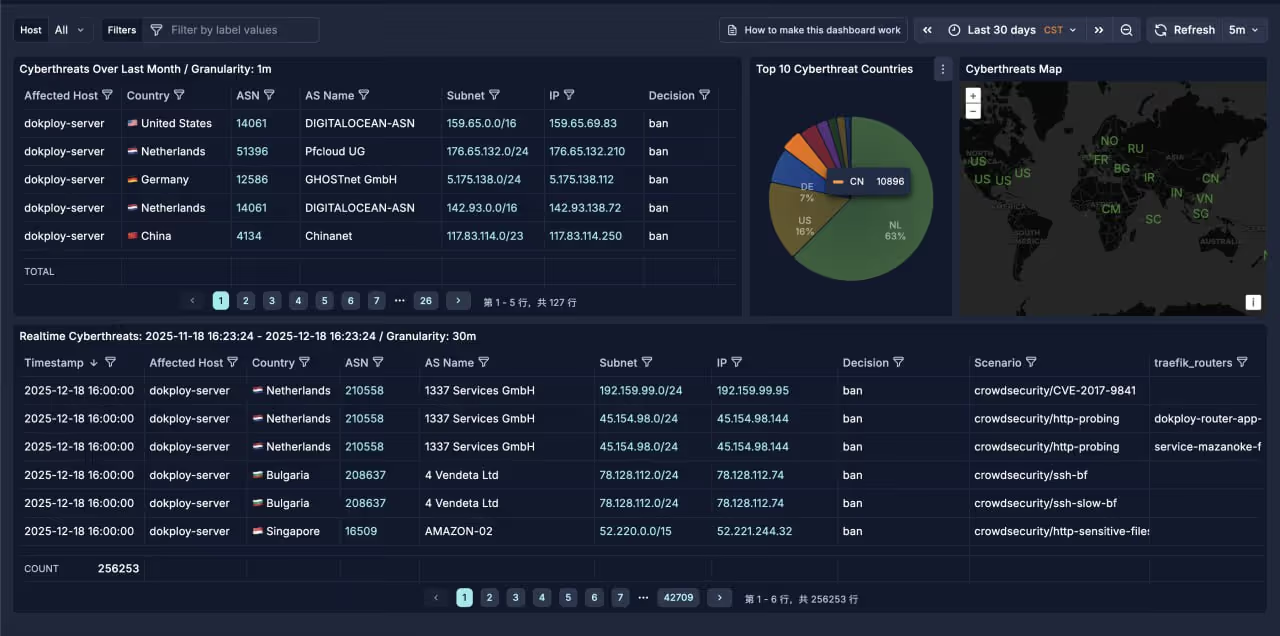
type: httpname: http_victoriametricslog_level: debugformat: > {{- range $Alert := . -}} {{- $traefikRouters := GetMeta . "traefik_router_name" -}} {{- range .Decisions -}} {"metric":{"__name__":"cs_lapi_decision","instance":"dokploy-server","country":"{{$Alert.Source.Cn}}","asname":"{{$Alert.Source.AsName}}","asnumber":"{{$Alert.Source.AsNumber}}","latitude":"{{$Alert.Source.Latitude}}","longitude":"{{$Alert.Source.Longitude}}","iprange":"{{$Alert.Source.Range}}","scenario":"{{.Scenario}}","type":"{{.Type}}","duration":"{{.Duration}}","scope":"{{.Scope}}","ip":"{{.Value}}","traefik_routers":{{ printf "%q" ($traefikRouters | uniq | join ",")}}},"values": [1],"timestamps":[{{now|unixEpoch}}000]} {{- end }} {{- end -}}url: http://service-victoriametrics-dhydty-victoriametrics-1:8428/api/v1/importmethod: POSTheaders: Content-Type: application/jsonThis creates the cs_lapi_decision metric containing attacker’s geolocation, ASN, scenario, and other information for analysis in Grafana.
Part 2: Traefik and Cloudflare Integration
2.1 Why Cloudflare IP Allowlist is Needed
When using Cloudflare as a CDN, all requests pass through Cloudflare proxies. This creates two issues:
- Source IP Confusion: Traefik sees Cloudflare’s proxy IP, not the real user IP
- Direct Access Bypass: Attackers might directly access the origin server IP, bypassing Cloudflare’s protection
Solution:
- Configure
forwardedHeaders.trustedIPsto trust Cloudflare IPs and correctly obtain real client IPs - Configure
ipAllowListmiddleware to only allow Cloudflare IPs
2.2 Traefik Static Configuration
Complete /etc/dokploy/traefik/traefik.yml configuration:
global: sendAnonymousUsage: false
experimental: plugins: bouncer: moduleName: github.com/maxlerebourg/crowdsec-bouncer-traefik-plugin version: v1.4.6
accessLog: filePath: "/etc/dokploy/traefik/dynamic/access.log" format: json bufferingSize: 100
providers: swarm: exposedByDefault: false watch: true docker: exposedByDefault: false watch: true file: directory: /etc/dokploy/traefik/dynamic watch: true
entryPoints: web: address: :80 forwardedHeaders: trustedIPs: # Cloudflare IPv4 - 173.245.48.0/20 - 103.21.244.0/22 - 103.22.200.0/22 - 103.31.4.0/22 - 141.101.64.0/18 - 108.162.192.0/18 - 190.93.240.0/20 - 188.114.96.0/20 - 197.234.240.0/22 - 198.41.128.0/17 - 162.158.0.0/15 - 104.16.0.0/13 - 104.24.0.0/14 - 172.64.0.0/13 - 131.0.72.0/22 http: middlewares: - cloudflare-only@file - crowdsec@file
websecure: address: :443 http3: advertisedPort: 443 forwardedHeaders: trustedIPs: # Cloudflare IPv4 (same as web) - 173.245.48.0/20 - 103.21.244.0/22 - 103.22.200.0/22 - 103.31.4.0/22 - 141.101.64.0/18 - 108.162.192.0/18 - 190.93.240.0/20 - 188.114.96.0/20 - 197.234.240.0/22 - 198.41.128.0/17 - 162.158.0.0/15 - 104.16.0.0/13 - 104.24.0.0/14 - 172.64.0.0/13 - 131.0.72.0/22 http: middlewares: - cloudflare-only@file - crowdsec@file tls: certResolver: letsencrypt
api: insecure: true
certificatesResolvers: letsencrypt: acme: storage: /etc/dokploy/traefik/dynamic/acme.json httpChallenge: entryPoint: webKey Configuration Notes:
forwardedHeaders.trustedIPs: Trust Cloudflare IPs so Traefik correctly parses theX-Forwarded-Forheader to get real client IPshttp.middlewares: Entry-point level middleware chain, all requests pass throughcloudflare-onlyandcrowdsecmiddlewaresaccessLog.format: json: JSON format logs for easy parsing by CrowdSec and Alloy
2.3 Dynamic Middleware Configuration
/etc/dokploy/traefik/dynamic/middlewares.yml:
http: middlewares: redirect-to-https: redirectScheme: scheme: https permanent: true
cloudflare-only: ipAllowList: sourceRange: # Cloudflare IPv4 - "173.245.48.0/20" - "103.21.244.0/22" - "103.22.200.0/22" - "103.31.4.0/22" - "141.101.64.0/18" - "108.162.192.0/18" - "190.93.240.0/20" - "188.114.96.0/20" - "197.234.240.0/22" - "198.41.128.0/17" - "162.158.0.0/15" - "104.16.0.0/13" - "104.24.0.0/14" - "172.64.0.0/13" - "131.0.72.0/22" # Cloudflare IPv6 - "2400:cb00::/32" - "2606:4700::/32" - "2803:f800::/32" - "2405:b500::/32" - "2405:8100::/32" - "2a06:98c0::/29" - "2c0f:f248::/32"
crowdsec: plugin: bouncer: enabled: true crowdsecMode: live crowdsecLapiKey: YOUR_TRAEFIK_BOUNCER_KEY crowdsecLapiHost: service-crowdsec-k5ws6c-crowdsec-1:8080TIPCloudflare IP lists may update. It’s recommended to periodically fetch the latest list from https://www.cloudflare.com/ips/.
2.4 Real IP Recognition Mechanism
When requests flow through the following path, IP information changes:
User (203.0.113.50) → Cloudflare (adds CF-Connecting-IP: 203.0.113.50) → Traefik (trusts Cloudflare IP, parses X-Forwarded-For) → CrowdSec (gets real IP 203.0.113.50 from logs)Traefik access log example:
{ "ClientAddr": "172.71.99.180:11150", "ClientHost": "203.0.113.50", "RequestHost": "example.com", "RequestMethod": "GET", "RequestPath": "/api/data", "DownstreamStatus": 200, "RouterName": "my-router@docker"}ClientAddr: Cloudflare proxy IPClientHost: Real client IP (correctly parsed through trust configuration)
2.5 Special Route Bypass Configuration
Some services may need to bypass CrowdSec detection (like analytics services). Create a separate route configuration:
http: routers: rybbit-backend-websecure: rule: Host(`analytics.example.com`) && PathPrefix(`/api`) service: rybbit-backend-service entryPoints: - websecure tls: certResolver: letsencrypt priority: 100 # High priority ensures matching first
services: rybbit-backend-service: loadBalancer: servers: - url: http://rybbit-backend:3001 passHostHeader: trueNote: These routes don’t have the crowdsec@file middleware applied, so they’re not protected by CrowdSec.
Part 3: Monitoring and Logging System
3.1 Loki Log Storage
Loki is a log aggregation system developed by Grafana Labs, designed for Kubernetes and container environments.
files/loki-config.yaml configuration:
# Loki 3.x configuration - Storage optimizedauth_enabled: false
server: http_listen_port: 3100 grpc_listen_port: 9096 log_level: info
common: path_prefix: /loki storage: filesystem: chunks_directory: /loki/chunks rules_directory: /loki/rules replication_factor: 1 ring: kvstore: store: inmemory
# Loki 3.x uses TSDB + v13 schemaschema_config: configs: - from: 2024-01-01 store: tsdb object_store: filesystem schema: v13 index: prefix: index_ period: 24h
storage_config: tsdb_shipper: active_index_directory: /loki/tsdb-shipper-active cache_location: /loki/tsdb-shipper-cache cache_ttl: 24h filesystem: directory: /loki/chunks
# Ingester optimization for better compressioningester: chunk_idle_period: 30m chunk_block_size: 262144 # 256KB blocks chunk_target_size: 1572864 # 1.5MB chunks chunk_retain_period: 1m max_chunk_age: 2h flush_check_period: 30s flush_op_timeout: 10m wal: enabled: true dir: /loki/wal flush_on_shutdown: true
limits_config: retention_period: 336h # 14 days retention ingestion_rate_mb: 8 ingestion_burst_size_mb: 16 max_streams_per_user: 5000 max_entries_limit_per_query: 5000 max_line_size: 128KB allow_structured_metadata: true per_stream_rate_limit: 3MB per_stream_rate_limit_burst: 10MB max_label_name_length: 1024 max_label_value_length: 2048 max_label_names_per_series: 15
compactor: working_directory: /loki/compactor retention_enabled: true retention_delete_delay: 1h delete_request_store: filesystem compaction_interval: 10m retention_delete_worker_count: 150
query_range: results_cache: cache: embedded_cache: enabled: true max_size_mb: 100 parallelise_shardable_queries: true cache_results: true
query_scheduler: max_outstanding_requests_per_tenant: 100
analytics: reporting_enabled: false3.2 Alloy Log Collection
Grafana Alloy is the next-generation log/metrics collector, replacing Promtail.
files/alloy-config.alloy configuration:
// Grafana Alloy Configuration - Log Collection// Optimized for storage efficiency
// ============================================// Loki Output Endpoint// ============================================loki.write "default" { endpoint { url = "http://loki:3100/loki/api/v1/push" batch_wait = "5s" // Batch for better compression batch_size = "1MiB" // 1MB batch size } external_labels = { cluster = "dokploy", }}
// ============================================// Docker Container Discovery// ============================================discovery.docker "containers" { host = "unix:///var/run/docker.sock" refresh_interval = "30s"}
// ============================================// Docker Container Log Collection// ============================================discovery.relabel "docker_logs" { targets = discovery.docker.containers.targets
// Extract container name rule { source_labels = ["__meta_docker_container_name"] regex = "/(.*)" target_label = "container" }
// Extract compose project rule { source_labels = ["__meta_docker_container_label_com_docker_compose_project"] target_label = "compose_project" }
// Extract compose service rule { source_labels = ["__meta_docker_container_label_com_docker_compose_service"] target_label = "compose_service" }
// Extract image name rule { source_labels = ["__meta_docker_container_image"] target_label = "image" }}
loki.source.docker "containers" { host = "unix:///var/run/docker.sock" targets = discovery.relabel.docker_logs.output forward_to = [loki.process.docker.receiver]}
loki.process "docker" { stage.static_labels { values = { job = "docker", host = "dokploy-server", } }
forward_to = [loki.write.default.receiver]}
// ============================================// Traefik Access Log (JSON format)// ============================================local.file_match "traefik" { path_targets = [{"__path__" = "/var/log/traefik/access.log"}] sync_period = "15s"}
loki.source.file "traefik" { targets = local.file_match.traefik.targets forward_to = [loki.process.traefik.receiver] tail_from_end = true}
loki.process "traefik" { stage.static_labels { values = { job = "traefik", host = "dokploy-server", } }
// Parse JSON and extract fields as labels stage.json { expressions = { client_ip = "ClientHost", method = "RequestMethod", path = "RequestPath", status = "DownstreamStatus", router = "RouterName", request_host = "RequestHost", entry_point = "entryPointName", } }
stage.labels { values = { client_ip = "", method = "", status = "", router = "", request_host = "", entry_point = "", } }
forward_to = [loki.write.default.receiver]}
// ============================================// SSH/Auth Log// ============================================local.file_match "auth" { path_targets = [{"__path__" = "/var/log/host/auth.log"}] sync_period = "30s"}
loki.source.file "auth" { targets = local.file_match.auth.targets forward_to = [loki.process.auth.receiver] tail_from_end = true}
loki.process "auth" { stage.static_labels { values = { job = "auth", host = "dokploy-server", } }
// Parse syslog format stage.regex { expression = "^(?P<timestamp>\\w+\\s+\\d+\\s+\\d+:\\d+:\\d+)\\s+(?P<hostname>\\S+)\\s+(?P<service>[^\\[:]+)(?:\\[(?P<pid>\\d+)\\])?:\\s+(?P<message>.*)$" }
stage.labels { values = { service = "", } }
forward_to = [loki.write.default.receiver]}
// ============================================// UFW Firewall Log// ============================================local.file_match "ufw" { path_targets = [{"__path__" = "/var/log/host/ufw.log"}] sync_period = "30s"}
loki.source.file "ufw" { targets = local.file_match.ufw.targets forward_to = [loki.process.ufw.receiver] tail_from_end = true}
loki.process "ufw" { stage.static_labels { values = { job = "ufw", host = "dokploy-server", } }
// Extract UFW fields stage.regex { expression = "\\[UFW (?P<action>\\w+)\\].*SRC=(?P<src_ip>[\\d\\.a-fA-F:]+).*PROTO=(?P<proto>\\w+)" }
stage.regex { expression = "DPT=(?P<dst_port>\\d+)" }
stage.labels { values = { action = "", src_ip = "", proto = "", dst_port = "", } }
forward_to = [loki.write.default.receiver]}
// ============================================// Kernel Log// ============================================local.file_match "kernel" { path_targets = [{"__path__" = "/var/log/host/kern.log"}] sync_period = "30s"}
loki.source.file "kernel" { targets = local.file_match.kernel.targets forward_to = [loki.process.kernel.receiver] tail_from_end = true}
loki.process "kernel" { stage.static_labels { values = { job = "kernel", host = "dokploy-server", } }
forward_to = [loki.write.default.receiver]}
// ============================================// CrowdSec Logs// ============================================local.file_match "crowdsec" { path_targets = [ {"__path__" = "/var/log/crowdsec/crowdsec.log", "log_type" = "main"}, {"__path__" = "/var/log/crowdsec/crowdsec_api.log", "log_type" = "api"}, {"__path__" = "/var/log/crowdsec/firewall-bouncer.log", "log_type" = "firewall-bouncer"}, ] sync_period = "30s"}
loki.source.file "crowdsec" { targets = local.file_match.crowdsec.targets forward_to = [loki.process.crowdsec.receiver] tail_from_end = true}
loki.process "crowdsec" { stage.static_labels { values = { job = "crowdsec", host = "dokploy-server", } }
forward_to = [loki.write.default.receiver]}3.3 VictoriaMetrics Metrics Storage
VictoriaMetrics is a high-performance Prometheus-compatible time-series database.
docker-compose.yml:
version: "3.8"services: victoriametrics: image: victoriametrics/victoria-metrics:latest restart: unless-stopped volumes: - vm-data:/storage - ../files/scrape.yml:/etc/victoriametrics/scrape.yml - ../files/blackbox:/etc/prometheus/blackbox ports: - "127.0.0.1:20001:8428" command: - "--storageDataPath=/storage" - "--retentionPeriod=90d" - "--httpListenAddr=:8428" - "--promscrape.config=/etc/victoriametrics/scrape.yml" networks: - default - dokploy-network
networks: default: dokploy-network: external: true
volumes: vm-data:files/scrape.yml metrics collection configuration:
scrape_configs: - job_name: 'crowdsec' scrape_interval: 15s static_configs: - targets: ['service-crowdsec-k5ws6c-crowdsec-1:6060']
- job_name: 'logporter' scrape_interval: 15s static_configs: - targets: ['service-loki-wykkft-logporter-1:9333'] metric_relabel_configs: - source_labels: [__name__] regex: 'docker_.*' action: keep
- job_name: 'node-exporter' scrape_interval: 15s static_configs: - targets: ['service-loki-wykkft-node_exporter-1:9100']3.4 Complete Docker Compose Configuration
Complete configuration for Loki + Alloy + Node Exporter + Logporter:
version: "3.8"
services: loki: image: grafana/loki:latest restart: unless-stopped command: -config.file=/etc/loki/local-config.yaml volumes: - loki-data:/loki - ../files/loki-config.yaml:/etc/loki/local-config.yaml networks: - default - dokploy-network
alloy: image: grafana/alloy:latest restart: unless-stopped command: - run - /etc/alloy/config.alloy - --server.http.listen-addr=0.0.0.0:12345 - --storage.path=/var/lib/alloy/data volumes: - ../files/alloy-config.alloy:/etc/alloy/config.alloy - alloy-data:/var/lib/alloy/data - /var/run/docker.sock:/var/run/docker.sock:ro # Traefik logs - /etc/dokploy/traefik/dynamic/access.log:/var/log/traefik/access.log:ro # System logs - /var/log/auth.log:/var/log/host/auth.log:ro - /var/log/ufw.log:/var/log/host/ufw.log:ro - /var/log/kern.log:/var/log/host/kern.log:ro # CrowdSec logs - /var/log/crowdsec.log:/var/log/crowdsec/crowdsec.log:ro - /var/log/crowdsec_api.log:/var/log/crowdsec/crowdsec_api.log:ro - /var/log/crowdsec-firewall-bouncer.log:/var/log/crowdsec/firewall-bouncer.log:ro depends_on: - loki networks: - default - dokploy-network
logporter: image: lifailon/logporter:latest restart: unless-stopped environment: - DOCKER_LOG_METRICS=false - DOCKER_LOG_CUSTOM_METRICS=false - DOCKER_LOG_CUSTOM_QUERY=error|Error|ERROR|exception|Exception|EXCEPTION|fail|Fail|FAIL volumes: - /var/run/docker.sock:/var/run/docker.sock networks: - default - dokploy-network
node_exporter: image: quay.io/prometheus/node-exporter:latest restart: unless-stopped command: - '--path.rootfs=/host' - '--path.procfs=/host/proc' - '--path.sysfs=/host/sys' - '--collector.filesystem.mount-points-exclude=^/(sys|proc|dev|host|etc)($$|/)' volumes: - /proc:/host/proc:ro - /sys:/host/sys:ro - /:/host:ro,rslave pid: host networks: - default - dokploy-network
networks: default: dokploy-network: external: true
volumes: loki-data: alloy-data:3.5 Grafana Deployment
Grafana is used for unified visualization of all monitoring data:
version: "3.8"services: grafana: image: grafana/grafana:latest restart: unless-stopped volumes: - grafana-storage:/var/lib/grafana ports: - "127.0.0.1:20000:3000" networks: - default - dokploy-network
networks: default: dokploy-network: external: true
volumes: grafana-storage:Configuring Data Sources:
- Loki: Set URL to
http://service-loki-wykkft-loki-1:3100 - VictoriaMetrics: Set URL to
http://service-victoriametrics-dhydty-victoriametrics-1:8428
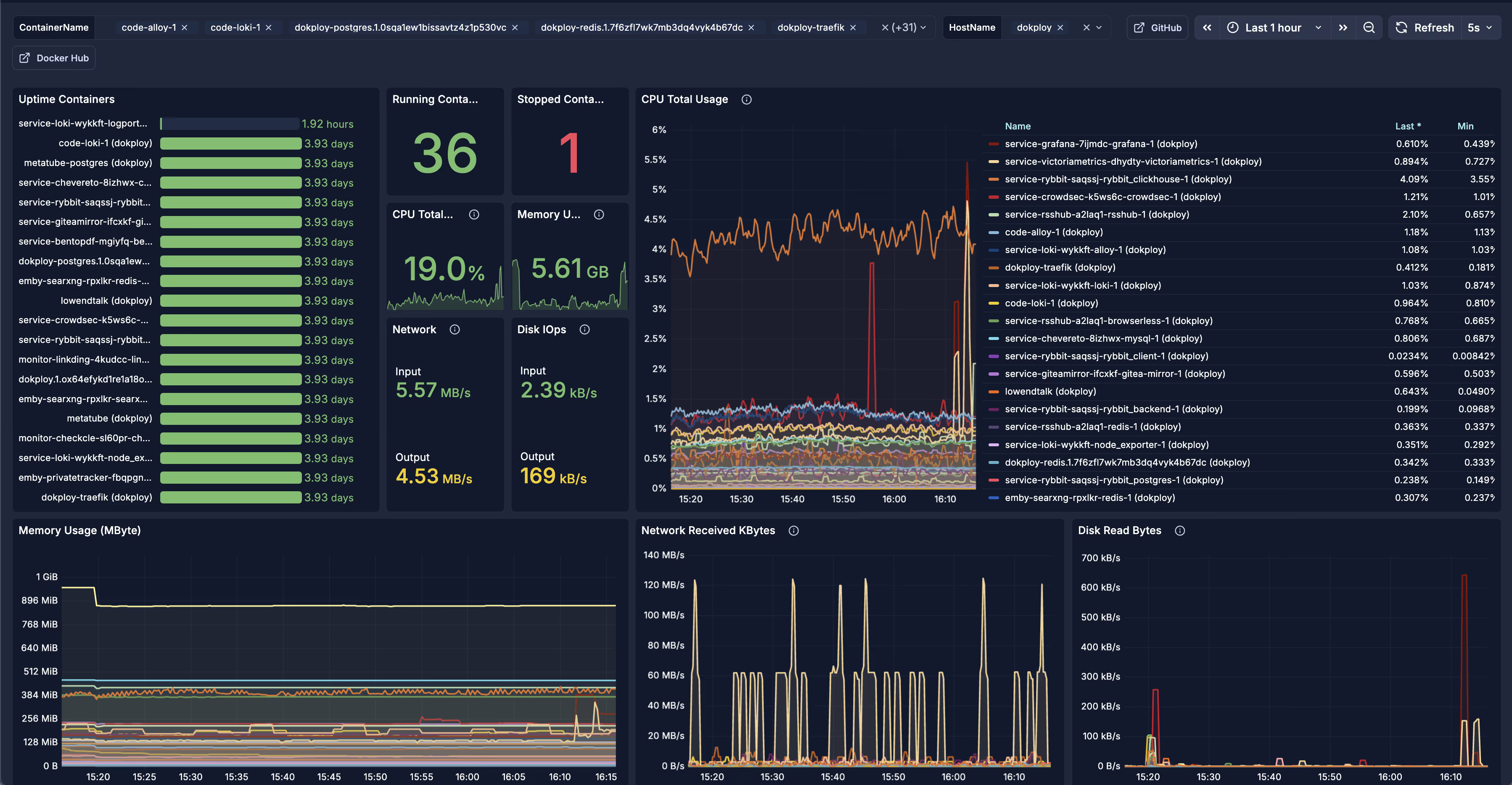
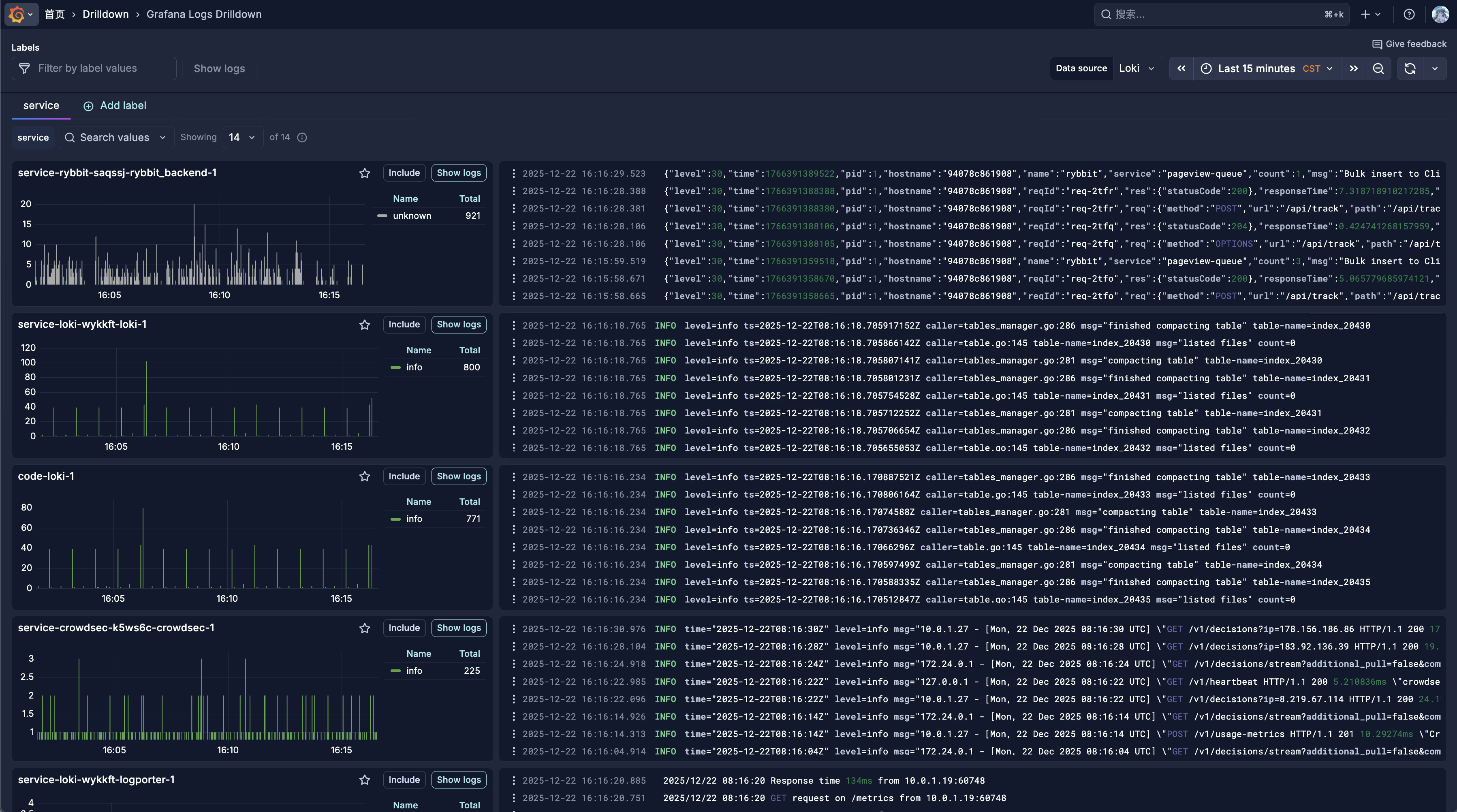
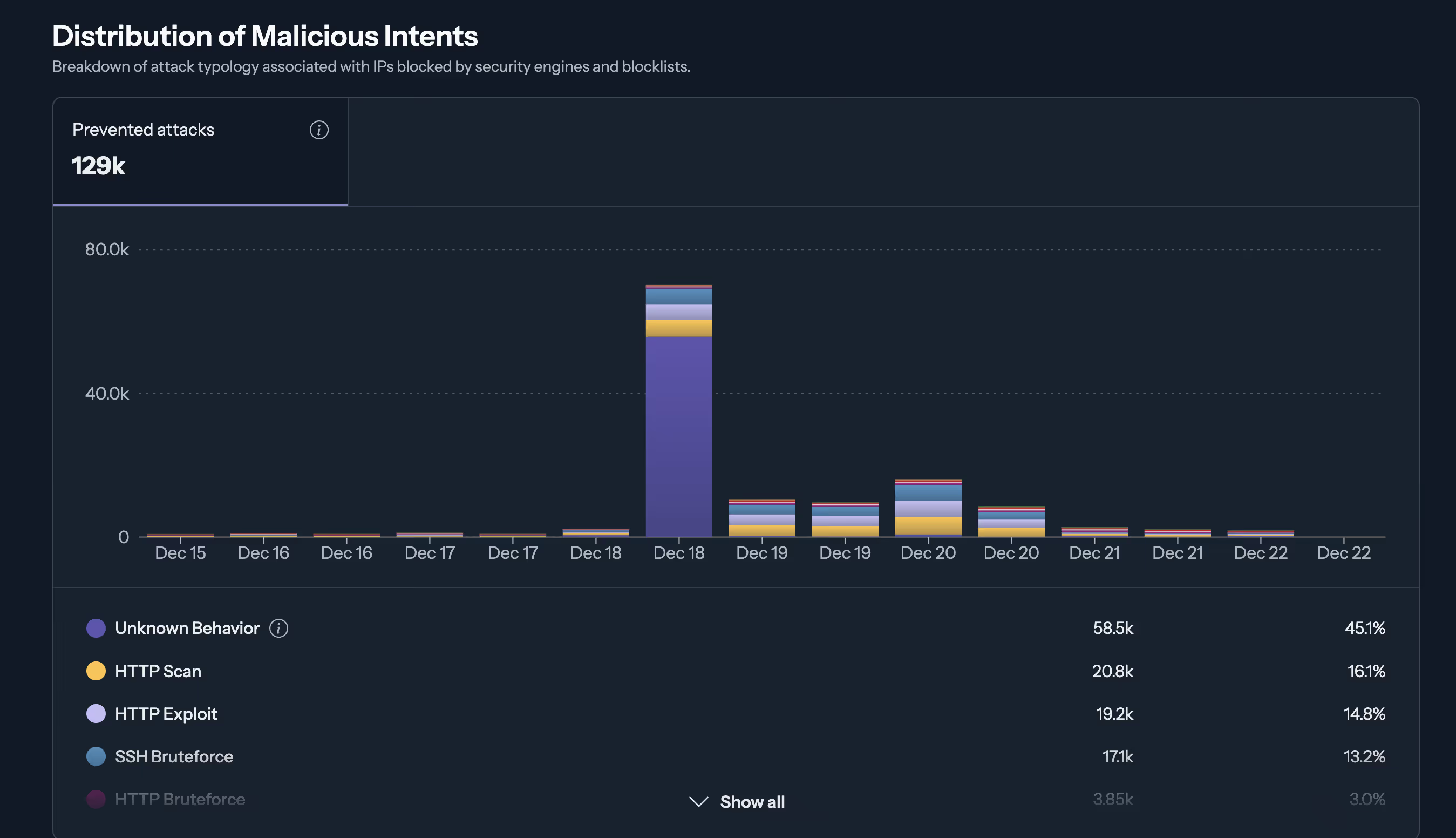
Dashboard Screenshots
Part 4: Troubleshooting
4.1 CrowdSec Common Issues
Issue: Bouncer connection failed
# Check CrowdSec service statusdocker exec -it <crowdsec-container> cscli bouncers list
# Check LAPI connectioncurl -s http://127.0.0.1:8080/v1/decisions | headIssue: No attacks detected
# Check log acquisition statusdocker exec -it <crowdsec-container> cscli metrics
# Check scenario statusdocker exec -it <crowdsec-container> cscli scenarios listIssue: False positive blocking legitimate users
# View current ban listdocker exec -it <crowdsec-container> cscli decisions list
# Remove specific IP bandocker exec -it <crowdsec-container> cscli decisions delete --ip <IP>
# Add whitelistdocker exec -it <crowdsec-container> cscli parsers install crowdsecurity/whitelists4.2 Traefik Connection Issues
Issue: 503 Service Unavailable
# Check container networkdocker network inspect dokploy-network
# Check if service is in correct networkdocker inspect <container> | grep -A 10 NetworksIssue: Real IP not obtained correctly
Check if forwardedHeaders.trustedIPs in traefik.yml includes all Cloudflare IPs.
4.3 Log Collection Issues
Issue: No logs in Loki
# Check Alloy statusdocker logs <alloy-container> --tail 100
# Check Loki health statuscurl -s http://127.0.0.1:3100/readyIssue: Missing log labels
Check that stage.labels and stage.json configurations in Alloy config are correct.
4.4 Missing Monitoring Data
Issue: No data in VictoriaMetrics
# Check scrape target statuscurl -s http://127.0.0.1:20001/targets
# Manually query metricscurl -s "http://127.0.0.1:20001/api/v1/query?query=up"Issue: CrowdSec metrics push failed
Check if the URL in victoriametrics.yaml is correct and ensure container names match actual names.
Summary
This article detailed the process of building a complete security and monitoring system in a Dokploy environment:
- CrowdSec Multi-layer Protection: Containerized deployment + Host Firewall Bouncer + Traefik Plugin
- Traefik + Cloudflare Integration: IP Allowlist + Real IP Recognition
- Observability Platform: Loki Logs + VictoriaMetrics Metrics + Grafana Visualization
- Comprehensive Log Collection: Docker containers, system logs, Traefik access logs, security logs
This system provides complete protection from network layer to application layer, along with comprehensive observability support, suitable for production environments.
References: