
Icons Gallery - Self-hosted Icons CDN Accelerated Service
Icons Gallery is an icon browsing and distribution service built on the upstream repository selfh.st/icons, providing fast and stable CDN access for users in mainland China.
Project Links
- Online Gallery: ico.bytecook.io
- NPM Package: @bytecook/icons
- Upstream Repository: github.com/selfhst/icons
- Official Package: jsdelivr.com/package/gh/selfhst/icons
Why This Project
selfh.st/icons is a high-quality collection of self-hosted application icons, featuring 6000+ curated icons covering a wide range of common self-hosted services and applications. It is suitable for:
- Dashboards like Homepage / Homarr / Dashy
- NAS / Server application displays
- Icon references in documentation and blogs
However, since the original resources are mainly hosted on GitHub, users in mainland China often encounter the following issues:
- Slow access speeds
- Failed icon loading
- Unstable jsDelivr CDN
To address these problems, this CDN accelerated mirror service was created.
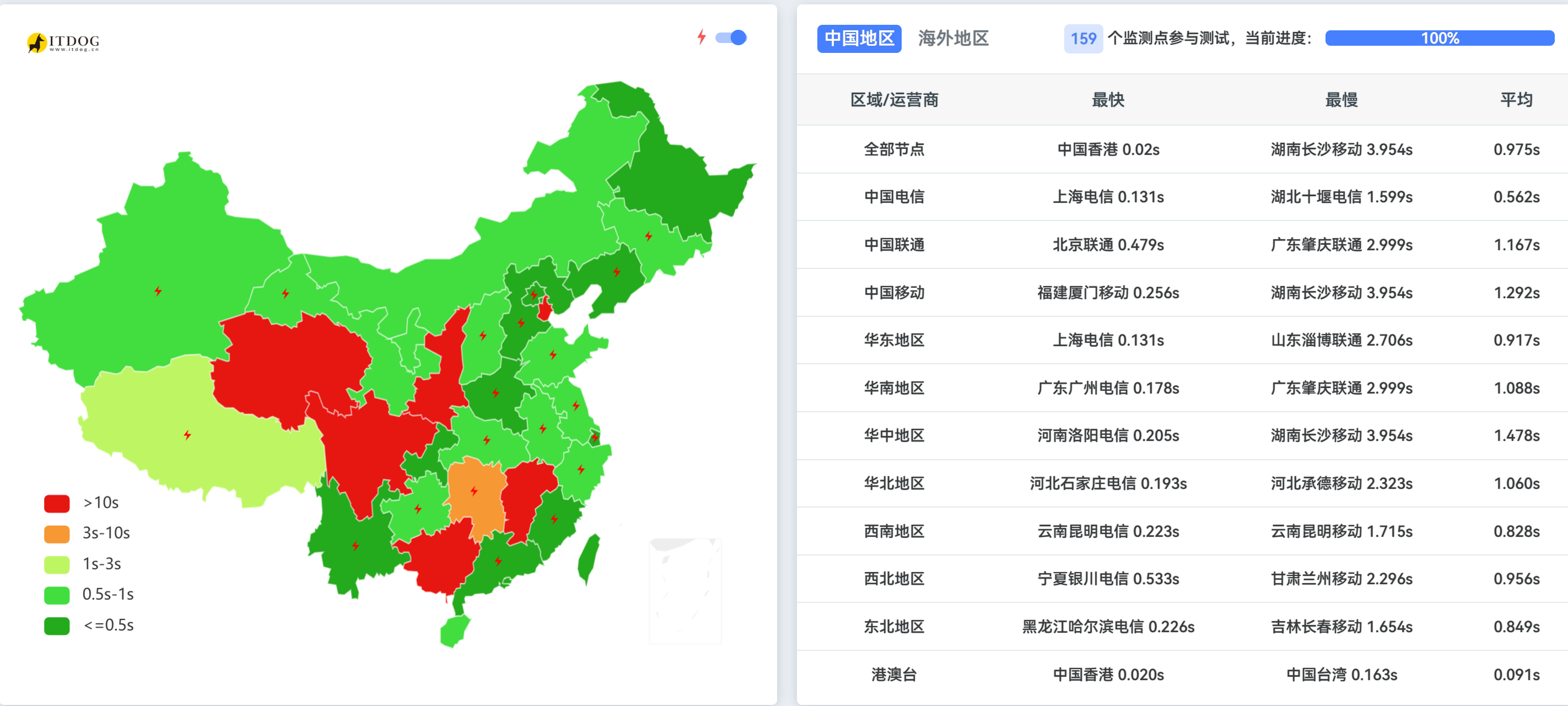
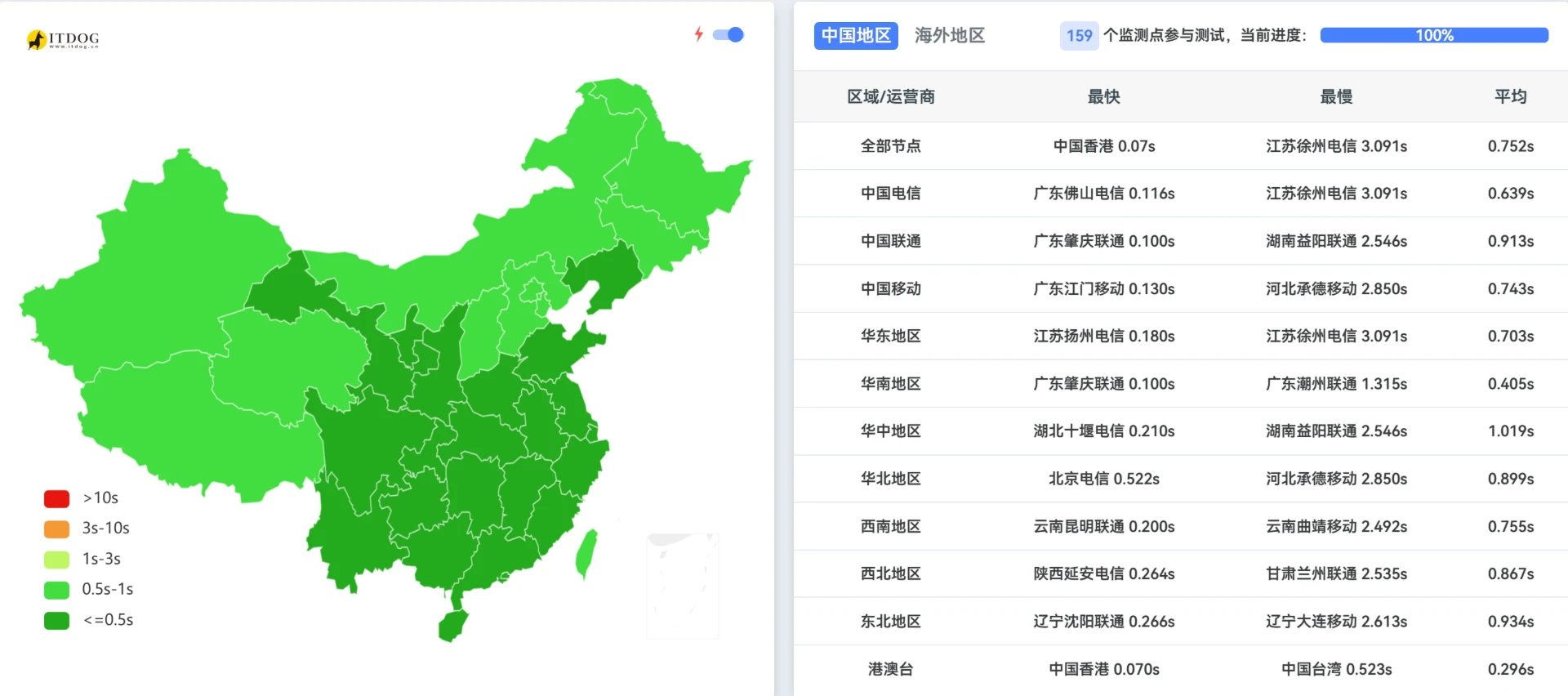
Speed Comparison
jsDelivr
Peekabo (Icons Gallery CDN)
Features
- 6000+ icons, fully synced with selfh.st/icons repository
- Support for SVG / PNG / WebP / AVIF / ICO formats
- China CDN acceleration for fast and stable access
- Online browsing, search, and category filtering
- One-click copy of icon direct links
- Light / Dark theme switching support
Usage
Online Browsing
Visit ico.bytecook.io directly. It supports keyword search and category filtering. Click on an icon to view details and copy the link.
CDN Reference
Icon URL format:
https://ico.bytecook.io/{format}/{icon-name}.{format}Examples:
https://ico.bytecook.io/svg/docker.svghttps://ico.bytecook.io/png/nginx.pnghttps://ico.bytecook.io/webp/portainer.webp
NPM Package Installation
npm install @bytecook/icons# orpnpm add @bytecook/icons# oryarn add @bytecook/iconsCode Usage
import { createIconUrl } from '@bytecook/icons';
// Default: SVG format, Peekabo CDN (China accelerated)createIconUrl('nginx');// => https://ico.bytecook.io/svg/nginx.svg
// Specify formatcreateIconUrl('nginx', { format: 'png' });// => https://ico.bytecook.io/png/nginx.png
// Dark/Light variantscreateIconUrl('nginx', { format: 'png', variant: 'dark' });// => https://ico.bytecook.io/png/nginx-dark.png
// Use jsDelivr CDN (global)createIconUrl('nginx', { cdn: 'jsdelivr' });// => https://cdn.jsdelivr.net/gh/selfhst/icons@main/svg/nginx.svgFactory Pattern
import { createIconHelper } from '@bytecook/icons';
const icons = createIconHelper({ format: 'webp' });
icons.url('docker'); // WebP formaticons.svg('docker'); // Force SVGicons.png('docker', 'dark'); // PNG dark variantIcon Metadata
import iconList from '@bytecook/icons/icons.json';
console.log(iconList.length); // 2360+ icons
// Each icon contains:// { name, reference, category, svg, png, webp, light, dark, tags }CDN Endpoints
| CDN | URL | Description |
|---|---|---|
| Peekabo | https://ico.bytecook.io | China accelerated (default) |
| jsDelivr | https://cdn.jsdelivr.net/gh/selfhst/icons@main | Global CDN |
Supported Formats
- SVG - Scalable vector graphics (recommended)
- PNG - Raster images
- WebP - Modern format with good compression
- AVIF - Next-gen format with best compression
- ICO - Windows icon format
Icon Variants
Many icons support light and dark variants:
- Standard:
nginx.svg - Light variant:
nginx-light.svg - Dark variant:
nginx-dark.svg
Related Links
- Online Gallery: ico.bytecook.io
- NPM Package: @bytecook/icons
- Official Package: jsdelivr.com/package/gh/selfhst/icons
- Icon Source: selfh.st/icons
- CDN Sponsor: Peekabo CDN