
Vercel Hosting: Use Cases and Alternatives Compared
Vercel Hosting: Use Cases and Alternatives Compared
Recently I migrated and refactored my entire blog, switching to the Fuwari theme on Astro. That introduced some differences from traditional WordPress deployments. Should you choose a platform like Vercel, or should you build your own dist files and deploy them via an Nginx directory configuration? From the perspective of simple deployment and agile development, the answer is clearly Vercel.
Modern frontend development often favors Next.js as the framework of choice when you need fast-loading, SEO-friendly, server-side rendered websites. Naturally, people evaluating hosting options for such sites will look at Vercel—the hosting platform run by the creators of Next.js.
This post explains what Vercel hosting actually provides and walks through the key trade-offs so you can answer:
Should your frontend be hosted on Vercel or somewhere else? And if not on Vercel, which alternatives are worth considering?
If you just want the recommendations, here’s the short version:
| Best suited for | Platform recommendation |
|---|---|
| Low-traffic sites or feature-complete projects that must launch quickly | Vercel: Excellent DX, deep Next.js integration, automatic scaling, but you must watch out for runaway costs. |
| No DevOps setup and predictable costs | Railway / Render: Modern DX with predictable pricing and no need to build your own pipelines, but with weaker framework integration. |
| Lowest cost and maximum control | Self-managed PaaS (Coolify, Dokku): Predictable pricing and no platform lock-in, but requires setup effort. |
| Teams already on AWS / GCP / DO | Amplify / Firebase / DO App Platform: Unified billing, smoother integration, leverage existing expertise—but platform offerings can be overwhelming. |
1. Three Core Capabilities You Need to Understand First
The Vercel hosting platform offers a huge number of features. This section doesn’t attempt to cover everything; instead it focuses on the capabilities that most affect your hosting decision.
1.1. Understanding Vercel’s Serverless Model
Most of Vercel’s hosting primitives are serverless—you don’t manage any servers yourself. When someone visits your site hosted on Vercel, Vercel automatically runs your code to handle the request. It does this using ephemeral serverless functions that spin up only when needed and terminate once the work is done.
This implies that:
- You never configure or manage servers.
- Vercel automatically scales the infrastructure up and down with traffic.
- You are billed by usage (execution time, data transfer) rather than by provisioned server capacity.
- Security components like firewalls are built into the platform.
- You inherit typical serverless constraints such as cold starts and no support for long-running tasks.
TL;DR: Vercel is a serverless platform. Your code runs on demand and scales automatically, but this usage-based model brings risks like cost overruns, cold starts, and hard limits on long-running work.
1.2. How Vercel Deployments Work
Vercel provides automated deployments. You simply connect a Git repository to your Vercel account. Whenever you push code to the configured branches, Vercel will:
- Automatically pull the latest code, build it, and deploy the artifacts to Vercel’s infrastructure.
- Let you define multiple environments (dev, QA, staging, etc.) each with its own settings and env vars.
- Provide production-ready features like deployment previews, CI/CD workflows, and one-click promotion to production when tests pass.
- Perform deployments with zero downtime, without interrupting live traffic.
TL;DR: Vercel handles builds and deployments with CI/CD workflows, previews, and zero-downtime releases. That saves you from wiring up your own pipelines and managing multiple environments.
1.3. Deep Integration Between Vercel and Next.js
Vercel is the company behind Next.js. As a result, the platform automatically integrates with various Next.js features, which simplifies setting up a Next.js-based frontend. For example:
- Image Optimization: When you use the
<Image />component fromnext/image, image requests are automatically routed to Vercel’s image optimization functions and cached on the Vercel CDN. - Incremental Static Regeneration (ISR): When ISR pages in Next.js are revalidated, Vercel automatically invalidates CDN cache and regenerates content in the background.
- Streaming responses: If the underlying server supports streaming, server-rendered pages in the Next.js
app/directory can stream responses. Vercel’s serverless functions support streaming out of the box.
Vercel also integrates well with other frontend frameworks, though not as deeply as it does with Next.js.
TL;DR: Vercel is tightly integrated with Next.js, enabling features like ISR and image optimization with zero setup. If you’re not on Next.js, this benefit is less important.
2. Key Factors to Consider
Choosing Vercel means accepting its core building blocks—and the trade-offs that come with them.
2.1. Hosting Costs
As a serverless platform, one of Vercel’s biggest impacts is its billing model. Instead of charging by how many servers (and how big) you provision, Vercel charges based on actual usage: how long your code runs and how much data you transfer.
Note: Vercel’s Pro plan has recently changed (rolling out fully in October 2025). The new Pro plan starts at $20/month as a base fee, including one visitor seat, plus $20 in credits and some bundled resources (like 1 TB Fast Data Transfer and 10M Edge Requests). The legacy plan charged $20/month per seat with fixed quotas for all services. In simple terms, compared with the old model, Vercel now wraps almost everything except bandwidth and function requests into a single $20 pool of credits that you can flexibly allocate across services—what they describe as more elastic.
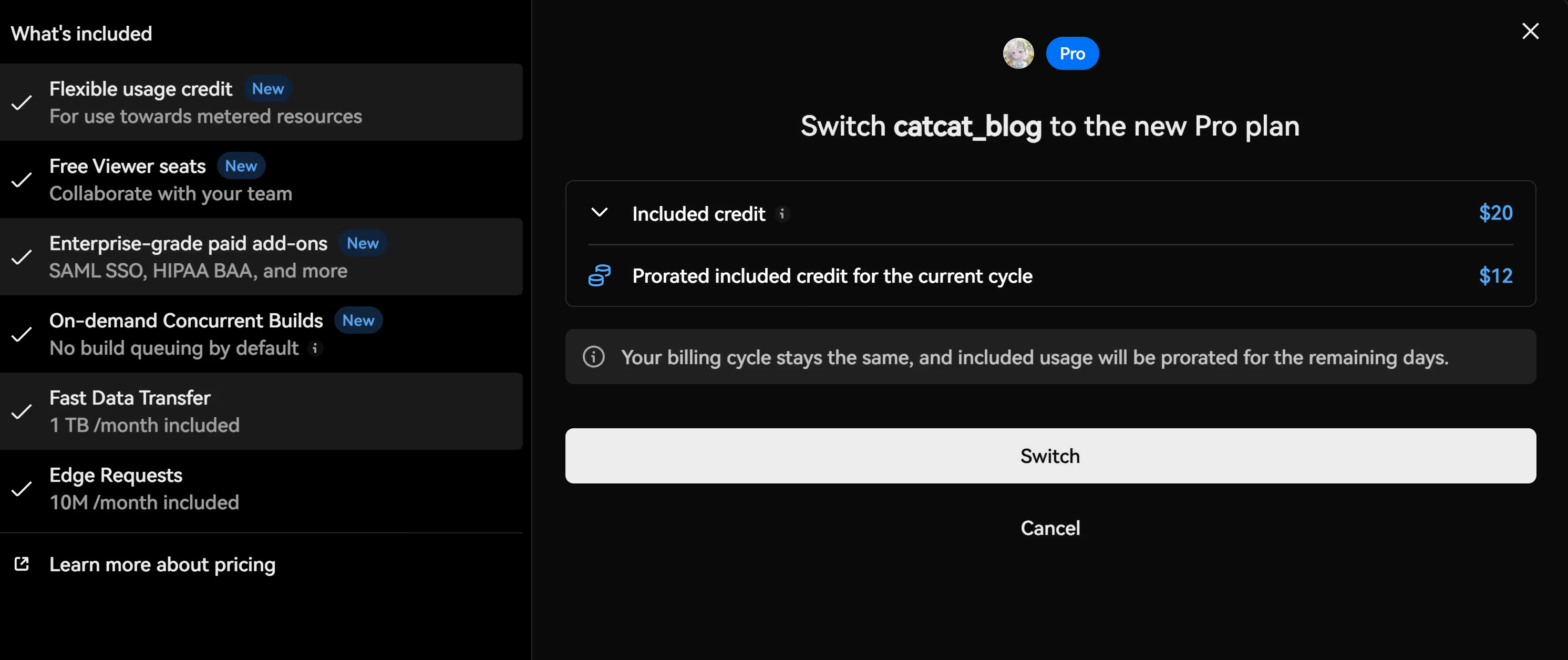
Old vs new Pro plan comparison:
| Aspect | Legacy Pro plan | New Pro plan |
|---|---|---|
| Monthly fee | $20/seat/month (each team member paid) | $20/month (each team member paid, viewer seats are free) |
| Included resources | Fixed quotas: - 1 TB bandwidth - 1000 GB-hours of function execution - 1M function invocations | $20 in credits + specific bundles: - 1 TB Fast Data Transfer (roughly $350 in value) - 10M Edge Requests (worth $32) - Enterprise-grade paid add-ons (SAML SSO, HIPAA BAA, etc. as paid options) |
| Overages | - Fast Data Transfer: $0.15/GB - Function execution: $0.0106/GB-hour (memory) + $0.128/hour (CPU) - Function invocations: $0.60/million | - Fast Data Transfer: $0.15/GB - Function execution: $0.0106/GB-hour (memory) + $0.128/hour (CPU) - Function invocations: $0.60/million |
| Spend management | Manual monitoring required | - Alerts enabled by default - Default $200 spend cap - Fully configurable |
| Enterprise features | Contact sales | Most features can be enabled on Pro directly |
Usage-based pricing is great for very low-traffic sites. But it raises some important issues:
-
Hard to estimate
Vercel’s pricing page is very detailed. The number of billing dimensions reflects how hard it can be to estimate next month’s bill. For example, here are just a few metrics that can affect your total:
- Number of incoming requests that hit the firewall and rate limiting.
- Volume of data transferred between your serverless functions and the Vercel CDN.
- Frequency of ISR page revalidations.
Any of these can change significantly due to code updates, config tweaks, or unexpected traffic (including bots), which makes reliable cost forecasting nearly impossible.
-
Potential for bill shock
Stories of unexpected Vercel bills aren’t rare. The core problem isn’t Vercel itself, but usage-based billing as a model: your costs are directly tied to traffic patterns—in effect, the internet controls your invoice.
Usage-based pricing is also prone to abuse. A flood of automated requests can dramatically inflate hosting costs, a pattern sometimes referred to as a Denial of Wallet (DoW) attack.
Vercel does have safeguards against infrastructure abuse, but as long as you pay per use, the DoW risk doesn’t disappear.
-
Non-linear cost growth with traffic
Vercel’s Pro quotas are generous. But once you exceed them, your hosting bill can climb rapidly.
Example: A media-heavy site (around 5 MB images per page) on Vercel Pro ($20/month)
- 100k requests: no extra bandwidth costs
- 500k requests: an extra $200/month in bandwidth charges
The spike comes partly from the fact that a single visit can trigger multiple services. For example, one product page view on an e‑commerce site might consume:
- Serverless compute – to render HTML on the server
- Image optimization compute – to process images on the fly
- Bandwidth – to deliver JS, CSS, and images
- Edge requests – to fetch region-specific pricing
As traffic grows, each of these multiplies, leading to a compounding effect on your bill.
TL;DR: If your traffic remains comfortably within Vercel’s plan limits, it can be cost-effective. But usage-based billing demands close monitoring: it’s hard to forecast, susceptible to abuse, and costs can rise quickly as traffic grows.
2.2. Cold Start Delays
Vercel’s serverless infrastructure doesn’t keep servers running continuously. Instead, it spins up short-lived environments on demand to run your code and tears them down afterwards. The time it takes to initialize those environments adds directly to your request latency.
Vercel and AWS (Vercel’s functions are backed by AWS Lambda) provide features to minimize cold starts, but they can’t eliminate them. That’s why you should monitor server response times closely when hosting on Vercel.
Because of how serverless functions work, cold starts affect some requests more than others:
| Site/section/page type | Likely cold start impact |
|---|---|
| Very low-traffic sites | High |
| Rarely visited sections/pages | High |
| Frequently invoked APIs | Low |
| Frequently visited pages | Low |
| Statically generated pages | None |
| ISR pages | None |
TL;DR: If your site is mostly static or ISR-based, or dominated by a few hot pages, cold starts are unlikely to be a major issue. For other patterns, you’ll want to monitor their impact on response times.
2.3. Scalability Under Traffic Spikes
One intrinsic advantage of serverless platforms like Vercel is that they can scale rapidly without extra configuration. Sites that experience periodic traffic spikes can benefit from these capabilities.
- With usage-based pricing, it may be more cost-effective than over-provisioning servers for peak load.
- You don’t need to invest effort in building a system that can survive sudden bursts of traffic.
TL;DR: If your traffic is spiky, Vercel’s auto-scaling can save you from over-provisioning and from spending DevOps effort on peak-capacity planning.
2.4. Limits on Long-Running Tasks
Serverless platforms like Vercel are generally optimized for requests that complete in milliseconds. If your workload includes tasks that run for seconds or minutes, then:
- Long-running requests (over 30 seconds) can explode your bill, because you’re billed for the entire execution time.
- Vercel enforces a 15‑minute hard limit for long-running jobs. Anything longer (including Vercel cron jobs) will be terminated.
TL;DR: Systems with substantial background work may need to move those jobs elsewhere, to a more suitable processing environment. If your user-facing flows must run long jobs inline, a non-serverless deployment may be more appropriate.
2.5. Vercel Platform Limits
Like any hosting platform, Vercel has specific constraints on deployment and usage. You should review them early to avoid surprises later on. Common limits include:
- Max build duration: 45 minutes per build
- Routes per deployment: 2048
- Max duration for scheduled jobs: 15 minutes
- Team pricing: Pro ($20/month) includes 1 member; each additional seat costs $20.
Note: This list isn’t exhaustive.
TL;DR: These limits won’t affect every project, but for certain architectures they can be blockers. If you expect to exceed them, consider other platforms.
2.6. Coordinating Frontend and Backend Hosting
Vercel focuses on frontend hosting. Projects that also need a backend or a database must host those elsewhere—and that can influence your frontend choice.
- Vercel offers out-of-the-box integrations with many managed backend providers. If your backend is already on a cloud service, Vercel can be a natural fit.
- If you run your own backend servers, it may be simpler to host frontend and backend on the same infrastructure.
TL;DR: If your backend lives on a managed service, Vercel’s integrations make it a natural frontend choice. If you self-manage your backend, co-locating frontend and backend often simplifies things.
2.7. Considering DevOps Expertise
One of Vercel’s biggest strengths is its automated build and deployment infrastructure. It also provides analytics, performance metrics, and observability features—covering many core DevOps needs that would otherwise require dedicated resources.
If you already have strong internal expertise with server management, deployment pipelines, monitoring, and logging, then self-hosting may give you more control and flexibility.
TL;DR: If you have in-house ops skills, self-hosting yields more control. If not, Vercel can save you the cost of hiring and maintaining DevOps capacity.
2.8. Framework Integration vs. Time-to-Market
A major differentiator for Vercel is how deeply it integrates with frontend frameworks—especially Next.js. Among hosting providers, Vercel offers the tightest Next.js integration. It also supports other frameworks to varying degrees. These integrations reduce the setup overhead for features like ISR, image optimization, and middleware, giving you faster time-to-market without sacrificing advanced hosting capabilities.
However, these benefits come from relying on platform-specific framework features. This coupling can lead to hosting lock-in, making it harder to migrate off Vercel in the future.
TL;DR: For Next.js apps, Vercel’s deep integration can significantly accelerate delivery. But as you lean on platform-specific features, lock-in risk grows.
3. Alternatives to Vercel
If you’re looking for alternatives to Vercel, you first need to clarify which parts of the Vercel value proposition you want to replace. That will help narrow your options and highlight the alternatives that best match your priorities.
Below, alternatives are grouped by how they differ from Vercel.
3.1. Frontend-Only Serverless Platforms
If Vercel’s pricing or platform limits worry you, you can look for frontend-only serverless alternatives. In terms of features and product shape, these are the closest to Vercel among all categories.
| Platform | Highlights |
|---|---|
| Netlify | Great for static sites, with extras like form handling. Free/Pro tiers lack firewall and rate limiting. Cold starts tend to be worse than Vercel. Framework integrations are less deep than Vercel’s. |
| Cloudflare Pages | Very generous CDN pricing with no bandwidth caps. SSR and Node.js support is limited since Workers run on a V8 runtime. Framework support is less broad than Vercel. Non-CDN DX is weaker than Vercel. |
In short, Cloudflare and Netlify are often a better fit for static sites, while Vercel excels for SSR and ISR-heavy frontends. Many teams also adopt a hybrid pattern—combining Cloudflare CDN with Vercel.
3.2. Full-Stack Serverless Ecosystems
If parts of your stack are already running on a particular cloud provider, using their serverless products for your frontend can simplify management, billing, and integration. It can also lower data transfer costs since most intra-cloud traffic is free or discounted.
| Platform | Highlights |
|---|---|
| AWS Amplify (built on AWS) | Full-stack capabilities using S3 (storage), Lambda (functions), Fargate (long-running tasks), CloudFront (CDN), and RDS (databases). Compute and bandwidth are generally cheaper than Vercel. The sheer number of options and services can be overwhelming from a DX perspective. |
| Firebase (layered on Google Cloud) | Full-stack capabilities via GCS (storage), Cloud Functions (functions), Cloud Run (long-running tasks), Cloud CDN, and Cloud SQL (databases). Compute is cheaper than Vercel but pricier than AWS; CDN bandwidth is less generous than AWS (no 1 TB free tier). DX is weaker than Vercel and you must juggle many options. |
If you’re already committed to AWS or Google Cloud, it’s natural to consider AWS Amplify or Firebase. Their huge catalog of services ensures you rarely hit a hard limit, but this breadth also makes them more complex to use.
3.3. Always-On Servers with Modern DX
If you prefer predictable pricing and want to avoid serverless constraints (cold starts, max duration on long tasks) while still enjoying Vercel-like DX (Git integration, automated builds, previews), consider the following platforms.
| Platform | Highlights |
|---|---|
| Railway | Deploy frontend, backend (Node, Python, CMS), and databases. Infrastructure-as-code–style setup makes infra management easier. Resources are provisioned and billed per minute. No CDN, edge functions, firewall, or DDoS protection. |
| Render | Similar to Railway—deploy frontend, backend, and databases. Richer feature set than Railway: includes CDN, firewall, DDoS protection (but no edge functions). Provisioned and billed per month. Pricing typically comparable to Railway, depending on config. |
| DigitalOcean App Platform | Great if the rest of your stack is already on DigitalOcean. Provisioned and billed per month. Includes a CDN, but no firewall, DDoS protection, or edge functions. Pricing is similar to Render. |
These platforms trade away some serverless characteristics (instant, infinite scale; per-request billing) for better predictability (clearer pricing, no cold starts, no function limits). In return, they lack Vercel’s deep framework integrations, built-in CDN/edge capabilities, and seamless “scale to infinity” behavior.
3.4. Self-Managed Traditional Servers
If you’re comfortable building your own CI/CD pipelines, you can host your frontend on any of the many self-managed server providers (AWS EC2, Google Compute Engine, Azure VM, DigitalOcean Droplet, Hetzner, etc.). This is usually the lowest-cost option with minimal platform lock-in—but it does require additional work to set up builds, deployments, and server management.
Self-hosted PaaS frameworks can simplify deployment on such servers:
| Self-hosted PaaS framework | Details |
|---|---|
| Coolify | UI-driven; deployment experience similar to Vercel/Netlify. Ready-made templates for databases, backends, and static sites. Easier to start with than Dokku, but less extensible. |
| Dokku | CLI-driven; deploy via git push, buildpacks, or Dockerfiles. Community plugins for databases, backends, and more. Around since 2013 with a large plugin ecosystem. |
With self-managed setups using Coolify, Dokku, and many others, you get maximum control at minimum hosting cost—but you also take on more hands-on server administration compared with managed platforms.
4. Conclusion
Choosing the right hosting platform is about matching each option’s strengths (cost, scalability, DX, framework integration, etc.) to your needs.
Vercel’s serverless foundation, CI/CD automation, and deep Next.js integration make it attractive for teams that prioritize faster time-to-market and a modern platform experience. At the same time, usage-based billing, cold starts, and platform lock-in mean it won’t fit every situation.
The table below summarizes which platforms suit different priorities:
| If you… | Then choose… |
|---|---|
| Want to start small with very low traffic | Self-managed PaaS (e.g. Coolify, Dokku): Cost-effective, predictable pricing, but some upfront setup. Vercel: Fast to launch, reasonable within plan limits, but watch for bill shock. |
| Need to ship quickly without sacrificing features | Vercel: Best-in-class DX, rich feature set, deep Next.js integration (and solid support for other frameworks). But be aware of lock-in risk. |
| Already use AWS / Google Cloud / DigitalOcean | Amplify, Firebase, or App Platform: Easier integration, unified invoices, cheaper data transfer, and leverage of existing AWS/GCP/DO skills (at the cost of more complex platform choices). |
| Want predictable pricing and no DevOps setup | Railway, Render: Modern DX and predictable billing with no infra to manage, but weaker framework-level integrations. |
| Have in-house DevOps skills | Self-managed PaaS (e.g. Coolify, Dokku): Maximum control, minimal platform lock-in, broadest choice of infrastructure providers, and lowest prices—but you must invest time and budget into DevOps work. |
In summary, Vercel hosting offers rapid time-to-market and strong Next.js integration, but the risk of runaway costs and lock-in means alternatives may be a better fit. For some projects, predictable pricing or greater DevOps control matters more than launch speed or framework niceties. The best choice depends on your priorities, your team’s skills, and how your system and traffic will evolve.